Power / Portable Power Stations
User Manual for Technaxx Electric Air Duster & Vacuum Pro TX-293
Quick guide for the Technaxx Electric Air Duster & Vacuum Pro TX-293. Learn how to operate the blower and vacuum functions, charge the device, and perform maintenance.
Table of contents
Manual images
Click an image to enlargeQuick guide from the manual
The Technaxx Electric Air Duster & Vacuum Pro TX-293 is a versatile cleaning tool. Important: Do not use the device continuously for more than 10 minutes to prevent overheating. Always ensure the air inlet and outlet are kept clean and unobstructed during operation. The device is not waterproof; do not submerge it in liquids.
Product Overview
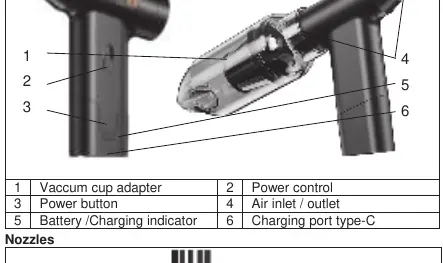
The device features a power button (3) to turn the unit on/off and a power control slider (2) to adjust the airflow speed. The vacuum cup adapter (1) is located at the back for vacuuming tasks, while the front is used for blowing attachments.
Operation
Vacuuming
- Attach the vacuum cup adapter to the back of the device.
- Press and hold the power button to turn the device on.
- Slide the power control to adjust the suction strength.
- To stop, slide the power control down and hold the power button to turn off the device.
- Twist the vacuum adapter clockwise to open and clean the dust cup.
Blowing
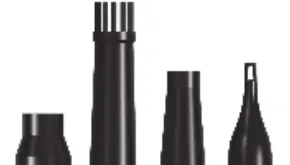
- Attach the most suitable nozzle to the front of the device.
- Press and hold the power button to turn the device on.
- Slide the power control to adjust the airflow.
- To stop, slide the power control down and hold the power button to turn off the device.
Charging
Connect the provided USB cable to a power adapter (DC 5V/2A or higher, not included) and the other end to the Type-C charging port on the device. The four indicator lights will illuminate during charging and remain steady once fully charged.
Cleaning and Maintenance
The filter and dust cup can be washed under running water. Ensure they are completely dry before reassembling and using the device again. Do not use harsh cleaning agents.
Safety Instructions
- Do not use as a hair dryer.
- Keep hair away from the air inlet to avoid injury.
- Keep away from flammable and explosive materials.
- Do not throw the device into fire due to the built-in battery.
- Do not attempt to open or repair the device yourself.
Manufacturer information
Technaxx Deutschland GmbH & Co. KG
Practical help
Common problems
Device does not turn on
Ensure the battery is charged. Connect to a 5V/2A power source using the provided USB-C cable.
Weak suction or airflow
Check if the dust cup or filter is clogged. Clean the filter and dust cup under running water and let dry completely.
Device gets hot
Do not use the device continuously for more than 10 minutes. Allow it to cool down.
Before use
- Ensure the device is fully charged before the first use.
- Select the correct nozzle for your specific task (blowing or vacuuming).
- Verify that the filter and dust cup are clean and dry.
- Ensure the air inlet and outlet are free from obstructions.
Specs in practice
- Charging Input
- Requires a DC 5V/2A adapter (not included). Using a lower current adapter may result in slow or failed charging.
- Running Time
- Up to 120 minutes, depending on the speed setting and usage intensity.
- Air Pressure
- 6.5 kPa maximum, suitable for light dust and crumbs.
Images and diagrams
- Power button (3): Hold to power on/off.
- Power control (2): Slide to adjust speed.
- Vacuum cup adapter (1): Attach to the back for vacuuming.
- Charging port (6): USB Type-C interface.
Model compatibility
- Requires a USB power adapter with at least 5V/2A output.

Manual page author
Michael Turner
Technical manual editor
Reviews PDF manuals for structure, safety notes, and practical product details so readers can find the right information quickly.