Tools / Power Tools
User Manual for HiKOKI RA 18DA Cordless Air Duster
Quick guide for the HiKOKI RA 18DA Cordless Air Duster. Includes setup, operation, maintenance, and troubleshooting instructions.
Quick answers from the manual
Quick answer
- The HiKOKI RA 18DA is a cordless air duster used for blowing dust and debris off materials and tools, cleaning tight spaces, and inflating/deflating inflatable items. p. 10
Key actions
- To activate continuous operation, pull the switch twice quickly. p. 12
First start
- Charge the battery using the specified charger, then insert it into the tool until it clicks. p. 10
Problems and fixes
Tool doesn't run
Charge the battery or push it in until you hear a click.
p. 14Error codes
| Code | Meaning | Action | Pages |
|---|---|---|---|
| LED blinks (0.3s on/0.3s off) | Temperature protection triggered. | Allow the tool and battery to cool down. Remove dust from air intake. | p. 13 |
Maintenance and reset
- Inspect mounting screws, clean the exterior, and inspect the air intake filter. p. 13
Technical specifications
| Parameter | Value | Meaning | Pages |
|---|---|---|---|
| Voltage | 18 V | Rated voltage | p. 10 |
Where to find it in the PDF
- Specifications p. 10
- Troubleshooting p. 14
Table of contents
Manual images
Click an image to enlargeQuick guide from the manual
The HiKOKI RA 18DA is a cordless air duster designed for blowing dust and debris off materials and tools, cleaning tight spaces, and inflating or deflating inflatable items. Always ensure the battery is charged and the air intake is free of debris before use.
Device Description
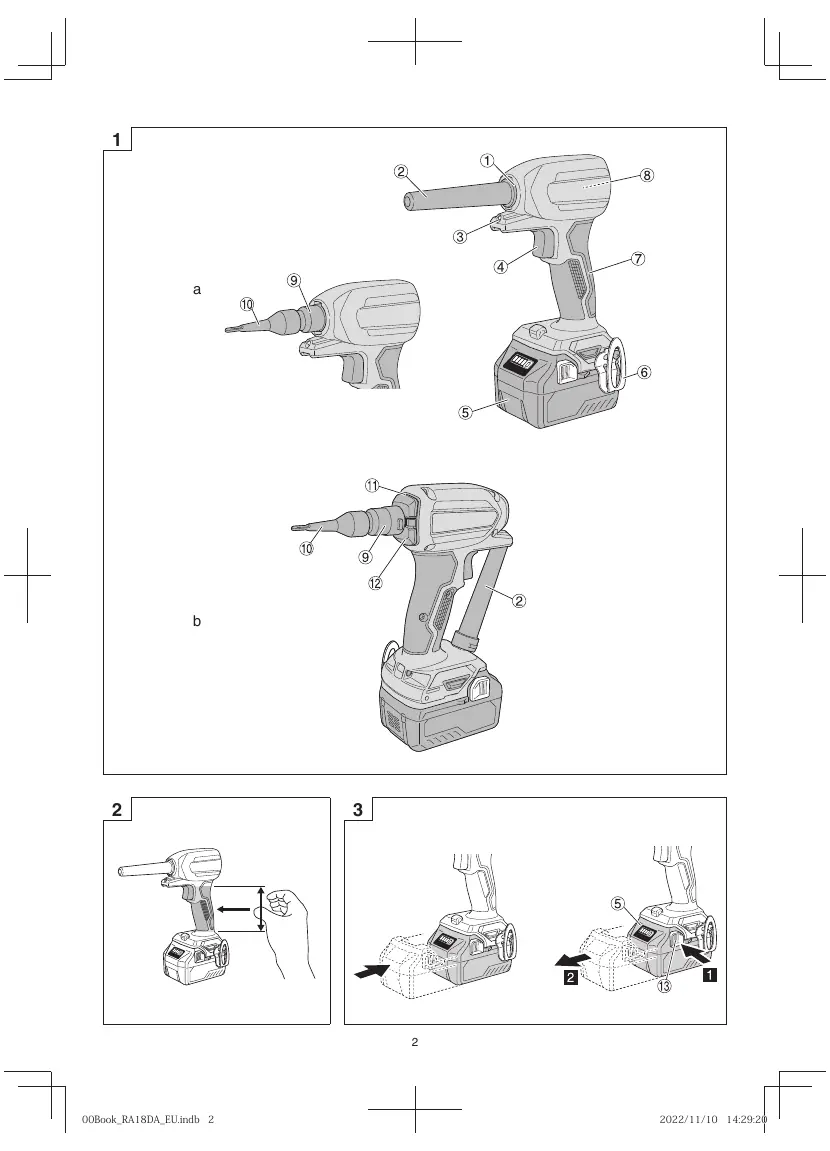
The tool features a blow port, an air dusting nozzle, a trigger switch, and an LED light. It is powered by a compatible HiKOKI battery (sold separately).
Operation
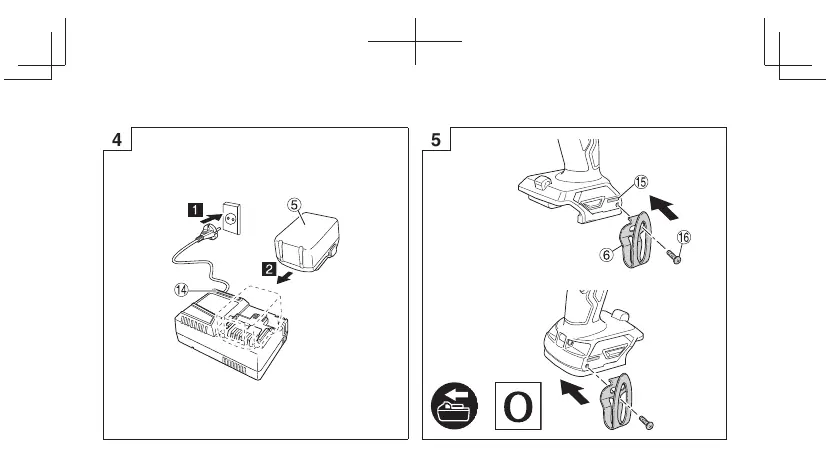
- Battery Insertion: Insert the battery firmly into the tool until it clicks into place.
- Switch Operation: Pull the trigger switch to start the tool.
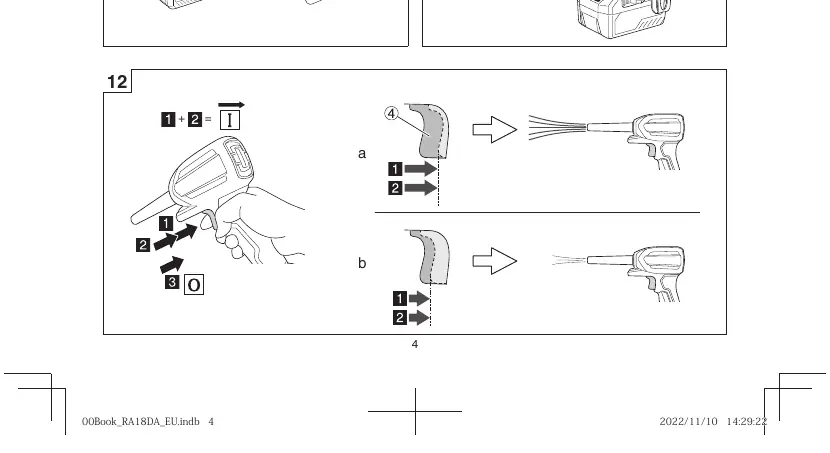
- Continuous Operation: Pull the switch twice quickly to activate continuous blowing. Pull the switch again to stop.
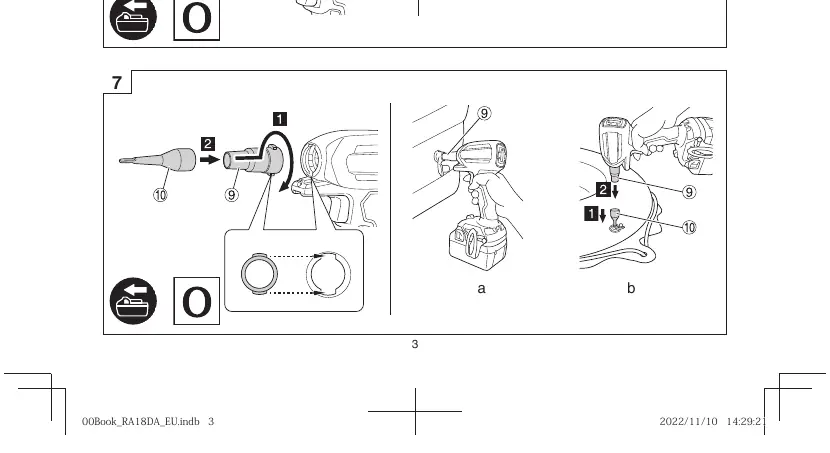
- Nozzle Attachment: Attach the appropriate nozzle (A or B) depending on the task (blowing, inflating, or deflating).
Maintenance and Inspection
- Mounting Screws: Regularly inspect all mounting screws and ensure they are properly tightened.
- Air Intake: Before and after use, check that the air intake is not clogged with dust or debris. If clogged, use a soft brush or vacuum cleaner to clean it.
- Terminals: Keep the tool and battery terminals free of swarf and dust.
Troubleshooting
If the tool does not operate normally, check the following:
- Tool doesn't run: Check if the battery is charged and fully inserted.
- Tool suddenly stopped: Check for overload, battery overheating, or a blocked air intake.
- Low blowing power: Check for foreign matter in the blow port or air intake.
Technical Specifications
The RA 18DA operates at 18V with a no-load speed of 89000 min-1. The maximum air velocity is 122 m/s.
Manufacturer information
HiKOKI
Practical help
Common problems
Tool doesn't run
Charge the battery or ensure it is fully inserted until it clicks.
Tool suddenly stopped
Check for overload, battery overheating, or a blocked air intake.
Low blowing power
Remove foreign matter from the blow port or air intake.
Before use
- Ensure the battery is fully charged.
- Check that the air intake is not clogged.
- Ensure the correct nozzle is securely attached.
- Verify the switch is in the OFF position before inserting the battery.
Specs in practice
- No-load speed
- 89000 min-1.
- Air velocity
- Maximum 122 m/s, Average 100 m/s.
Images and diagrams
- Fig 1: Parts identification
- Fig 3: Battery insertion/removal
- Fig 6-7: Nozzle attachment
- Fig 11-12: Switch operation and continuous mode
Model compatibility
- Compatible with HiKOKI Multi Volt batteries and BSL18 series.

Manual page author
Michael Turner
Technical manual editor
Reviews PDF manuals for structure, safety notes, and practical product details so readers can find the right information quickly.