Power / Portable Power Stations
User Manual for Technaxx Pro 160W TX-293 Dust Blower and Vacuum
Quick guide for the Technaxx Pro 160W TX-293 battery-powered dust blower and vacuum. Learn how to operate, charge, clean, and safely use your device.
Quick answers from the manual
Quick answer
- The Technaxx TX-293 is a battery-powered dust blower and vacuum cleaner intended for cleaning dust and crumbs from items like computers, keyboards, sofas, and cars. p. 1
Key actions
- Vacuuming: Attach the dust adapter to the back of the device, hold the power button (3) to turn it on, and use the speed controller (2) to adjust airflow. p. 1
- Blowing: Attach the desired nozzle to the front, hold the power button (3) to turn it on, and use the speed controller (2) to adjust airflow. p. 1
- Charging: Connect the provided USB cable to a 5V/2A power adapter (not included) and the device's Type-C port. p. 1
First start
- Charge the device fully before first use using a 5V/2A adapter. p. 1
Problems and fixes
General maintenance/cleaning
Wash the filter and dust adapter under running water and let them dry completely. Wipe the device with a damp cloth.
p. 1Maintenance and reset
- Wash the filter and dust adapter under running water and allow to dry completely. Wipe the device with a damp cloth. p. 1
Technical specifications
| Parameter | Value | Meaning | Pages |
|---|---|---|---|
| Power | 160 W | Motor power | p. 1 |
| Battery Capacity | 2500 mAh / 7.4 V | Battery specifications | p. 1 |
| Charging Input | DC 5 V / 2 A | Required charging adapter | p. 1 |
| Runtime | Up to 120 min | Battery life per charge | p. 1 |
| Charging Time | Approx. 3.5 hours | Time to fully charge | p. 1 |
| Weight/Dimensions | 232 g / 13.8 x 10.6 x 3.6 cm | Physical size and weight | p. 1 |
Where to find it in the PDF
- User Manual Page 1 p. 1
Table of contents
Quick Start Guide
The Technaxx Pro 160W TX-293 is a versatile cordless device designed for blowing dust and vacuuming small debris. Before first use, ensure the device is fully charged. Use the appropriate nozzle for your specific task, whether it is blowing dust from electronics or vacuuming crumbs from surfaces.
Product Overview
The device consists of the following main components:
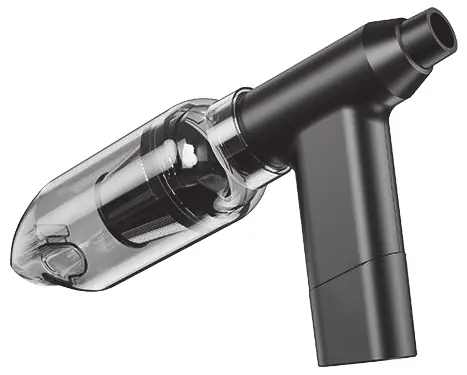
- 1: Dust adapter
- 2: Speed controller
- 3: Power button
- 4: Air inlet/outlet
- 5: Battery/charging indicator
- 6: USB-C charging port
The package includes 5 different nozzles for various applications, including a universal adapter, dust brush, and attachments for beds or toys.
Charging
To charge the device, connect the provided USB cable to a power adapter (DC 5V/2A, not included) and plug the other end into the USB-C charging port (6). The charging indicator (5) will show the status. Once fully charged, the indicator lights will remain on continuously.
Vacuuming
To use the vacuum function:
- Attach the dust adapter (1) to the rear of the device.
- Press and hold the power button (3) to turn the device on.
- Use the speed controller (2) to adjust the airflow as needed.
- To stop, press the power button (3) again.
Blowing
To use the blowing function:
- Attach the desired nozzle to the front of the device.
- Press and hold the power button (3) to turn the device on.
- Slide the speed controller (2) upwards to adjust the airflow.
- To stop, press the power button (3) again.
Cleaning and Maintenance
Regular maintenance ensures optimal performance:
- Dust Container: Rotate the dust adapter clockwise to open the container and empty it.
- Filter: The filter and dust adapter can be washed under running water. Ensure they are completely dry before reassembling.
- Housing: Clean the exterior of the device regularly with a damp cloth. Do not use harsh cleaning agents or solvents.
- Caution: Ensure no water enters the openings of the device to prevent electric shock or damage.
Safety Warnings
- Do not use as a hair dryer.
- Keep hair away from the air inlet to prevent it from being sucked in.
- Do not use continuously for more than 10 minutes.
- Keep the device away from water, liquids, flammable, and explosive materials.
- Do not throw the device into fire; the built-in battery may explode.
- Keep out of reach of children.
- Repairs should only be performed by the manufacturer or authorized personnel.
Technical Specifications
- Power: 160W
- Air Pressure: 6.5 kPa / 165g (max)
- Speed: 130,000 RPM
- Battery: 2500 mAh / 7.4V
- Charging Input: DC 5V / 2A (USB-C)
- Runtime: Up to 120 minutes
- Charging Time: Approx. 3.5 hours
- Noise Level:
- Operating Temperature: 0-60°C
Support
For technical support, you can contact the service hotline at 01805 012643 (Mon-Fri, 9:00-13:00 and 14:00-17:00) or via email at [email protected].
Manufacturer information
Technaxx Deutschland GmbH & Co. KG
Practical help
Common problems
Device does not turn on
Check if the battery is charged. Connect to a 5V/2A power source via USB-C.
Weak suction or airflow
Check if the dust container is full or if the filter is clogged. Clean the filter under running water and ensure it is dry.
Device overheats
Do not use the device continuously for more than 10 minutes. Allow it to cool down.
Before use
- Charge the device fully before the first use.
- Ensure the filter is clean and dry.
- Select the correct nozzle for the intended task (blowing or vacuuming).
- Ensure the dust container is securely attached.
- Verify the power adapter provides 5V/2A output.
Images and diagrams
- 1: Dust adapter (rear attachment for vacuuming)
- 2: Speed controller (adjusts airflow)
- 3: Power button (on/off)
- 4: Air inlet/outlet (front for blowing, rear for vacuuming)
- 5: Battery/charging indicator
Model compatibility
- Requires a 5V/2A power adapter (not included in the package).

Manual page author
Emily Carter
User documentation editor
Prepares concise manual descriptions and highlights the most useful setup, operation, and maintenance information for readers.