Tools / Hand Tools
Torque Wrench User Manual
Comprehensive user guide for the Torque Wrench. Includes safety instructions, torque setting procedures, parameter tables for various models, and conversion charts.
Quick answers from the manual
Quick answer
- To set the torque, unlock the locker, rotate the handle to the desired main value, and then rotate the supplementary graduation until the specific number aligns with the center line. p. 5, 6
Key actions
- Set to minimum torque after use p. 3
First start
- Ensure the wrench is set to the minimum scale before first use. p. 3
Problems and fixes
Click sound is weak
The click sound is acoustically weaker with lower torque settings; stop applying pressure when heard.
p. 3Maintenance and reset
- Recalibrate approximately once a year or every 5000 uses. p. 3
Technical specifications
| Parameter | Value | Meaning | Pages |
|---|---|---|---|
| Precision | ±3% | Clockwise accuracy | p. 4 |
Where to find it in the PDF
- Safety Instructions p. 3
- Parameter Tables p. 4
- Setting Torque Value p. 5, 6
Table of contents
Manual images
Click an image to enlargeQuick guide from the manual
This torque wrench is a precision instrument designed to apply a specific torque force to fasteners. To ensure accuracy and longevity, always store the tool in its provided box and set it to the minimum torque value after use. Stop applying pressure immediately when you hear the "click" sound, which indicates the set torque has been reached.
Safety instructions
- Do not use the torque wrench as a hammer.
- Do not use pliers to clip the wrench or use it in water.
- Do not use this product to loosen bolts, screws, or other fasteners, as this may damage the ratchet and calibrated settings.
- Always use the wrench within its rated torque range.
- Regular inspection: It is recommended to have the tool professionally inspected for function and accuracy approximately once a year or every 5000 uses.
- Disassembly: Do not disassemble the assembly.
How to set a torque value
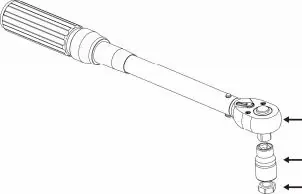
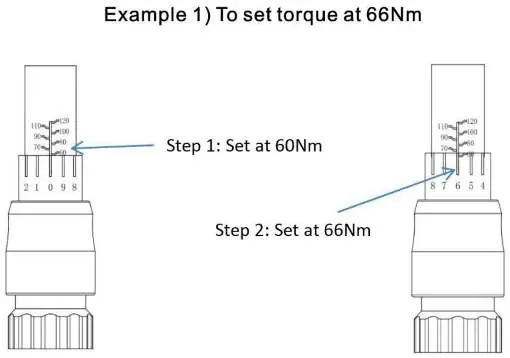
- Unlock: Pull back the locker to unlock the supplementary graduation.
- Set main value: Turn the supplementary graduation until the desired main torque value on the main graduation is close to the graduation datum line.
- Set fine value: Turn the handle clockwise until the specific number on the supplementary graduation aligns with the center line.
- Lock: Ensure the setting is secure before use.
- Operation: Apply the socket to the bolt or nut and turn clockwise. Stop pulling when you hear the "click" sound.
Storage and maintenance
This product is a precision instrument and should be stored with care using the provided storage box. Avoid any vibrations and shocks. Always set the torque to the lowest level before storage. If the wrench will not be used for a long time, apply anti-rust oil and store it in a dry place.
Technical specifications
The torque wrench is available in various models with different drive sizes (1/4", 3/8", 1/2", 3/4") and torque ranges. All models feature a precision of ±3% for clockwise operation. Please refer to the parameter tables in the manual to identify the specific range and length for your model.
Manufacturer information
The Home Depot
Practical help
Common problems
Click sound is not heard or is too quiet
The click sound is acoustically weaker at lower torque settings. Stop applying pressure immediately when the click is heard.
Loss of accuracy
Recalibrate the tool approximately once a year or every 5000 uses.
Before use
- Ensure the wrench is set to the correct torque value.
- Verify the wrench is set to the minimum scale before storage.
- Check that the socket is properly applied to the bolt or nut.
- Ensure the tool is not being used to loosen fasteners.
Specs in practice
- Number of Teeth
- Indicates the ratchet mechanism's fineness; higher numbers allow for smaller swing arcs.
Images and diagrams
- The manual provides a step-by-step visual guide on how to set the torque value using the main and supplementary graduations.
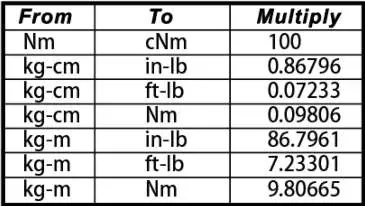
- A conversion table is included to help translate torque units (e.g., Nm to ft-lb).
Model compatibility
- Use only within the rated torque range specified for your specific model.
- Do not use the wrench to loosen bolts or nuts.

Manual page author
Emily Carter
User documentation editor
Prepares concise manual descriptions and highlights the most useful setup, operation, and maintenance information for readers.