Power / Transfer Switches
Installation and Operation Guide for Tigo EI ATS 200A
Quick start guide for the Tigo EI ATS 200A. Includes installation requirements, wiring instructions, manual bypass procedures, and system commissioning steps.
Quick answers from the manual
Quick answer
- The Tigo EI ATS 200A is an automatic transfer switch. Installation requires mounting on a flat wall (≤15° tilt), using non-fine-stranded wire with ferrules (22.5Nm torque), and commissioning via the Tigo EI mobile app. p. 1, 2
Key actions
- Mounting the enclosure p. 1
- Performing manual bypass p. 2
First start
- Commissioning steps p. 2
Problems and fixes
Inverter does not start
Force-start the battery by removing the start button cover and pressing until the green leaf status LED flashes rapidly.
p. 2Error codes
| Code | Meaning | Action | Pages |
|---|---|---|---|
| Fault LED Flashing (.5s on/.5s off) | Fault present | Check system status | p. 2 |
| Fault LED Flashing (1s on/3s off) | Loads > available power | Reduce load | p. 2 |
Technical specifications
| Parameter | Value | Meaning | Pages |
|---|---|---|---|
| Terminal Torque | 22.5Nm | Required torque for power connections | p. 1 |
Where to find it in the PDF
- Installation and Wiring p. 1
- Commissioning and Operation p. 2
Table of contents
Manual images
Click an image to enlargeQuick guide from the manual
The Tigo EI ATS 200A is an automatic transfer switch designed for residential solar solutions. This guide provides essential steps for mounting, wiring, and commissioning the system. Always ensure installation is performed by qualified personnel in accordance with applicable electrical codes.
Mounting the enclosure
Proper mounting is critical for system safety and performance. Follow these requirements:
- Location: Choose a well-ventilated, easily accessible location.
- Surface: Mount on a flat surface against a solid wall with a tilt of ≤15°.
- Environment: Ensure the area is sheltered from direct sunlight and precipitation.
- Temperature: Ambient temperature must not exceed 50°C.
- Clearance: Keep away from antennas or other sources of strong electromechanical interference and above potential flooding.
Power connections
Use non-fine-stranded wire with ferrules for all power connections. Torque all terminals to 22.5Nm.
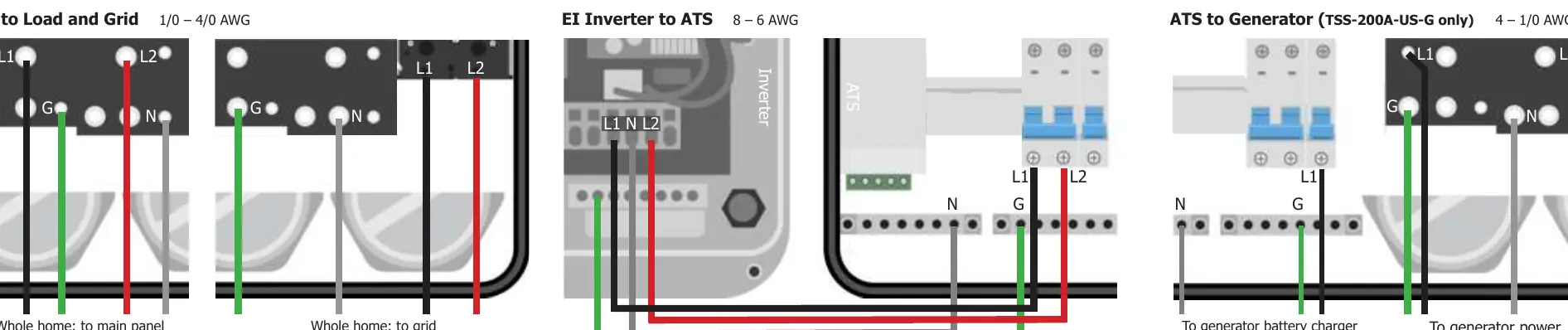
- ATS to Load and Grid: 1/0 – 4/0 AWG.
- EI Inverter to ATS: 8 – 6 AWG.
- ATS to Generator (TSS-200A-US-G only): 4 – 1/0 AWG.
Communications connections
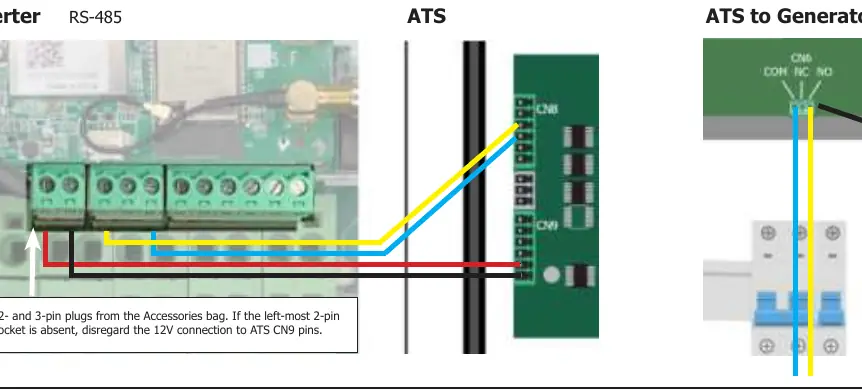
You must install the communication connection to the inverter. Use the provided 2- and 3-pin plugs from the Accessories bag for RS-485 connections.
Manual bypass switch
The manual bypass switch connects grid power to the home service panel during installation, servicing, or commissioning.
- Turn off the two ATS breakers (service disconnect and inverter) and wait until no ATS LEDs show power.
- Plug the 3-pin jumper (from the Accessories bag) with jumped pins 1 and 3 into the RSD+ and RSD- terminals.
- Remove the black cover, turn the manual bypass switch to GRID, and restore power connections.
Note: To reverse the procedure, turn off all power connections, remove and save the jumper, and turn on the system. Do not manually turn the bypass switch back to INV; the switch resets automatically.
Commissioning
Commission the system after double-checking all connections and installing the Tigo EI mobile app.
- Turn on any disconnects and breakers between the grid and the ATS.
- Ensure the E-Stop RSS initiator button is not engaged.
- Turn the ATS Service disconnect and the inverter DC disconnect to ON.
- If the inverter does not start, force-start the battery by removing the start button cover and pressing until the green leaf status LED flashes rapidly.
- Enable Bluetooth on your mobile device, open the Tigo EI app, and tap + to create a new system.
- Open Select Equipment, tap Scan, and select EI Inverter. Ensure the listing matches the CCA MAC ID serial number on the inverter.
- Complete the commissioning process in the app.
Status indicators
The system provides status feedback via LEDs:
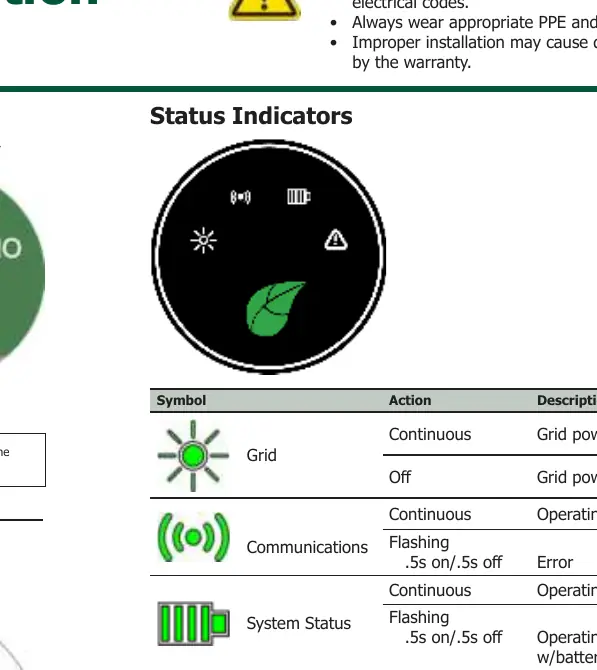
- Grid: Continuous (Grid power on), Off (Grid power off).
- Communications: Continuous (Operating normally), Flashing .5s on/.5s off (Error).
- System Status: Continuous (Operating on-grid), Flashing .5s on/.5s off (Operating off-grid w/battery and/or generator).
- Fault: Off (Operating normally), Flashing .5s on/.5s off (Fault present), Flashing 1s on/3s off (Loads > available power).
Practical help
Common problems
Inverter does not start during commissioning
Force-start the battery by removing the start button cover and pressing until the green leaf status LED flashes rapidly.
Fault LED is flashing
Check if a fault is present or if loads exceed available power.
Before use
- Ensure installation is performed by qualified personnel.
- Wear appropriate PPE and use insulated tools.
- Verify mounting surface is flat and solid with ≤15° tilt.
- Ensure ambient temperature is below 50°C.
- Use non-fine-stranded wire with ferrules.
- Verify E-Stop RSS initiator button is not engaged.
Specs in practice
- Terminal Torque
- 22.5Nm (Required for all power connections)
- Mounting Tilt
- ≤15° (Maximum allowable tilt for enclosure)
- Ambient Temperature
- ≤50°C (Maximum operating temperature)
Images and diagrams
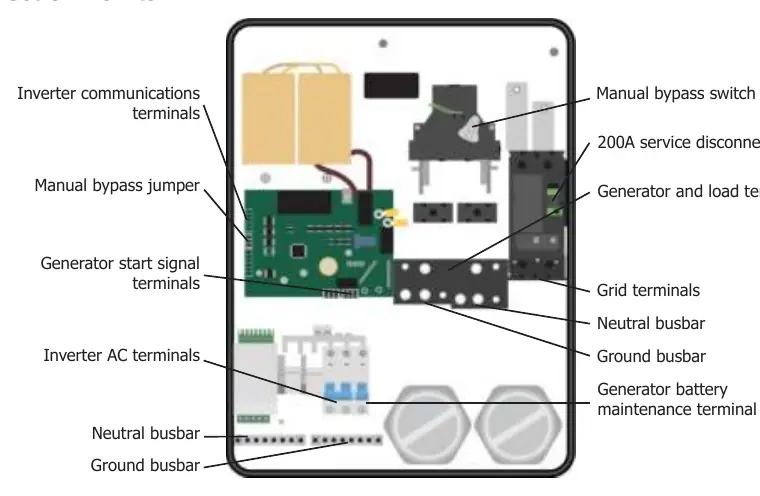
- Connection Points: Identifies terminals for inverter communications, manual bypass, generator, grid, and busbars.
- Power Connections: Wiring diagrams for Load/Grid, Inverter, and Generator connections.
- Manual Bypass: Shows the switch position and jumper insertion point.
Model compatibility
- TSS-200A-US-G model is required for generator support.
- Requires Tigo EI Inverter and Tigo EI mobile app for commissioning.

Manual page author
Emily Carter
User documentation editor
Prepares concise manual descriptions and highlights the most useful setup, operation, and maintenance information for readers.