HVAC / Parts & Accessories
Trane Technologies Integrated Variable Speed Control Drive Replacement Installation Guide
Installation guide for replacing the Trane Integrated Variable Speed Control (IVSC) drive. Includes safety warnings, removal and installation steps, thermal grease application, and torque specifications.
Quick answers from the manual
Quick answer
- This guide provides instructions for replacing the Integrated Variable Speed Control (IVSC) drive, including safety precautions, removal of the old unit, application of thermal grease, and installation of the new drive. p. 1
Key actions
- Power down and wait 2 minutes before servicing. p. 4
- Verify DC voltage is less than 42 VDC. p. 4
- Apply 1/8" bead of thermal grease. p. 6
Technical specifications
| Parameter | Value | Meaning | Pages |
|---|---|---|---|
| Torque | 40-50 in. lbs. | Tightening torque for aluminum nuts. | p. 7 |
Where to find it in the PDF
- Installation p. 6, 7
Table of contents
Manual images
Click an image to enlargeQuick guide from the manual
This document provides instructions for replacing the Integrated Variable Speed Control (IVSC) drive. Safety is critical: always disconnect power and wait at least 2 minutes before servicing. You must verify that the DC voltage is less than 42 VDC at the inverter test points before proceeding. Ensure all grounding devices are reconnected after service.
Tools and parts required
- DC Volt Meter
- 5/16" Nut Driver
- 7/16" Socket Wrench
- Torque Wrench with 7/16" Socket
- Replacement Kit (includes Thermal Grease and 3 Aluminum Nuts)
Removing the IVSC
- Power down the outdoor unit and wait at least 2 minutes.
- Remove the 4 screws securing the control box cover.
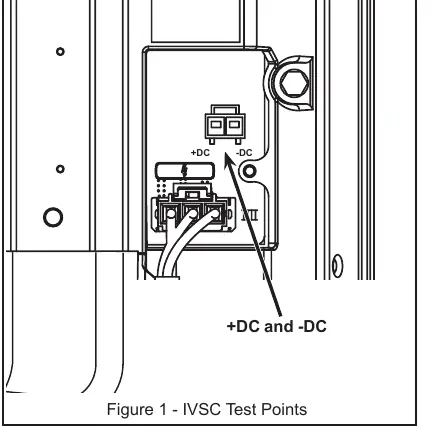
- Test voltage across inverter test points (+DC and -DC). Do not proceed until voltage is below 42 VDC.
- Disconnect the ground wire and the harness.
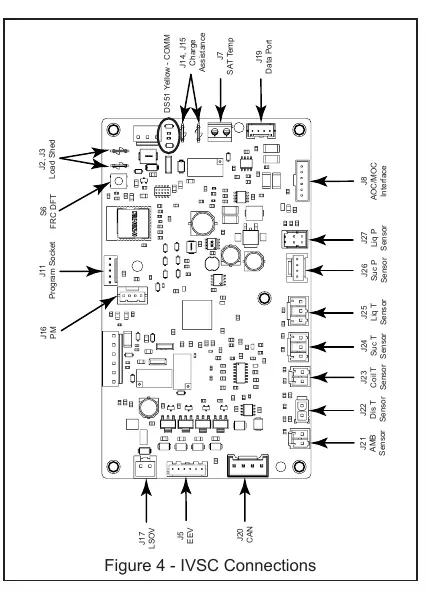
- Unplug all AOC connectors (Latching Switchover Valve, EEV, CAN, sensors, etc.) and HPCO wires.
- Remove the 3 aluminum nuts securing the cold plate to the drive assembly.
- Remove the cold plate and separate the liquid line from the drive assembly by 1-2 inches.
- Remove the screws securing the IVSC and slide the drive up and away from the cabinet housing.
Installing the replacement IVSC
- Clean existing thermal grease from copper tubes using a dry cloth.
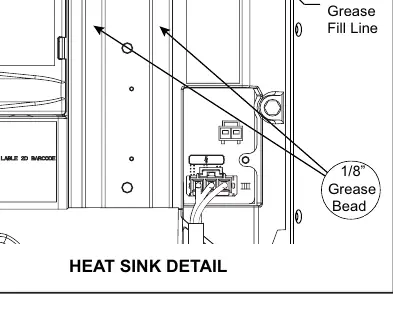
- Apply a 1/8" bead of thermal grease in the center of the cutout on the IVSC.
- Slide the drive back into its original position between the liquid line and cabinet housing.
- Secure the drive with screws, starting with the top right screw.
- Reattach all wiring harnesses to the AOC and MOC boards.
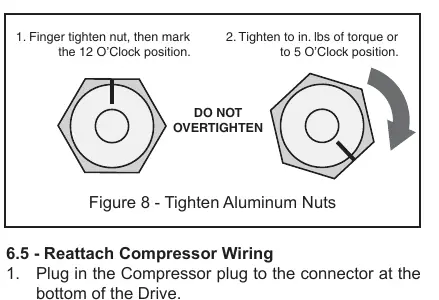
- Align the liquid line with the cutout, position the cold plate, and hand-tighten the 3 aluminum nuts.
- Press the liquid line into the cutout and tighten the aluminum nuts to 40-50 in. lbs. of torque.
Final inspection
Verify that all wires are reconnected and not pinched. Start the unit to verify operation. Replace the control box cover and ensure the line set cover is in place.
Practical help
Common problems
High voltage hazard
Wait 2 minutes after power down and verify DC voltage is less than 42 VDC at test points before touching components.
Thermal contact issues
Ensure proper application of thermal grease (1/8" bead) and that the liquid line is firmly seated in the cutout.
Nut stripping
Do not overtighten aluminum nuts. Use a torque wrench to 40-50 in. lbs. or follow the 12 o'clock to 5 o'clock marking method.
Before use
- DC Volt Meter
- 5/16" Nut Driver
- 7/16" Socket Wrench
- Torque Wrench with 7/16" Socket
- Replacement Kit (Thermal Grease and Aluminum Nuts)
Specs in practice
- Thermal Grease
- Apply a 1/8" bead in the center of the cutout for adequate thermal transfer.
- Voltage Safety
- Must be less than 42 VDC before servicing.
Images and diagrams
- Figure 1: IVSC Test Points for voltage verification.
- Figure 4: IVSC Connections for wiring harness identification.
- Figure 8: Tightening sequence for aluminum nuts.
Model compatibility
- Use only the aluminum nuts that were on the unit originally or those that shipped with the Replacement Kit.

Manual page author
Michael Turner
Technical manual editor
Reviews PDF manuals for structure, safety notes, and practical product details so readers can find the right information quickly.