Power / Batteries Chargers
Twelve South 120W Charger User Guide
Quick start guide for the Twelve South 120W charger, including international adapter installation, power allocation details, battery replacement for the tracking feature, and device reset instructions.
Table of contents
Manual images
Jump to the sectionQuick guide from the manual
The Twelve South 120W charger is a versatile power adapter designed for international use. This guide covers the setup of plug adapters, power management, and maintenance of the integrated tracking feature battery.
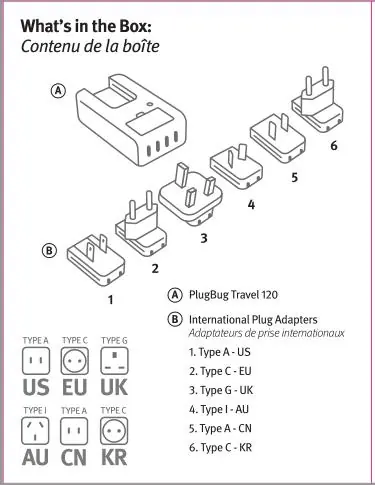
What's in the box
The package includes the PlugBug Travel 120 unit and a set of international plug adapters (Type A-US, Type C-EU, Type G-UK, Type I-AU, Type A-CN, Type C-KR).
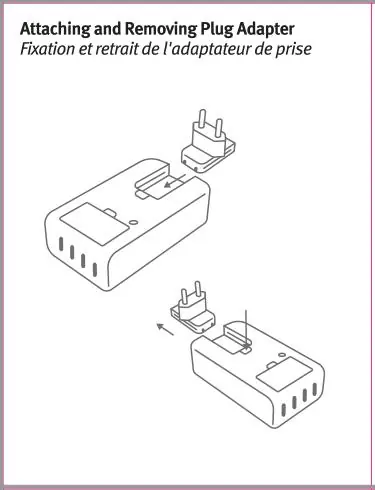
Attaching and removing plug adapters
To attach an adapter, slide it onto the main unit until it clicks into place. To remove, press the release mechanism and slide the adapter off the unit.
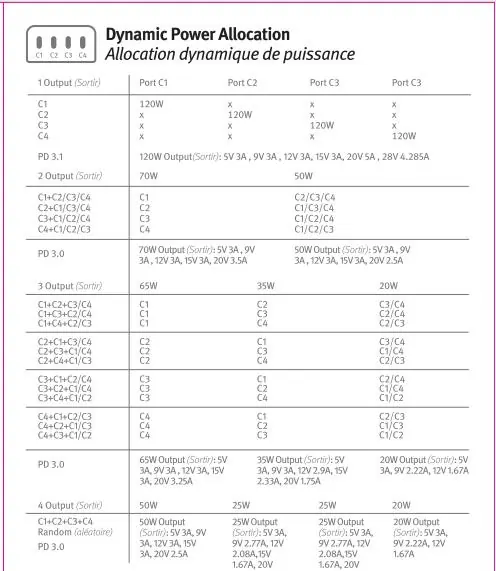
Dynamic power allocation
The device features intelligent power distribution. Depending on how many ports are used simultaneously (C1, C2, C3, C4), the charger dynamically adjusts the output wattage to ensure optimal charging for connected devices, ranging from 120W for a single device to split outputs for multiple devices.
Operation and tracking
To turn on the device, press and hold the button for 3 seconds until it beeps. To turn off, double-click the device first, then quickly press the button 5 times within 2 seconds. The device supports Apple Find My; please refer to the specific Find My setup guide for pairing instructions.
Resetting the device
If you need to pair the device with a new Apple ID, first remove it from the Find My app. Then, quickly press the button twice. After the confirmation chime, press and hold the button for 5 seconds. After the second chime, press and hold again for 3 seconds until you hear the reset prompt.
Battery replacement
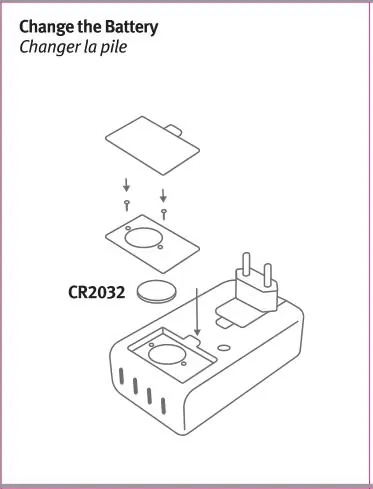
The device uses a CR2032 battery for its tracking features. To replace it: press the battery compartment clip to remove the rear cover, use a screwdriver to unscrew the two metal screws on the middle partition, open the partition, and replace the battery with a new CR2032 cell.
Safety and maintenance
Always use the charger in a dry environment and keep it away from children. Do not cover the charger during operation or place it near heat sources. Ensure the battery compartment is always securely closed. If the compartment does not close securely, stop using the product and remove the battery.
Practical help
Common problems
Device needs to be paired with a new Apple ID
Remove the device from the Find My app, then perform the reset sequence: double-press the button, wait for the chime, press and hold for 5 seconds, then press and hold for another 3 seconds.
Battery compartment is loose or won't close
Stop using the product immediately, remove the battery, and keep it away from children.
Before use
- Ensure the charger is connected to a compatible power source.
- Verify the voltage matches the device requirements.
- Check that the plug adapter is securely attached.
- Ensure no foreign objects are obstructing the ports.
- Confirm the device is not covered during operation.
Specs in practice
- Dynamic Power Allocation
- The system that automatically adjusts power output based on the number and type of devices connected to the four ports.
Images and diagrams
- The manual provides a table showing how power is distributed (120W, 70W, 65W, 50W, etc.) depending on which combination of ports (C1-C4) is used.
- Visual steps are provided for sliding on/off the international plug adapters.
- A diagram illustrates the screw locations and battery placement for the CR2032 cell.
Model compatibility
- For information technology and office equipment use only.
- Complies with FCC radiation exposure limits for uncontrolled environments.
- Requires a minimum distance of 20cm between the radiator and your body during operation.

Manual page author
Michael Turner
Technical manual editor
Reviews PDF manuals for structure, safety notes, and practical product details so readers can find the right information quickly.