Electronics / Cameras
User Manual for Trust Primo 10W Wireless Charger
Quick guide for the Trust Primo 10W Wireless Charger. Learn how to set up, understand power requirements for 10W and 5W charging, and follow safe usage instructions.
Table of contents
Manual images
Click an image to enlargeQuick guide from the manual
This document provides instructions for setting up and using the Trust Primo 10W Wireless Charger. Ensure you have a compatible wall adapter, as one is not included with the device.
Setup
To set up the charger:
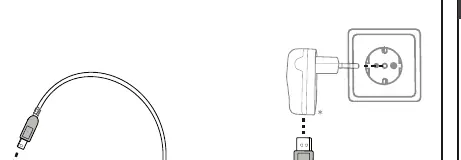
- Connect the provided USB cable to the wireless charger.
- Connect the other end of the USB cable to a suitable wall adapter (not included).
Power Requirements
The charging speed depends on the power adapter used:
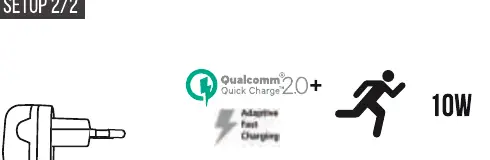
- 10W Charging: Requires a Qualcomm Quick Charge 2.0+ compatible wall adapter.
- 5W Charging: Requires a standard 5V/2A wall adapter.
Charging Instructions
To charge your device effectively:
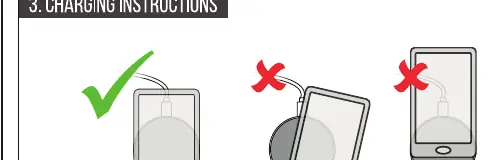
- Place your smartphone in the center of the charging pad.
- Ensure the device is aligned correctly; off-center placement may prevent charging.
- Check your phone screen to confirm the charging status.
- Warning: Do not place metal objects such as keys, credit cards, or other foreign items on the charging surface, as this can cause overheating or damage.
Safety Instructions
Follow these safety guidelines to ensure proper operation:
- Keep the device away from extreme heat, direct sunlight, and fire.
- Do not use the device in humid or wet conditions.
- Do not use the device near explosive gases or flammable materials.
- Do not drop, crush, impact, or mechanically abuse the unit.
- Keep the device out of reach of children.
Manufacturer information
Trust International B.V.
Practical help
Common problems
Device is not charging
Ensure the phone is placed exactly in the center of the charging pad. Off-center placement will prevent charging.
Slow charging speed
Verify that your wall adapter meets the requirements. For 10W charging, a Qualcomm Quick Charge 2.0+ adapter is required. A standard 5V/2A adapter will only provide 5W.
Foreign object detection
Remove any metal objects (keys, credit cards, etc.) from the charging surface immediately.
Before use
- Ensure you have a compatible wall adapter (not included).
- Verify that your smartphone supports wireless charging.
- Clear the charging surface of any metal objects or cards.
- Ensure the USB cable is securely connected to both the charger and the power adapter.
Specs in practice
- 10W Charging
- Fast charging mode; requires a Qualcomm Quick Charge 2.0+ wall adapter.
Images and diagrams
- Setup 1/2: Illustrates connecting the USB cable to the charger and the wall adapter.
- Setup 2/2: Shows the power requirements for 10W (QC 2.0+) vs 5W (5V/2A) charging.
- Charging Instructions: Demonstrates correct centered placement versus incorrect off-center placement and warns against placing metal objects on the pad.
Model compatibility
- Requires a wall adapter (not included).
- 10W mode requires Qualcomm Quick Charge 2.0+ technology.

Manual page author
Michael Turner
Technical manual editor
Reviews PDF manuals for structure, safety notes, and practical product details so readers can find the right information quickly.