Power / Wireless Chargers
User Manual for Urban Vitamin Anaheim 10W Speaker
Quick guide for the Urban Vitamin Anaheim 10W speaker with 15W magnetic charging. Learn how to pair Bluetooth, use TWS mode, charge the speaker, and use the wireless charging feature.
Table of contents
Quick Guide
The Urban Vitamin Anaheim is a 10W Bluetooth speaker featuring a 15W magnetic wireless charging surface. This guide provides essential instructions for operation, charging, and safety.
Device Layout
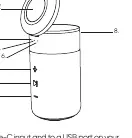
- 1. Power button: Used for power, play/pause, and call management.
- 2. Volume up / Next track: Short press for volume, long press for next track.
- 3. Volume down / Previous track: Short press for volume, long press for previous track.
- 4. Charging/Bluetooth indicator LED: Shows connection and charging status.
- 5. Mic: Built-in microphone for calls.
- 6. Wireless charging indicator: Shows status of the wireless charger.
- 7. Magnetic wireless charging surface: Area for charging compatible devices.
- 8. Type-C charging port: Input for charging the speaker.
Charging the Speaker
Connect the supplied charging cable to the Type-C input and a USB power adapter. The charging LED will be red while charging and turn off when fully charged. If the device has not been used for 7 days, charge it for 10 minutes before powering it on. You can continue to use the device while it is charging.
Bluetooth Operation
- Turn on the speaker using the power button. The Bluetooth indicator will flash.
- Ensure Bluetooth is enabled on your device.
- Search for available devices and select Urban Vitamin Anaheim.
- A sound will play upon successful connection, and the indicator will remain solid.
Note: Only one Bluetooth device can be connected at a time. To connect a different device, disconnect the currently connected one first.
Wireless Charging
- Connect the wireless charger to a power adapter using the included Type-C cable.
- Ensure your phone is compatible with magnetic wireless charging.
- Place your device on the magnetic surface (position 7).
- The indicator will turn green when charging begins and red when the phone is fully charged.
- The indicator will flash red if Foreign Object Detection (FOD) is activated.
Note: Wireless charging requires a minimum input of 9V/3A.
TWS Connection
To use TWS (True Wireless Stereo) mode, you need two Urban Vitamin Anaheim speakers. Double press the power button on one speaker to enter or exit TWS connection mode.
Specifications
- Speaker driver: 57mm
- S/N Ratio: 80dB
- Frequency response: 100Hz-16kHz
- Continuous playtime: 8 hours (at 50% volume)
- Charging time: 2 hours
- Battery capacity: 2000mAh
- Bluetooth version: 5.3
Safety Warnings
- Do not expose the speaker to water, moisture, or extreme humidity; it is not waterproof.
- Use only the included Type-C cable to avoid electrical hazards.
- Ensure the power source is within the 9V/3A input range.
- Do not attempt to disassemble or modify the device.
- Consult a physician before use if you have a pacemaker or other electronic medical device, due to the magnetic alignment feature.
- Disconnect from the charger once fully charged to avoid battery damage.
Practical help
Common problems
Speaker does not turn on
If not used for 7 days, charge for at least 10 minutes before powering on.
Bluetooth connection fails
Ensure only one device is connected; disconnect the previous device first.
Wireless charging not working
Ensure the Type-C cable is connected and the power source provides at least 9V/3A.
Device overheating
Disconnect from the charger immediately and allow it to cool down.
Before use
- Charge the speaker fully using the provided Type-C cable.
- Ensure your phone supports magnetic wireless charging.
- Check that Bluetooth is enabled on your source device.
- Keep the speaker away from water and moisture.
- Verify the power adapter supports 9V/3A input.
Specs in practice
- Continuous playtime
- Up to 8 hours based on 50% volume and normal use.
- Wireless charging output
- 15W maximum output for compatible devices.
- Bluetooth version
- 5.3 for stable wireless connection.
- Battery capacity
- 2000mAh internal battery.
Images and diagrams
- The power button (1) is used for power, play/pause, and call functions.
- Volume buttons (2, 3) also control track skipping with a long press.
- The magnetic surface (7) is located on the top of the speaker.
Model compatibility
- Wireless charging is only possible if the Type-C cable is connected.
- TWS mode requires two Urban Vitamin Anaheim units.
- Not waterproof; avoid exposure to liquids.

Manual page author
Emily Carter
User documentation editor
Prepares concise manual descriptions and highlights the most useful setup, operation, and maintenance information for readers.