Power / Batteries & Chargers
Urban Vitamin Sonoma 10000mAh Powerbank
Quick guide for the Urban Vitamin Sonoma 10000mAh Powerbank. Learn how to charge the device, use wireless charging, and operate the built-in stand.
Table of contents
Quick guide from the manual
The Urban Vitamin Sonoma is a 10,000mAh powerbank featuring both wired and wireless charging capabilities, along with an integrated magnetic stand. This guide provides essential instructions for operating the device safely and efficiently.
Device Overview
The powerbank consists of the following components:
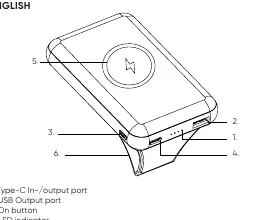
- Type-C In-/output port
- USB Output port
- On button
- LED indicator
- Wireless charging area
- Integrated stand
Specifications
- Battery capacity: 10,000 mAh
- Type-C Input: 5V/3A, 9V/2A
- Type-C Output: 5V/3A, 9V/2.22A, 12V/1.5A (20W max.)
- USB Output: 5V/3A, 9V/2A, 12V/1.5A (18W max.)
- Wireless Output: 5W, 7.5W, 10W
Charging the Powerbank
To charge the powerbank via cable:
- Plug the supplied Type-C cable into your wall charger.
- Connect the USB connector to your charger and the Type-C connector to the powerbank.
- Disconnect the powerbank once fully charged.
Important: Only use included or certified accessories to charge the powerbank to ensure safety.
Charging Mobile Devices
To charge via cable:
- Plug your charging cable into the USB port on the powerbank.
- Connect the other end to your mobile device.
- The powerbank will charge your device to 95% in approximately two hours.
- Recharge the powerbank after use.
Wireless Charging
- Ensure your phone is compatible with wireless charging.
- Switch on the powerbank using the on button.
- Place your device on the wireless charging surface.
- If your device supports MagSafe, the magnets will align automatically. The powerbank is compatible with other wireless charging devices, though the magnetic function will not work.
Using the Built-in Stand
To use the stand:
- Gently pull on the narrow part of the magnetic stand to release the magnet.
- Pull it out until the top part of the magnet folds down and attaches to the back of the powerbank.
- Place the powerbank on a flat surface and position your phone vertically or horizontally on the MagSafe area.
Safety Warnings
- Do not vigorously shake, hit, or throw the product.
- If not used for a long time, charge/discharge the powerbank once every three months.
- Do not place metal objects, magnets, or magnetic stripe cards between the device and the wireless charger.
- Keep the device away from moisture and heat sources.
- This is not a toy; keep out of reach of children under 7 years old.
Practical help
Common problems
Wireless charging not working
Ensure the phone is compatible, remove thick phone cases, and check for metal objects or magnets between the phone and the charging pad.
Device not charging properly
Ensure the mobile device is placed accurately on the charging surface and check that the powerbank has sufficient battery.
Network reception loss
Using the wireless charger in areas with weak network coverage may interfere with your phone's signal.
Before use
- Charge the powerbank fully before first use.
- Verify your phone supports wireless charging.
- Remove any metal objects or magnetic cards from the charging area.
- Use only the included or certified cables and chargers.
Specs in practice
- Battery Capacity
- 10,000 mAh total energy storage.
- Wireless Output
- Supports 5W, 7.5W, and 10W charging speeds depending on the device.
- Type-C Output
- Supports fast charging up to 20W max.
Images and diagrams
- 1. Type-C In-/output port
- 2. USB Output port
- 4. LED indicator
- 5. Wireless charging area
- 6. Integrated stand
Model compatibility
- MagSafe magnetic alignment works with iPhone 12 and newer.
- Compatible with all wireless charging devices, but magnetic alignment is specific to MagSafe.

Manual page author
David Miller
Documentation analyst
Organizes user manual content into clear summaries, with attention to model details, product context, and everyday usability.