Electronics / Speakers & Soundbars
User Manual for Urban Vitamin Fairfield 15W 3-in-1 Wireless Charger
Quick start guide and user manual for the Urban Vitamin Fairfield 15W 3-in-1 Wireless Charger. Learn how to charge your phone, watch, and earbuds, troubleshoot charging issues, and follow safety guidelines.
Table of contents
Quick Guide
The Urban Vitamin Fairfield is a 3-in-1 wireless charging station designed to charge your phone, smartwatch, and wireless earbuds simultaneously. To begin, connect the USB-C cable to a compatible USB power adapter and place your devices on the designated charging pads.
Device Layout
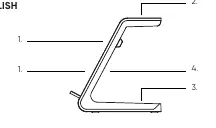
- 1. Phone Charging Pad: Supports 5W, 7.5W, 10W, and 15W output.
- 2. Watch Charging Pad: Provides 3W output. Optimized for Apple Watch; may not be compatible with all smartwatches.
- 3. Earbuds Charging Pad: Provides 5W output.
- 4. Ventilation Holes: Ensure these are not blocked to prevent overheating.
Charging Requirements
To achieve optimal charging speeds (7.5W/10W/15W for phones or charging watches/earbuds), you must use a USB power adapter that supports "Quick Charge" or "Power Delivery" standards. The adapter must support 9V/12V and 3A/2.5A output.
LED Status Indicators
- Static Light: Device is charging.
- Flashing Light: Foreign object detected; charging is disabled.
Troubleshooting
If you experience high temperatures, slow charging, or no charging, check the following:
- Ensure the connected USB adapter or port has sufficient power output.
- Verify the charging cable is compatible with the power adapter.
- Ensure your phone case is not too thick (recommended maximum thickness is 2-3 mm).
- Remove any metal or magnets from the back of the phone or phone case.
- Ensure the device is placed in the center of the charging pad.
- Verify that your device supports Qi wireless charging.
- Do not place bank cards or other magnetic items on the charger.
Safety Instructions
- Keep the wireless charger away from water and other liquids.
- Clean the charger only with a dry cloth. Ensure it is disconnected from the power source before cleaning.
- Operate the device within an ambient temperature range of -20°C to +45°C.
Practical help
Common problems
Slow or no charging
Ensure the power adapter supports Quick Charge/Power Delivery (9/12V, 3/2.5A), remove thick cases (>3mm), remove metal/magnets, and align the device to the center of the pad.
Flashing LED light
A foreign object has been detected on the charger. Remove the object to resume charging.
Before use
- Use a USB power adapter that supports Quick Charge or Power Delivery.
- Ensure your phone supports Qi wireless charging.
- Remove any metal or magnets from the back of your phone or case.
- Ensure your phone case is 2-3 mm thick or less.
- Place the device in the center of the charging pad.
Specs in practice
- Phone Output
- 5W, 7.5W, 10W, or 15W depending on device compatibility.
- Watch Output
- 3W (Optimized for Apple Watch).
- Earbuds Output
- 5W.
Images and diagrams
- 1. Phone charging pad
- 2. Watch charging pad
- 3. Earbuds charging pad
- 4. Ventilation holes
Model compatibility
- The watch charging pad is optimized for Apple Watch and is not compatible with all smartwatches.

Manual page author
Michael Turner
Technical manual editor
Reviews PDF manuals for structure, safety notes, and practical product details so readers can find the right information quickly.