Power / Batteries & Chargers
User Manual for Urban Vitamin Compton 10,000mAh Magnetic Fast Charge Powerbank
Quick guide for the Urban Vitamin Compton 10,000mAh Magnetic Fast Charge Powerbank. Learn how to charge the powerbank, charge your mobile devices via cable or wireless, and view safety warnings.
Table of contents
Quick Guide
The Urban Vitamin Compton is a 10,000mAh magnetic powerbank supporting both wired and wireless charging. To begin, charge the powerbank using the provided Type-C cable. For wireless charging, ensure your device is compatible, place it on the wireless charging area, and press the power button.
Product Overview
The device features:
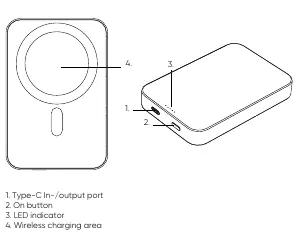
- Type-C In-/output port: Used for charging the powerbank itself or charging devices via cable.
- On button: Press to activate the powerbank.
- LED indicator: Displays battery status.
- Wireless charging area: The surface where you place your wireless-charging-enabled device.
Specifications
- Battery Capacity: 10,000mAh / 3.85V / 38.5Wh
- Type-C Input/Output: 5V/3A, 9V/2.2A, 12V/1.67A
- Wireless Output: 5W, 7.5W, 10W, 15W
Charging the Powerbank
Connect the supplied Type-C cable to a wall charger and the powerbank. Disconnect once fully charged.
Charging Your Mobile Device
Via Cable: Plug your cable into the USB port on the powerbank and the other end into your device. The powerbank can charge your device to 95% in approximately two hours.
Wireless: Ensure your phone supports wireless charging. Switch on the powerbank using the button. Place your device on the wireless charging surface. If using a MagSafe-compatible device, the magnets will align automatically.
Safety Warnings
- Do not shake, hit, or throw the product.
- Keep away from moisture and heat sources.
- Do not place metal objects, magnets, or magnetic stripe cards between the device and the charger.
- Use only certified accessories.
- If not used for a long time, charge/discharge once every three months to maintain battery health.
Practical help
Common problems
Wireless charging not working
Ensure your phone is compatible, remove thick phone cases, check alignment on the charging surface, and ensure no metal or magnetic objects are between the phone and powerbank.
Device not charging properly
Ensure the mobile device is placed accurately on the charging surface. Weak network coverage in the area may also affect wireless charging performance.
Before use
- Charge the powerbank fully before first use.
- Use only certified cables and chargers.
- Ensure your phone supports wireless charging.
- Remove metal objects or magnetic cards from between the phone and powerbank.
Specs in practice
- Battery Capacity
- 10,000mAh / 38.5Wh total energy storage.
- Type-C Input/Output
- Supports fast charging up to 12V/1.67A.
- Wireless Output
- Supports variable output: 5W, 7.5W, 10W, 15W.
Images and diagrams
- 1. Type-C In-/output port: Used for charging the powerbank and wired device charging.
- 2. On button: Activates the powerbank.
- 3. LED indicator: Shows battery status.
- 4. Wireless charging area: Place your device here for wireless charging.
Model compatibility
- Compatible with MagSafe devices for magnetic alignment.
- Works with other wireless charging devices, though magnetic function will not apply.
- Recommended to use a power adapter above 20W for best charging experience.

Manual page author
Emily Carter
User documentation editor
Prepares concise manual descriptions and highlights the most useful setup, operation, and maintenance information for readers.