Automotive / Car Audio
User Manual for Vibe 1080P/WIFI Action Camera
Quick guide for the Vibe 1080P/WIFI Action Camera. Learn how to mount, charge, record video, take photos, use playback mode, and connect via the GoPlus Cam app.
Table of contents
Quick guide from the manual
This manual provides instructions for the Vibe 1080P/WIFI Action Camera. Before first use, ensure the battery is fully charged. The camera supports Micro SD/SDHC cards up to 32GB. Use the Power/Mode button to turn the device on/off and switch between modes (Video, Photo, Playback, Setup). The camera can be controlled via the GoPlus Cam app on Android or iOS devices.
Package contents
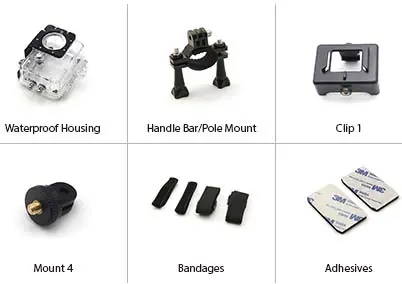
The package includes the 1080P/WIFI Action Camera, waterproof case, standard case, handlebar/pole mount, swivel adapter, pivot adapter, buckle adapter, helmet/wrist mount, helmet/wrist straps, adhesive replacements, USB charging cable, removable battery, and this operation manual.
Camera diagram
The camera features a Power/Mode button, Up/WiFi selection button, Down selection button, Shutter/Select button, Micro SD card port, Micro USB charge port, LCD screen, LED indicator, and a wide-angle HD lens.
Mounting the camera
Insert the camera into the Standard or Waterproof case. Screw the Swivel Adapter into the case, then attach it to the desired mount (Handlebar, Pivot, or Buckle/Helmet mount). Ensure all knobs are tightened securely before use.
Charging the camera
It is recommended to fully charge the camera before the first use. Connect the USB cable to a computer USB port and the Micro USB plug to the camera. The charging indicator will illuminate while charging and turn off when fully charged. A full charge may take up to 3.5 hours.
Operation
Turning On/Off: Press and hold the Power/Mode button for 3 seconds to turn on. Press and hold the button to turn off. The unit automatically turns off after 3 minutes of inactivity.
Switching Modes: Press the Power/Mode button to cycle through Video, Photo, Playback, and Setup modes.
Recording and photos
Recording Videos: The camera starts in video mode by default. Aim the camera and press the Shutter Button to start/stop recording. The date and recording time will appear in red on the display when recording.
Taking Photos: Switch to Photo mode. Use the setup menu to adjust settings like Exposure, Image Size, Quality, Timer, Sharpness, ISO, Anti-Shaking, and White Balance. Press the Shutter button to capture a photo.
Playback mode
Enter playback mode to view photos and videos. Use the up and down buttons to cycle through files. Press the select button to play/pause videos. To delete, select the file, press the mode button to enter settings, and locate the delete option.
Settings
Enter the setup menu to configure options such as Resolution, Exposure, Cyclic Record, Video Lapse, WDR, Audio Recording, Date Stamp, Motion Detection, Anti-Shaking, Frequency, OSD Mode, Screen Saver, Rotate, Auto Power Off, Language, Date/Time, TV Switch, Car Mode, WiFi settings, and formatting.
App connectivity
Download the GoPlus Cam app from the App Store or Google Play Store. Power on the camera and enable WiFi by pressing the Up button. Connect your smartphone to the camera's WiFi network (typically named "VE-IFXAC") using the password "123456". Open the app to control the camera, view live streams, and download media.
Care and maintenance
Keep the unit away from heat, moisture, and liquids. Do not drop the unit or expose it to sharp objects. Do not attempt to disassemble the device. If the unit malfunctions, return it to the place of purchase.
Practical help
Common problems
Camera will not turn on
Ensure the battery is fully charged.
Video recording stops automatically
Check if the memory card is full or the battery is low.
WiFi connection fails
Ensure the camera is powered on and WiFi is enabled by pressing the Up button. Verify the password '123456' is entered correctly.
Before use
- Charge the battery fully (up to 3.5 hours).
- Insert a compatible Micro SD/SDHC card (up to 32GB).
- Ensure the camera is in Off Mode before inserting/removing the memory card.
- Download the 'GoPlus Cam' app on your smartphone.
- Tighten all mounting knobs securely before use.
Specs in practice
- Video Resolution
- Supports up to 1080P (1920x1080) at 30fps.
Images and diagrams
- Power/Mode button: Used for turning on/off and switching modes.
- Up/WiFi button: Used for menu navigation and enabling WiFi.
- Shutter/Select button: Used for recording, taking photos, and confirming selections.
Model compatibility
- Compatible with Android 4+ and iOS 9+ devices.
- UHS (ultra high speed) cards are not 100% backward compatible.

Manual page author
David Miller
Documentation analyst
Organizes user manual content into clear summaries, with attention to model details, product context, and everyday usability.