Electronics / IP Phones
User Guide for Vtech S2210-X Corded Hotel Telephone
Comprehensive user guide for the Vtech S2210-X corded hotel telephone. Includes installation instructions for desktop and wall mounting, operation procedures, troubleshooting, and technical specifications.
Table of contents
Manual images
Click an image to enlargeQuick guide from the manual
The Vtech S2210-X is a SIP-based corded hotel telephone. Upon connection to a Power over Ethernet (PoE) network, the phone initiates a four-step initialization process. During this time, the MUTE and SPEAKER keys will flash. Successful registration is indicated when the MESSAGE WAITING LED, LINE, MUTE, and SPEAKER keys illuminate for 500ms. If registration fails, the SPEAKER key will blink twice every second; in this case, disconnect the Cat-5 cable and reconnect it to reset.
Parts included
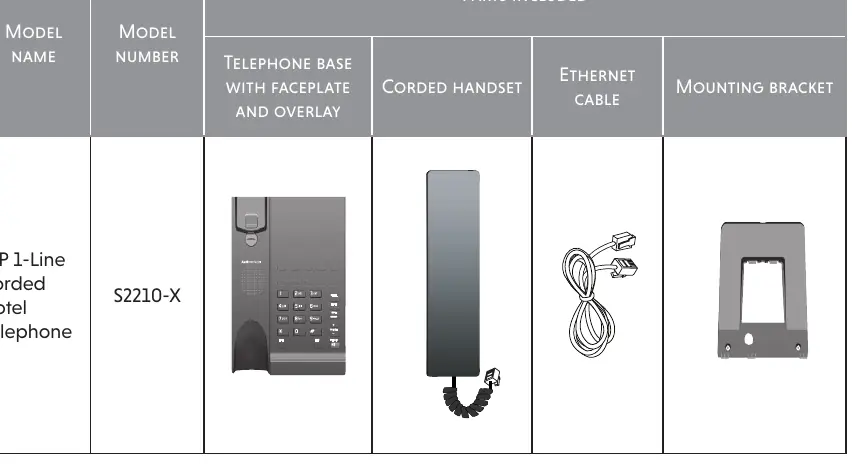
- Telephone base with faceplate and overlay
- Corded handset
- Ethernet cable
- Mounting bracket
Installation
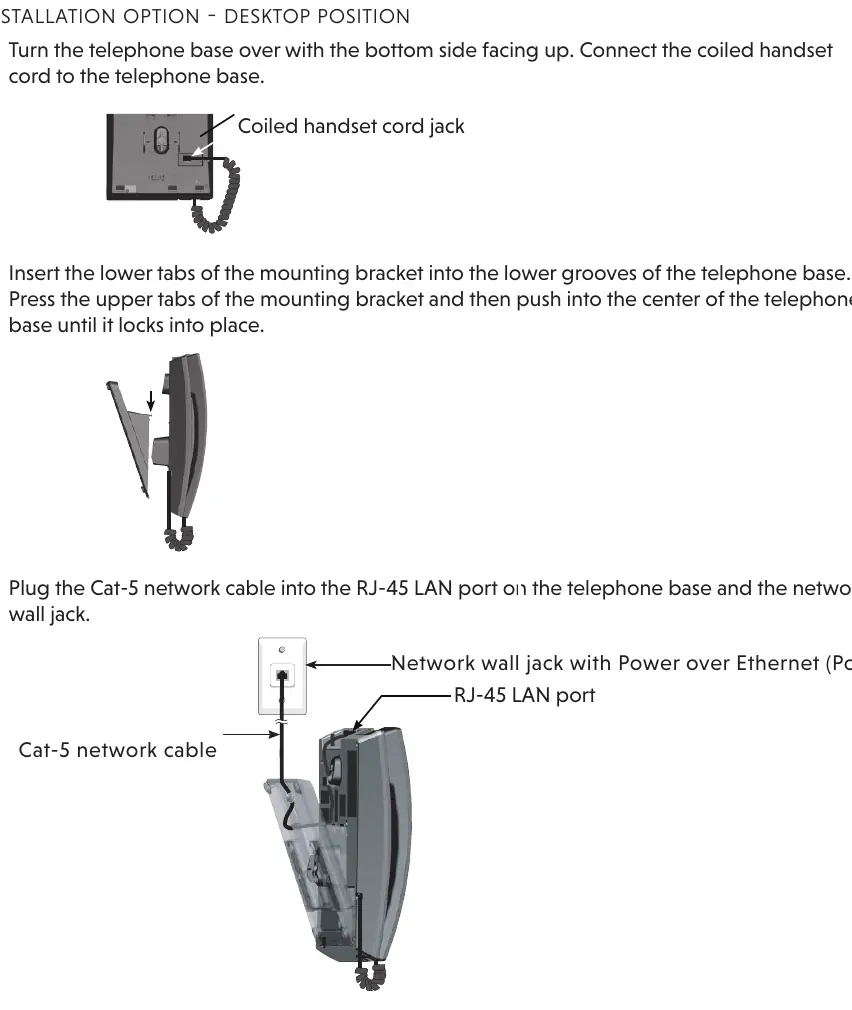
Desktop position
- Connect the coiled handset cord to the telephone base.
- Insert the lower tabs of the mounting bracket into the lower grooves of the telephone base.
- Press the upper tabs of the mounting bracket and push into the center of the base until it locks.
- Plug the Cat-5 network cable into the RJ-45 LAN port and the network wall jack.
Wall mount position
- Unplug the Cat-5 cable.
- Remove the handset. Use a coin to rotate the wall mount clip 180 degrees so the protruding edge points toward the upper edge of the base.
- Remove the mounting bracket by pressing the tabs.
- Plug the Cat-5 cable back in and slide the telephone base down onto the wall plate mounting studs until it locks.
- Place the handset on the cradle.
Telephone operation
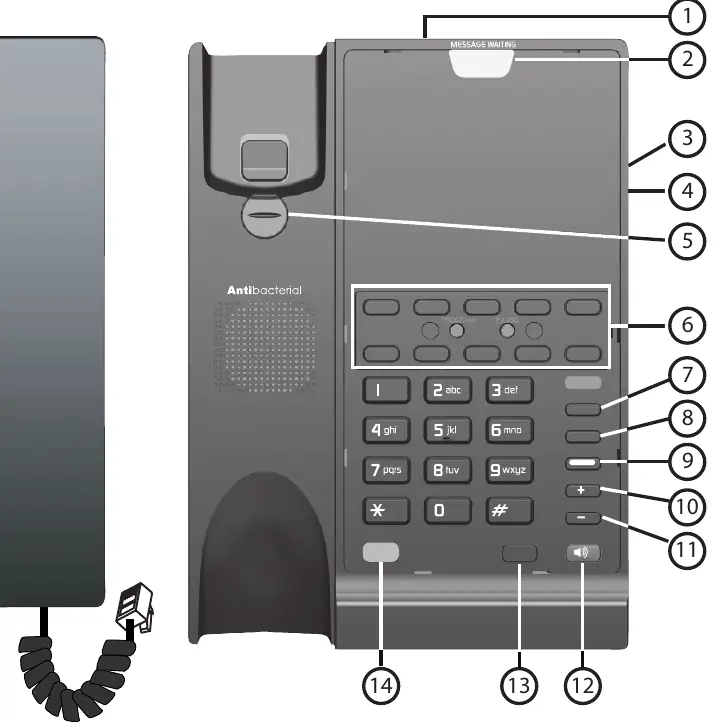
- Receive a call: Lift the handset or press the LINE/SPEAKER key.
- Place a call: Lift the handset or press the LINE/SPEAKER key, listen for a dial tone, and dial the number or press a Speed Dial key.
- Switching calls: You can switch between the handset and speakerphone by pressing the SPEAKER key or lifting/replacing the handset.
- Volume: Press VOL+ or VOL- during a call to adjust listening volume, or in idle mode to adjust ringer volume.
- Mute: Press the MUTE key during a call to silence the microphone. Press again to resume.
- Hold: Press the HOLD key to place a call on hold. Press the LINE key to release.
- Transfer: Press the FLASH key to put a call on hold, dial the transfer number, and press the LINE key or replace the handset to complete the transfer.
Maintenance and cleaning
Clean the telephone casing only with a soft cloth slightly dampened with water or mild soap. Do not use excess water or cleaning solvents. Avoid placing the phone near water, in damp conditions, or in direct sunlight. Do not use the phone during electrical storms.
Troubleshooting
- Telephone does not work: Ensure the Cat-5 cable is connected to a PoE-enabled port. Try unplugging for 15 seconds and reconnecting.
- No dial tone: Verify the network provides PoE. Check if the initialization process completed successfully.
- Cannot dial out: Check server settings or wait a moment for the phone to synchronize.
- Speed Dial not working: The key may not be properly programmed.
Technical specifications
- Power: Power over Ethernet (PoE) IEEE 802.3af class 2 (48V).
- Ports: 1 x 10/100/1000 Mbps RJ-45 LAN port, 1 x 10/100/1000 Mbps RJ-45 COMPUTER port.
- USB: Charging port (up to 500mA @ 5V).
- Speed Dial: Up to 10 memory locations.
Practical help
Common problems
Telephone does not work at all
Ensure the Cat-5 cable is plugged into the LAN port and a PoE-enabled network jack. Try unplugging the cable for 15 seconds and reconnecting.
No dial tone
Verify the network provides PoE. Ensure the initialization process completed (SPEAKER key should not be blinking twice per second).
Cannot dial out
Check server settings or wait a few seconds for the phone to synchronize with the network.
Interference during conversation
If using a surge protector, try a different location or remove the surge protector. Ensure the phone is not near other electronic interference sources.
Before use
- Ensure the network wall jack provides Power over Ethernet (PoE).
- Connect the coiled handset cord to the base.
- Plug the provided Cat-5 network cable into the LAN port.
- Wait for the initialization process to complete (indicated by LED illumination).
- Ensure the phone is not placed on soft surfaces that block ventilation.
Specs in practice
- PoE (Power over Ethernet)
- The phone is powered directly through the network cable; no separate power adapter is required.
Images and diagrams
- RJ-45 LAN port: Connects the phone to the network.
- RJ-45 COMPUTER port: Pass-through port for internet access.
- USB CHARGE ONLY: Port for charging external devices.
Model compatibility
- Requires PoE network connection.
- Not designed for direct connection to standard PSTN/POTS telephone lines.
- Only use the supplied Cat-5 network cable.

Manual page author
Emily Carter
User documentation editor
Prepares concise manual descriptions and highlights the most useful setup, operation, and maintenance information for readers.