Toys / Games
User Guide for Vtech RC Cory Carson
Learn how to set up, operate, and troubleshoot your Vtech RC Cory Carson toy. This guide covers battery installation, remote control functions, and maintenance tips.
Table of contents
Manual images
Jump to the sectionQuick guide from the manual
The Vtech RC Cory Carson is a remote-controlled toy designed for interactive play. To begin, ensure you have the required batteries installed in both the car and the remote control. The toy features a light-up windshield button for sounds and phrases, and a two-button remote for movement and tricks. The unit includes an automatic shut-off feature to preserve battery life.
Included in the package
- 1 RC Cory Carson vehicle
- 1 Remote control
- Parents' guide
Battery installation
Adult assembly is required for battery installation. Ensure the unit is turned off before proceeding.
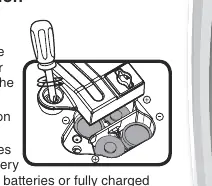
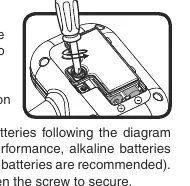
Car
- Locate the battery cover on the bottom of the unit.
- Use a screwdriver to loosen the screw and open the cover.
- Remove old batteries if present.
- Install 4 new AA (AM-3/LR6) batteries following the diagram inside the battery box.
- Replace the cover and tighten the screw.
Remote Control
- Locate the battery cover on the back of the unit.
- Use a screwdriver to loosen the screw and open the cover.
- Remove old batteries if present.
- Install 2 new AAA (AM-4/LR03) batteries following the diagram inside the battery box.
- Replace the cover and tighten the screw.
Note: For best performance, use alkaline batteries or fully charged Ni-MH rechargeable batteries. Do not mix old and new batteries or different types of batteries.
Product features and operation
On/Off Switch: Slide the switch to the On position to activate the unit, or to the Off position to turn it off.
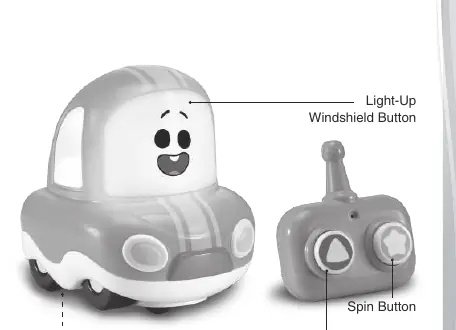
Remote Control: Use the Forward Button to move Cory forward. Use the Spin Button to back up, turn, and perform tricks.
Automatic Shut-Off: The unit will power down after approximately 100 seconds of inactivity. Press the Light-Up Windshield Button to wake the unit. If the button is held for more than 15 minutes, the system enters sleep mode.
Activities
Light-Up Button: Press the Light-Up Windshield Button to hear fun songs, phrases, sounds, and music. The light will flash in sync with the sounds.
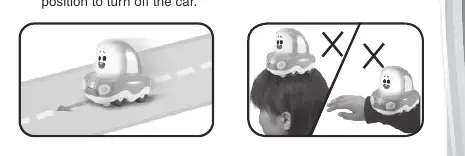
Movement: Use the Forward and Spin buttons on the remote to drive the car. The car plays sounds while driving.
Care and maintenance
- Keep the unit clean by wiping it with a slightly damp cloth.
- Keep the unit away from direct sunlight and heat sources.
- Remove batteries if the unit will not be used for an extended period.
- Do not drop the unit on hard surfaces or expose it to moisture or water.
- Ideal operating temperature range: 32°F - 95°F (0°C - 35°C).
Troubleshooting
If the unit stops working or malfunctions, follow these steps:
- Turn the unit Off.
- Remove the batteries to interrupt the power supply.
- Let the unit stand for a few minutes.
- Replace the batteries and turn the unit On.
- If the problem persists, install a fresh set of batteries.
For further assistance, contact Consumer Services at 1-800-521-2010 (U.S.) or 1-877-352-8697 (Canada), or visit vtechkids.com.
Official resources from the manual
Practical help
Common problems
Unit stops working or malfunctions
Turn the unit off, remove batteries, wait a few minutes, replace batteries, and turn back on.
Unit powers down repeatedly during play
The batteries may be low; install a new set of batteries.
Remote control does not work
The unit may be in sleep mode. Press the Light-Up Windshield Button on the car to wake it up.
Something caught in the wheels
Lift the car up so it is no longer touching the child or surface, or turn the unit off immediately.
Before use
- Remove all packaging materials (tape, plastic sheets, etc.) for child safety.
- Install 4 AA batteries in the car.
- Install 2 AAA batteries in the remote control.
- Ensure the On/Off switch is set to the On position.
- Place the car on a flat, smooth surface for optimal performance.
Specs in practice
- Remote Battery
- 2 x AAA (AM-4/LR03) batteries.
- Auto Shut-off
- Powers down after ~100 seconds of inactivity.
- Operating Temperature
- 32°F - 95°F (0°C - 35°C).
Images and diagrams
- The battery compartments for both the car and remote require a screwdriver to open.
- The car features a Light-Up Windshield Button for interaction.
- The remote control has two main buttons: Forward and Spin.
Model compatibility
- Use alkaline or fully charged Ni-MH rechargeable batteries.
- Do not mix old and new batteries.
- Do not mix alkaline, standard (carbon-zinc), or rechargeable batteries.

Manual page author
David Miller
Documentation analyst
Organizes user manual content into clear summaries, with attention to model details, product context, and everyday usability.