Tools / Generators
User Manual for Vtoman Jump 1500 Backup Battery
Quick guide for the Vtoman Jump 1500 backup battery. Learn how to connect, charge, discharge, troubleshoot, and maintain your power station safely.
Table of contents
Quick guide from the manual
The Vtoman Jump 1500 is a backup battery designed to extend the capacity of your power station. Key operational points include:
- Connection: Use the provided CP3500 cable to connect the power station and the backup battery.
- Priority: When no charger is plugged in, the backup battery has output priority.
- Charging/Discharging Logic: If the main battery is not full, it charges/discharges first. Once full, the system automatically switches to the backup battery.
- Warning: The CP3500 cable generates high temperatures during operation; do not touch it to avoid scalding.
Product Overview and Connection
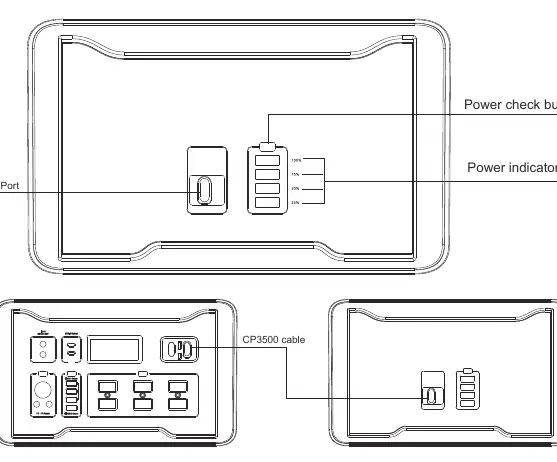
The device features a power check button and a power indicator light to monitor status. To connect, use the CP3500 cable between the power station and the backup battery. Do not disconnect the main and backup battery while they are working, as this may interrupt the current output.
Charging and Discharging
When charging, the main battery displays its own remaining power, and the backup battery displays its own remaining power. When discharging, the main battery displays the combined power of both the main and secondary batteries, while the backup battery displays its own power.
Technical Specifications
- Battery Type: LiFePO4
- Capacity: 1548Wh
- Input: 200W (MAX)
- Output: 1000W-1500W (MAX)
- Operating Temperature (Output): -4°F to 131°F (-20°C to 55°C)
- Operating Temperature (Charging): 32°F to 131°F (0°C to 55°C)
- Weight: 14.87kg
- Dimensions: 260 x 270 x 280mm
Troubleshooting
If you encounter issues, check the following:
- Cannot be charged: Ensure the input interface is connected well. If the connection is good but the indicator is off, the charger may be damaged.
- Cannot output: Ensure the main and backup batteries are properly connected. If the battery is too low, charge it. If the equipment power exceeds the product's scope, reduce the load.
- Interrupted output: If the device power is too small, the product may fail to identify it and turn off the output.
Safety and Maintenance
- Do not take this product on a plane (capacity exceeds 100Wh).
- Keep the battery dry and away from water or damp environments.
- Do not expose to fire or temperatures above 140°F.
- Do not disassemble the battery.
- If not in use for a long time, charge the battery every 12 months.
- Dispose of the product according to local laws.
Customer Service
For support, contact the manufacturer via email at [email protected]. You can also find more information at www.vtoman.com.
Official resources from the manual
Practical help
Common problems
Product cannot be charged
Check if the input interface is connected well. If the connection is good but the indicator is off, the charger may be damaged; contact after-sales service.
Product cannot output power
Ensure the main and backup batteries are properly connected. If the battery is too low, charge it. If the equipment power exceeds the product's scope, replace with a larger power battery or reduce the load.
Output is interrupted during use
If the device power is too small, the product may fail to identify it and turn off the output. Try restarting the unit.
Before use
- Ensure the CP3500 cable is securely connected between the power station and the backup battery.
- Verify the battery is charged before use.
- Check that the equipment power is within the rated output range (1000W-1500W).
- Ensure the environment temperature is within the specified range (-20°C to 55°C for output, 0°C to 55°C for charging).
Specs in practice
- Battery Capacity: 1548Wh
- The total energy storage capacity of the battery.
- Output: 1000W-1500W
- The range of power the device can deliver to connected appliances.
Images and diagrams
- The diagram illustrates the connection between the power station and the backup battery using the CP3500 cable, highlighting the power check button and indicator light.
Model compatibility
- Not suitable for air travel as the capacity exceeds 100Wh.
- Requires equipment power to be within the rated output range; very low power devices may not be identified.

Manual page author
Emily Carter
User documentation editor
Prepares concise manual descriptions and highlights the most useful setup, operation, and maintenance information for readers.