Power / Portable Power Stations
Vtoman Jump 1000 Portable Power Station
A comprehensive guide for the Vtoman Jump 1000 portable power station. Learn how to charge the unit, operate AC/DC/USB outputs, jump start your vehicle, and follow essential safety guidelines.
Table of contents
Manual images
Click an image to enlargeQuick Guide
The Vtoman Jump 1000 is a portable power station designed for emergency power and off-grid use. Before first use, charge the unit fully using the provided AC adapter. Always verify the power requirements of your devices before connecting them to the AC or DC ports to avoid overload. If the unit is not in use, turn off the power switches to save battery.
Product Overview
The device features an LCD screen that displays battery percentage, available time, and power consumption. Key ports include:
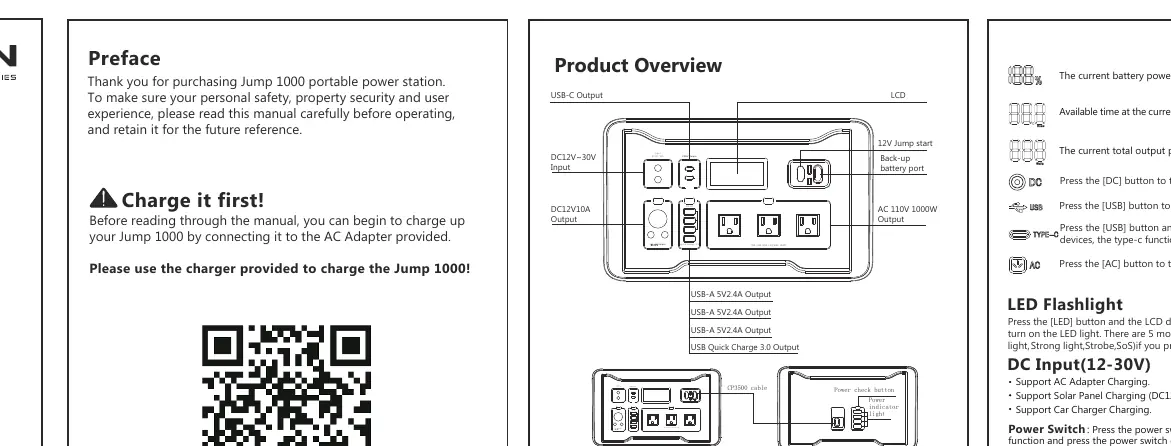
- AC Output: 110V/60Hz, continuous 1000W, peak 2000W.
- DC Output: 12V cigarette lighter socket and 12V DC ports (total 120W).
- USB Output: 3x USB-A (5V/2.4A) and 1x Quick Charge 3.0 port.
- Type-C Output: Supports PD 100W max.
- Jump Start Port: Dedicated port for vehicle jump-starting.
Charging the Device
Before using or storing, if the LCD display shows capacity less than 5%, recharge the unit immediately. There are three ways to recharge:
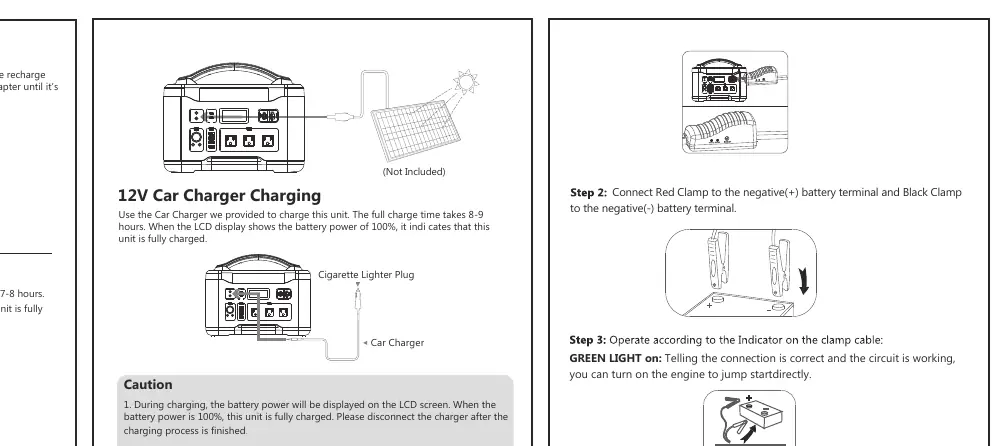
- AC Adapter: Connect the provided AC adapter to the input port. Full charge takes 7-8 hours.
- Car Charger: Use the provided car charger. Full charge takes 8-9 hours.
- Solar Panel: Supports 60W-200W solar panels (not included). Charging time depends on solar intensity.
Using Outputs
Press the corresponding power button (AC, DC, or USB) to activate the desired output function. The LCD screen will display the function icon when active. To save power, turn off the function when not in use. The unit features intelligent detection and will automatically shut off if no power is consumed for 30 seconds.
Jump Starting a Vehicle
- Plug the blue connector of the clamp cable into the jump starter socket.
- Connect the Red Clamp to the positive (+) battery terminal and the Black Clamp to the negative (-) battery terminal.
- Check the indicator on the clamp cable. If the GREEN LIGHT is on, the connection is correct.
- If the GREEN LIGHT is blinking, press the "BOOST" button, wait until the light becomes solid, then start the engine within 30 seconds.
- Once the vehicle is started, remove the clamp cable from the jump starter first, then remove the clamps from the battery.
Safety Instructions
- Do not disassemble, repair, or modify the unit.
- Do not expose the product to fire or excessive temperatures (over 266°F).
- Do not use or store in bathrooms or areas exposed to rain or moisture.
- Do not touch the unit or plug-in points with wet hands.
- Keep the unit away from children and pets.
- If the unit is dropped or damaged, stop using it immediately.
Troubleshooting
If the unit encounters issues, check the following:
- Overload/Short Circuit: If the AC or DC output shuts off, resolve the short circuit or overload and press the corresponding power button to reset.
- Jump Starter Lock: If the jump starter locks down due to safety reasons, turn it off, remove the clamps, restart the unit, and reconnect.
- LCD Display: If the battery percentage blinks, the unit is charging.
Practical help
Common problems
AC output shuts off automatically
The device connected exceeds 1000W or there is a short circuit. Remove the device, resolve the issue, and press the AC button to reset.
Jump starter does not work
Ensure the clamps are connected correctly. If the indicator light is off, press the 'BOOST' button and wait for the green light.
Device not charging
Check if the input voltage is within the 12-30V range. Ensure the AC adapter or car charger is securely connected.
LCD screen is off
Press any power switch to wake the display. If no functions are active, the screen will shut off after 30 seconds.
Before use
- Charge the unit fully using the provided AC adapter.
- Verify that your devices require less than 1000W for AC output.
- Ensure the environment is clean, dry, and well-ventilated.
- Check the battery level on the LCD screen.
- Confirm the jump starter clamp cable is available if needed for vehicle emergencies.
Images and diagrams
- LCD Screen: Shows battery percentage, available time, and power consumption.
- Jump Start Port: Blue connector for the clamp cable.
- AC Output: Standard 110V/60Hz outlet for home appliances.
Model compatibility
- AC output is for devices under 1000W.
- 12V Cigarette Lighter Socket + 2 DC ports total output is 120W.
- Supports 60W-200W solar panels (not included).

Manual page author
Michael Turner
Technical manual editor
Reviews PDF manuals for structure, safety notes, and practical product details so readers can find the right information quickly.