Tools / Generators
User Manual for VTOMAN Jump 1500X Portable Power Station
Quick guide for the VTOMAN Jump 1500X portable power station. Learn how to charge, use the jump starter, operate AC/DC/USB outputs, and troubleshoot common issues.
Table of contents
Quick Guide from the Manual
Before using your VTOMAN Jump 1500X, please charge the unit fully using the provided AC adapter. Ensure the device you intend to power is compatible with the 1500W AC output limit. Always operate the unit in a clean, dry environment and avoid exposing it to extreme temperatures. If the LCD display shows a capacity of less than 5%, recharge the unit immediately to maintain battery health.
Product Overview
The VTOMAN Jump 1500X features a variety of output ports to power your devices:
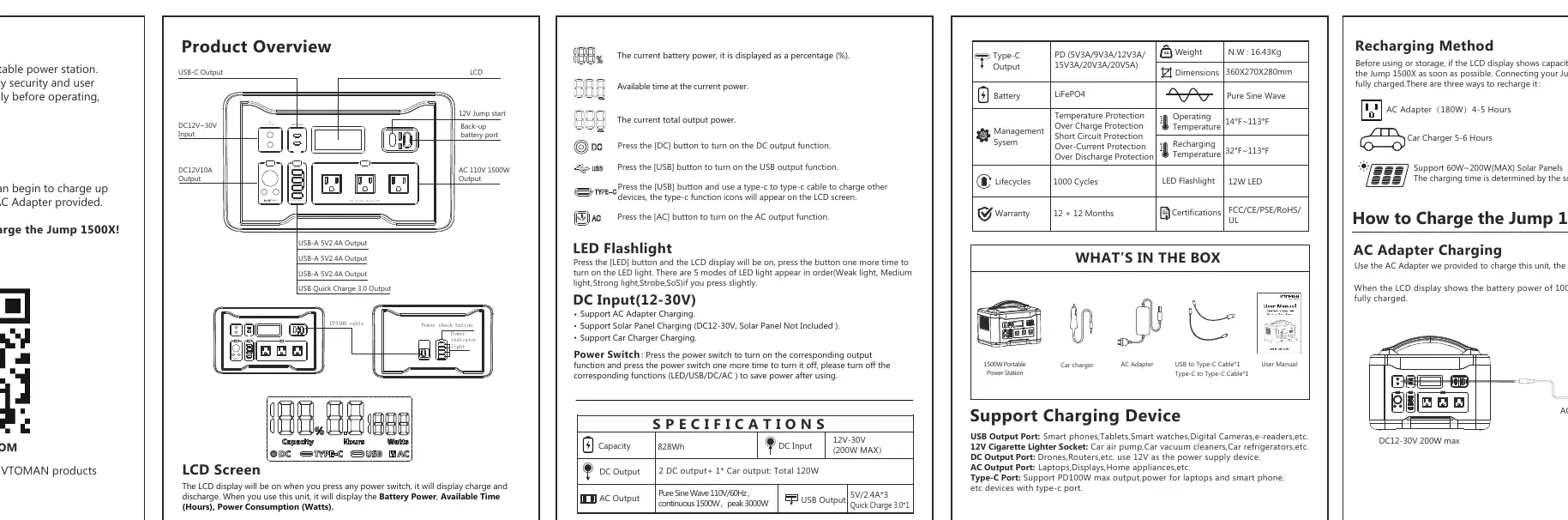
- AC Output: 110V/60Hz, 1500W continuous, 3000W peak.
- DC Output: 12V cigarette lighter socket and DC ports (120W total).
- USB Output: 3x USB-A (5V/2.4A) and 1x USB Quick Charge 3.0.
- Type-C Output: Supports PD 100W max.
- LCD Screen: Displays battery percentage, available time, and power consumption.
Charging the Unit
There are three ways to recharge the Jump 1500X:
- AC Adapter: Use the provided adapter for a full charge in 4-5 hours.
- Solar Panel: Supports 60W-200W solar panels (not included). Charging time depends on light intensity.
- Car Charger: Use the provided car charger for a full charge in 5-6 hours.
Operation Instructions
To use the power station, press the power switch corresponding to the output function you wish to use (LED, USB, DC, or AC). When the function icon appears on the LCD screen, the output is active. To save power, turn off the specific function when not in use. The unit will automatically shut off after 6 hours if no power is consumed.
How to Jump Start a Vehicle
- Fully plug the blue connector of the clamp cable into the jump starter socket. Ensure the indicator on the clamp cable is off.
- Connect the Red Clamp to the positive (+) battery terminal and the Black Clamp to the negative (-) battery terminal.
- If the GREEN LIGHT is on, you can turn on the engine to jump start.
- If the GREEN LIGHT is blinking, the vehicle battery is low. Press the BOOST button, wait until the light becomes solid, then turn on the engine within 30 seconds.
- Once the vehicle starts, remove the clamp cable from the jump starter first, then remove the clamps from the battery.
Safety Instructions
DANGER: Do not disassemble, repair, or modify the unit. Do not expose to fire or temperatures over 266°F. Do not use in bathrooms or areas exposed to rain or moisture.
WARNING: If peculiar odors, overheating, or abnormal circumstances occur, stop using the unit immediately. Keep away from children and pets. Do not use if the power cord is damaged.
Troubleshooting
If the unit does not function correctly, check for short-circuits or overloads. If the AC or DC output shuts off due to protection mode, resolve the issue (e.g., remove the device exceeding the power limit) and press the corresponding output button to reset the function.
Practical help
Common problems
LCD display shows capacity less than 5%
Recharge the Jump 1500X immediately.
Vehicle does not start
Wait at least 30 seconds before retrying. Do not attempt to jump start more than four times consecutively.
Output shuts off automatically
Check for short-circuit or overload. Remove the device, then press the corresponding output button to reset.
Before use
- Charge the unit fully using the provided AC adapter.
- Verify the device power consumption is less than 1500W for AC output.
- Ensure the environment temperature is between 32°F and 113°F.
- Check the LCD screen for battery status and error icons.
Specs in practice
- Battery Type
- LiFePO4
Images and diagrams
- The LCD screen provides real-time data on battery power, available time, and power consumption.
- The jump start cable connects to the dedicated port on the front panel.
Model compatibility
- AC output is for devices under 1500W.
- 12V DC ports support devices up to 120W total.
- Type-C port supports PD 100W max.

Manual page author
Michael Turner
Technical manual editor
Reviews PDF manuals for structure, safety notes, and practical product details so readers can find the right information quickly.