Software / Apps Services
User Guide for Xiaomi 11T Pro Smartphone
Quick guide for the Xiaomi 11T Pro smartphone. Learn how to set up your device, insert SIM cards, and find important safety and regulatory information.
Table of contents
Manual images
Jump to the sectionQuick Start Guide
To start using your Xiaomi 11T Pro, press and hold the power button to turn on the device. Follow the on-screen instructions to complete the initial setup. For further assistance, visit the official website at www.mi.com/global/service/userguide.
Device Overview
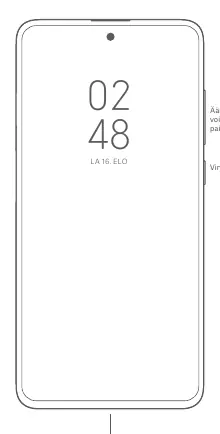
The device features volume buttons and a power button located on the right side. The USB Type-C port is located at the bottom of the device.
SIM Card Installation
The device supports dual SIM functionality. Use the SIM card tray to insert your cards:
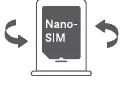
- Supports two Nano-SIM cards.
- Supports dual 5G/4G/3G/2G connectivity.
- Both cards can be set as the primary card.
- Do not use non-standard SIM cards, as they may damage the SIM card tray.
Safety Information
Please adhere to the following safety guidelines to ensure proper device operation:
- Battery Safety: Do not attempt to replace the battery yourself. Use only approved chargers and cables. Do not charge the device for longer than 12 hours.
- Temperature: The operating temperature range is 0–40 °C.
- Hearing Protection: Avoid listening at high volume levels for extended periods to prevent hearing damage.
- General Usage: Keep the device dry. Do not disassemble, crush, or burn the battery. If the battery appears damaged or deformed, stop using it immediately.
- Medical Devices: Maintain a distance of at least 15 cm between the phone and pacemakers to avoid interference.
Regulatory Information
This device complies with EU regulations and SAR (Specific Absorption Rate) standards. The maximum SAR values are 0.570 W/kg for the head and 0.974 W/kg for the body (at 5 mm distance). The device is intended for use within the EU. For detailed certification information, visit www.mi.com/en/certification.
Technical Specifications
The included charger (Model: MDY-13-EE) supports various output voltages and currents, with a maximum output power of 120 W. Ensure the charger meets IEC/EN 62368-1 standards.
Official resources from the manual
Manufacturer information
Xiaomi Corporation
Practical help
Common problems
Device not charging
Ensure you are using the provided charger and cable. Check that the power outlet is functional and the charger is securely connected.
SIM card not recognized
Ensure you are using a standard Nano-SIM card. Verify that the card is inserted correctly into the tray.
Device overheating
Avoid using the device in hot environments and do not charge it for more than 12 hours continuously.
Before use
- Charge the device using the provided cable and adapter.
- Insert Nano-SIM cards into the tray.
- Follow on-screen instructions for initial setup.
- Keep the device dry and away from moisture.
- Ensure the charger is easily accessible.
Specs in practice
- Operating Temperature
- 0–40 °C. Using the device outside this range may cause damage.
- Charger Model
- MDY-13-EE, supporting up to 120W output.
- SAR Limit (EU)
- 2.0 W/kg (10g). The device meets these safety standards.
Images and diagrams
- The device layout shows volume and power buttons on the right edge and a USB Type-C port at the bottom.
- The SIM tray diagram illustrates the correct orientation for inserting Nano-SIM cards.
Model compatibility
- Supports dual 5G connectivity.
- Requires standard Nano-SIM cards only.
- Compatible with standard USB Type-C chargers.

Manual page author
Emily Carter
User documentation editor
Prepares concise manual descriptions and highlights the most useful setup, operation, and maintenance information for readers.