Mobile / Smartphones
User Manual for Xiaomi 15T Pro
Quick start guide and safety information for the Xiaomi 15T Pro smartphone. Includes setup instructions, SIM card installation, safety warnings, and regulatory compliance details.
Table of contents
Quick Start Guide
This guide provides essential information for setting up and using your Xiaomi 15T Pro smartphone safely.
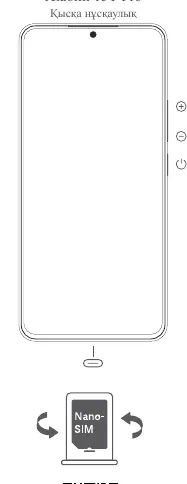
- Powering On: Press and hold the power button to turn on the device.
- Setup: Follow the on-screen instructions to configure your device.
- SIM Card: Insert a standard Nano-SIM card into the SIM slot. Do not use non-standard SIM cards as they may damage the slot.
Safety Information
Please read all safety precautions before using the device to prevent injury or damage.
- Battery Safety: Do not attempt to replace the battery yourself. Only authorized service centers should handle battery removal or repair. Do not disassemble, crush, or burn the battery.
- Usage Environment: Use the device in a closed, heated environment with an ambient temperature between 0°C and 40°C and relative humidity not exceeding 95%.
- Charging: Use only the included or approved cable and power adapter. Do not charge the device for more than 12 hours. Disconnect the adapter after charging.
- General Precautions: Keep the device dry. Do not use unauthorized cables or adapters. Do not use the phone while it is charging.
Regulatory and Compliance
This device complies with various international and regional safety standards, including EU and FCC regulations regarding radio frequency (RF) exposure and SAR (Specific Absorption Rate) limits.
- SAR Information: The device has been tested to ensure it does not exceed SAR limits for head and body exposure. Maintain a minimum distance of 5mm from the body when using the device.
- EU Compliance: The device supports GSM, GPRS, EDGE, UMTS, LTE, and 5G NR standards.
- Electronic Label: You can access certification information on the device by going to Settings > About phone > Certification.
Troubleshooting and Support
If the device malfunctions:
- Turn off the device.
- Disconnect the device from the power supply.
- Contact an authorized service center or dealer for assistance.
For further information, visit the official website at www.mi.com/global/service/userguide.
Official resources from the manual
Manufacturer information
Xiaomi Corporation
Practical help
Common problems
Device not working properly
Turn off the device, disconnect it from the power supply, and contact an authorized service center or dealer.
Battery issues or damage
Do not attempt to replace the battery yourself. Contact an authorized service center for repair.
SIM card insertion issues
Ensure you are using a standard Nano-SIM card. Do not force non-standard cards into the slot.
Before use
- Ensure you are using a standard Nano-SIM card.
- Charge the device using the included or approved cable and power adapter.
- Read all safety instructions provided in the manual.
- Ensure the operating environment is between 0°C and 40°C.
Specs in practice
- Battery Capacity
- 5500 mAh (typical), 5330 mAh (minimum).
- Charging Output
- 5V 3A.
- Operating Temperature
- 0°C to 40°C.
Images and diagrams
- The diagram illustrates the physical layout of the device, including the power button and the Nano-SIM card slot.
Model compatibility
- Compatible with 2G, 3G, 4G, and 5G networks.
- Use only approved accessories to avoid damage or safety risks.

Manual page author
David Miller
Documentation analyst
Organizes user manual content into clear summaries, with attention to model details, product context, and everyday usability.