Mobile / Smartphones
Xiaomi 14T Smartphone Quick Start Guide
Quick start guide for the Xiaomi 14T smartphone. Learn how to power on, insert a SIM card, and find important safety and regulatory information.
Table of contents
Quick guide from the manual
To start using your Xiaomi 14T, long press the power button to turn on the device. Follow the on-screen instructions to complete the initial configuration.
Device Overview
The device features the following physical controls and ports:
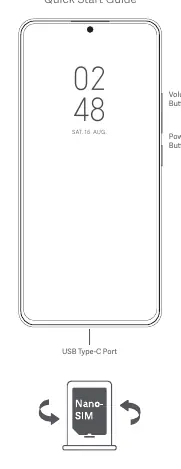
- Volume Buttons: Located on the side of the device.
- Power Button: Located on the side of the device.
- USB Type-C Port: Located at the bottom of the device for charging and data transfer.
SIM Card Installation
Please insert a standard Nano-SIM card into the SIM card slot. Do not insert non-standard SIM cards, as they may damage the slot.
Important Safety Information
- Operating Temperature: The device operates within a range of -20°C to 60°C. Using the device outside this range may cause damage.
- Battery Safety: Do not attempt to replace the built-in battery yourself. Use only authorized cables and power adapters. Do not charge for more than 12 hours.
- Medical Devices: Maintain a minimum distance of 15 cm between the mobile phone and pacemakers to avoid interference.
- General Safety: Keep the device dry. Do not disassemble, hit, crush, or burn the battery.
Regulatory and Compliance
This device complies with EU and FCC regulations regarding radio frequency exposure (SAR). For detailed certification information, you can access the E-label on your device:
Go to Settings > About phone > Certification, or open Settings and type "Certification" into the search bar.
Manufacturer information
Xiaomi Corporation
Practical help
Common problems
Device will not turn on
Ensure the battery is charged using the included cable and adapter. Long press the power button.
SIM card not recognized
Ensure you are using a standard Nano-SIM card and it is inserted correctly into the slot.
Before use
- Charge the device using the included cable and power adapter.
- Insert a Nano-SIM card into the SIM slot.
- Follow the on-screen instructions to configure the device.
Specs in practice
- Operating Temperature
- -20°C to 60°C. Using the device outside this range may damage it.
Images and diagrams
- The device features a USB Type-C port at the bottom.
- Volume and Power buttons are located on the side of the device.
Model compatibility
- 5G connection depends on country, carrier, and user environment.
- Wi-Fi connectivity may vary based on regional availability and local network support.

Manual page author
Michael Turner
Technical manual editor
Reviews PDF manuals for structure, safety notes, and practical product details so readers can find the right information quickly.