Electronics / Security Cameras
User Manual for Mi Wireless Outdoor Security Camera 1080p Set
Quick guide for the Mi Wireless Outdoor Security Camera 1080p Set (Model MWC13). Learn how to install, connect to the Mi Home app, understand indicator lights, and maintain your device.
Table of contents
Manual images
Click an image to enlargeImportant Information
The Mi Wireless Outdoor Security Camera 1080p Set is a precision electronic device with an IP65 waterproof rating. For optimal performance, ensure the camera is installed in an area with a strong Wi-Fi signal and avoid placing the lens near reflective surfaces like glass or white walls, which can cause overexposure. The device operates between -20°C and 50°C.
Product Overview
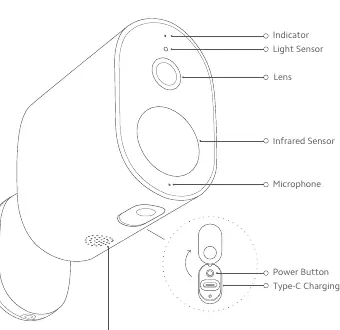
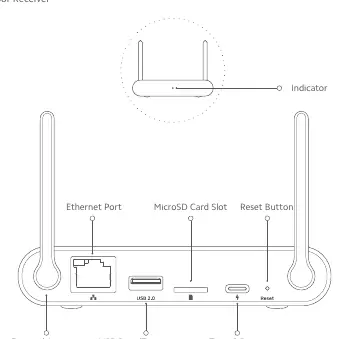
The set includes an outdoor camera (with battery) and an indoor receiver. The camera features a lens, infrared sensor, microphone, power button, and Type-C charging port. The indoor receiver includes an Ethernet port, USB port for storage, MicroSD card slot, and a reset button.
Installation
Follow these steps to mount the camera:
- Paste the mounting template sticker on the wall.
- Drill two holes (approx. 5 mm diameter, 26 mm depth) based on the template.
- Insert wall plugs into the holes.
- Remove the anti-theft screw from the base and detach the camera from the mounting plate.
- Install the base mounting plate on the wall using the provided screws. Ensure the anti-theft screw hole faces downwards.
- Rotate the base of the camera 180° so the anti-theft screw hole faces downwards.
- Attach the camera to the mounting plate and tighten the anti-theft screw.
How to Use
Charging: Connect the camera to the charging cable. The indicator blinks red while charging and turns off when fully charged.
Turning On/Off: Once charged, briefly press the power button to turn on. The indicator will blink orange, and a voice notification will play. Briefly press the power button again to turn off.
Reset: With the device turned on, press and hold the power button for 5 seconds (camera) or the reset button for 3 seconds (receiver) until the indicator blinks orange.
Indicator Status
Outdoor Camera:
- Awaiting reset: Orange
- Awaiting connection: Blinking orange
- Connecting: Blinking blue
- Connected: Off
- Charging: Blinking red
- Fully charged: Off
Indoor Receiver:
- Awaiting reset: Orange
- Awaiting connection: Blinking orange
- Connecting: Blinking blue
- Connected: Blue
Connecting with Mi Home/Xiaomi Home App
The product works with the Mi Home/Xiaomi Home app. Scan the QR code in the manual or search for the app in the store. Open the app, tap the + icon, and scan the QR code on the indoor receiver to connect. Once the receiver is connected, follow the app instructions to add the outdoor camera by scanning the QR code on the camera body. Note that the system only supports 2.4 GHz Wi-Fi networks.
Specifications
- Model: MWC13
- Resolution: 1920 x 1080
- Lens Angle: 130°
- Battery Capacity: 5700 mAh
- Operating Temperature: -20°C to 50°C
- IP Rating: IP65
- Wireless Connectivity: Wi-Fi IEEE 802.11 b/g/n 2.4 GHz
Manufacturer information
Xiaomi Corporation
Practical help
Common problems
Image appears overly bright or dark.
Do not place the lens facing or next to reflective surfaces like glass windows or white walls.
Poor Wi-Fi connection.
Ensure the camera is installed in an area with a strong Wi-Fi signal and away from microwave ovens or other interference sources.
Short battery standby time.
Avoid using real-time footage for long periods while charging. Standby time is also affected by low-temperature environments.
Before use
- Charge the outdoor camera fully before first use.
- Ensure you have a 2.4 GHz Wi-Fi network available (5 GHz is not supported).
- Download the Mi Home/Xiaomi Home app.
- Verify the installation location has a strong Wi-Fi signal.
- Prepare a drill for mounting the camera.
Specs in practice
- 130° Lens Angle
- Provides a wide field of view for monitoring.
- 5700 mAh Battery
- Built-in rechargeable battery capacity.
Images and diagrams
- The camera diagram identifies the lens, infrared sensor, microphone, power button, and Type-C charging port.
- The receiver diagram identifies the Ethernet port, USB port, MicroSD card slot, and reset button.
Model compatibility
- Requires Mi Home/Xiaomi Home app.
- Compatible with Android 6.0 & iOS 10 or above.
- Only supports 2.4 GHz Wi-Fi networks.

Manual page author
David Miller
Documentation analyst
Organizes user manual content into clear summaries, with attention to model details, product context, and everyday usability.