Mobile / Smartphones
Mi 360° Camera (1080p) User Manual
Comprehensive user guide for the Mi 360° Camera (1080p), covering installation, setup, app integration, and maintenance.
Table of contents
Product Overview
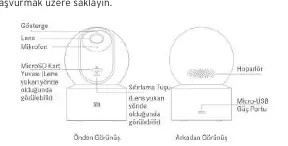
The Mi 360° Camera (1080p) is a high-quality security camera designed for indoor monitoring. The package includes the camera, a power cable, a wall mounting kit, and documentation. The device features a rotatable lens, a built-in microphone, and a speaker for two-way communication. It also includes a MicroSD card slot for local storage and a reset button for factory settings.
Installation
The camera can be placed on a flat surface like a table or mounted on a wall. To mount it on a wall, mark the positions for the base mounting holes, drill two holes (approx. 6mm diameter, 30mm depth), insert plastic wall plugs, and secure the base with screws. Align the grooves on the bottom of the camera with the raised part on the base and rotate clockwise to lock it in place.
Setup and App Integration
To start using the camera, connect the power cable to the Micro-USB port. The indicator will flash orange. Download the Mi Home/Xiaomi Home app, open it, and tap the '+' icon to add your device. Follow the on-screen instructions to connect the camera to your Wi-Fi network. Once successfully connected, the indicator will turn blue.
Usage and Features
The camera supports real-time monitoring, infrared night vision (up to 9 meters), and motion detection via the Home Surveillance Assistant. You can record videos, take screenshots, and adjust settings like resolution and viewing angle through the app. If a MicroSD card is inserted, the camera automatically records footage, which can be played back at up to 16x speed.
Maintenance and Safety
Keep the camera in a dry environment with a temperature range between -10°C and 40°C. Avoid placing it near reflective surfaces like glass or white walls to prevent overexposure. Ensure a strong Wi-Fi signal and keep the device away from metal objects or microwaves. Clean the surface only with a soft, dry cloth. Do not attempt to disassemble the device yourself; contact authorized service centers for repairs.
Manufacturer information
Xiaomi Corporation
Practical help
Common problems
Indicator flashing blue
Network error. Check your Wi-Fi connection.
Lens position is incorrect
Use the Mi Home/Xiaomi Home app to calibrate the lens.
Device overheating
It is normal during long operations. The device may slow down or shut off automatically to protect itself.
Before use
- Ensure the camera is placed on a stable, flat surface or securely mounted.
- Check that the wall can support at least three times the camera's weight.
- Insert a compatible MicroSD card (up to 32GB, Class 10/U1 or faster) while the camera is powered off.
- Ensure the Wi-Fi signal is strong and stable.
- Download the Mi Home/Xiaomi Home app.
- Keep the camera away from moisture and extreme temperatures.
Specs in practice
- Viewing Angle
- 110° field of view.
- Wireless Connectivity
- Wi-Fi IEEE 802.11 b/g/n 2.4 GHz.
Images and diagrams
- Front view shows the lens, microphone, and indicator light.
- Rear view shows the speaker and Micro-USB power port.
- MicroSD card slot is accessible by pushing the lens upward.
- Reset button is located under the lens when pushed upward.
Model compatibility
- Requires Android 4.4 or iOS 9.0 and later.
- Uses the Mi Home/Xiaomi Home app.
- Supports MicroSD cards up to 32GB.

Manual page author
Michael Turner
Technical manual editor
Reviews PDF manuals for structure, safety notes, and practical product details so readers can find the right information quickly.