Computers / Tablets
Xiaomi Pad 8 User Guide
Quick start guide for the Xiaomi Pad 8, covering device setup, charging instructions, safety precautions, and factory reset procedures.
Table of contents
Quick guide from the manual
This document provides essential instructions for setting up and safely operating your Xiaomi Pad 8. Key actions include powering on the device, configuring it via on-screen prompts, and following specific charging and safety guidelines to ensure optimal performance and user safety.
Getting started
To turn on your device, press and hold the power button. Once the device is active, follow the on-screen instructions to complete the initial configuration.
Charging
The package does not include a charger for environmental reasons. You can charge the device using a computer via a USB data cable or by using a compatible USB power adapter with a Type-C plug. The device supports chargers with a maximum output of 45W. Ensure the charger complies with USB2.0 or higher standards and relevant safety certifications (IEC 60950 or IEC 6368-1).
Factory reset
To erase all local data, including accounts, contacts, photos, videos, and apps, navigate to Settings > About tablet > Factory reset.
Safety and maintenance
- Operating temperature: Use the device within the 0°C to 40°C range.
- Battery safety: Do not disassemble, crush, or burn the battery. If the battery appears deformed or damaged, stop using it immediately.
- Moisture: Keep the device dry and avoid using it in high-humidity areas like bathrooms.
- Medical interference: Maintain a minimum distance of 15 cm from pacemakers and consult a doctor if you use medical devices.
- Disposal: Dispose of the device and battery according to local regulations; do not discard with household waste.
Certification and support
The device features an electronic label for certification information, accessible via Settings > About tablet > Certification. For further assistance, visit the official website at www.mi.com/global/service/userguide or contact support via email at [email protected].
Official resources from the manual
Manufacturer information
Xiaomi Corporation
Practical help
Common problems
Device not charging or charging slowly
Ensure you are using a compatible USB power adapter (up to 45W) and a high-quality USB Type-C cable that meets IEC safety standards.
Need to erase all data
Go to Settings > About tablet > Factory reset to perform a full data wipe.
Interference with medical equipment
Maintain a minimum distance of 15 cm from pacemakers and avoid using the tablet near hearing aids or cochlear implants.
Before use
- Ensure the device is kept dry at all times.
- Verify that your power adapter meets the required safety standards (IEC 60950 or IEC 6368-1).
- Check that the ambient temperature is between 0°C and 40°C.
- Ensure the battery is not deformed or damaged before charging.
Specs in practice
- Operating Temperature
- The device must be used between 0°C and 40°C to prevent damage.
- Charging Compatibility
- Supports chargers up to 45W; must comply with USB2.0 or higher and IEC safety standards.
Images and diagrams
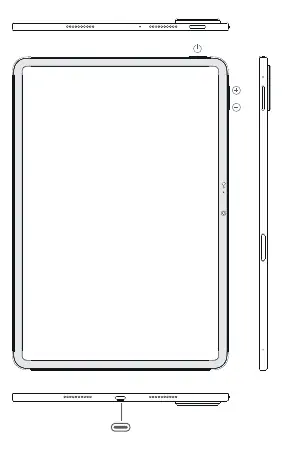
- The device features a power button and volume buttons on the side.
- A USB Type-C port is located at the bottom for charging and data transfer.
- The device includes speaker grilles and camera modules as indicated in the hardware layout.
Model compatibility
- The device is restricted to indoor use only when operating in the 5150-5350 MHz frequency range in certain regions.
- Wireless charging mode is intended for desktop use only; keep at least 20cm away from persons when active.

Manual page author
Michael Turner
Technical manual editor
Reviews PDF manuals for structure, safety notes, and practical product details so readers can find the right information quickly.