Computers / Tablets
Xiaomi Redmi Pad Pro User Guide
Comprehensive user guide for the Xiaomi Redmi Pad Pro, covering setup, safety precautions, battery care, and regulatory information.
Table of contents
Getting Started
To begin using your Redmi Pad Pro, press and hold the power button to turn on the device. Follow the on-screen instructions to complete the initial configuration. For further assistance and detailed information, visit the official Xiaomi website at www.mi.com/global/service/userguide.
Device Overview
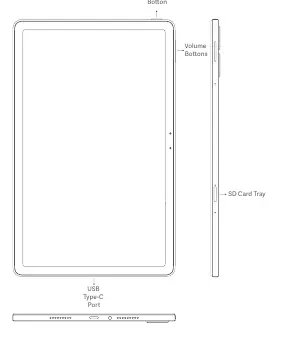
The tablet features a power button, volume buttons, an SD card tray, and a USB Type-C port for charging and data transfer. Ensure you use only authorized accessories and cables to maintain device integrity and safety.
Important Safety Information
Operating your device safely is crucial. The operating temperature range is 0°C to 40°C; using the tablet outside this range may cause damage. Do not attempt to replace the built-in battery yourself. Charge the device only with the included or authorized cable and power adapter. Disconnect the adapter once charging is complete and do not charge for more than 12 hours. Avoid exposing the battery to high temperatures, short circuits, or physical damage, as this poses a risk of fire or explosion.
Usage Precautions
Observe all local laws regarding tablet use. Avoid using the device in explosive environments, such as petrol stations or near fueling areas. Keep the tablet away from medical equipment, such as pacemakers, maintaining a minimum distance of 15 cm. Do not use the device in high-humidity areas like bathrooms to prevent electric shock or fire. Always turn off the tablet when required, such as on aircraft or in blasting areas.
Maintenance and Disposal
Keep your device dry and do not attempt to repair it yourself. If the device malfunctions, contact authorized customer support. When disposing of the tablet or its battery, follow local regulations and do not discard them with household waste. The WEEE marking indicates that this product must be recycled responsibly to protect the environment and human health.
Regulatory Information
The device complies with EU and UK regulations regarding radio equipment and SAR limits. For certification details, you can access the electronic label by navigating to Settings > About tablet > Certification or by searching for 'Certification' in the settings menu.
Official resources from the manual
Manufacturer information
Xiaomi Corporation
Practical help
Common problems
Device does not turn on
Ensure the battery is charged using the authorized adapter and cable.
Battery or device damage
Do not attempt to repair or replace the battery yourself; contact an authorized service center.
Potential interference with medical devices
Maintain a minimum distance of 15 cm from pacemakers and consult your doctor.
Before use
- Ensure you are using the original authorized power adapter and cable.
- Check that the environment temperature is between 0°C and 40°C.
- Verify that the device is kept dry and away from high humidity.
- Ensure the device is not used in explosive atmospheres.
- Confirm that you have read all safety precautions provided in the guide.
Specs in practice
- Operating Temperature
- 0°C to 40°C; essential for preventing hardware damage.
- Charging Time
- Do not charge for more than 12 hours to prevent battery stress.
Images and diagrams
- Power button: Located on the top edge for turning the device on/off.
- Volume buttons: Located on the side for adjusting audio levels.
- SD Card tray: Located on the side for storage expansion.
- USB Type-C port: Located on the bottom edge for charging and data.
Model compatibility
- Use only authorized accessories and power adapters.
- Incompatible devices should not be connected to the tablet.
- Wi-Fi connectivity features may vary based on regional availability.

Manual page author
Michael Turner
Technical manual editor
Reviews PDF manuals for structure, safety notes, and practical product details so readers can find the right information quickly.