Electronics / Routers
Redmi 15C 5G: Safety Information and User Manual
Comprehensive user manual for the Redmi 15C 5G, covering setup, safety precautions, system navigation, camera features, and maintenance.
Table of contents
Getting Started
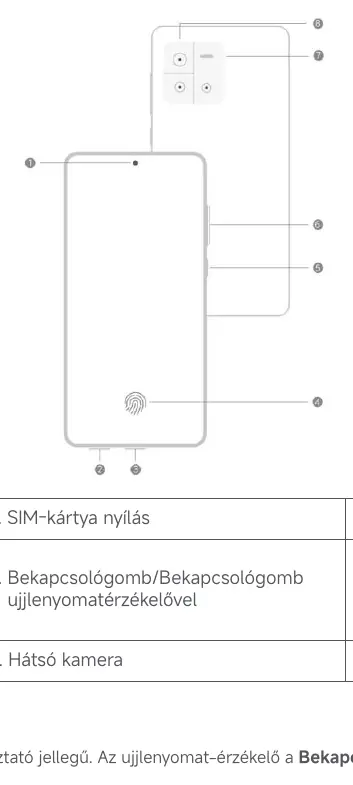
The Redmi 15C 5G is a high-performance smartphone running on the HyperOS operating system. To begin, insert your SIM card using the provided tool. Power on the device by holding the power button until it vibrates, then follow the on-screen setup wizard to configure your network, Wi-Fi, and accounts. You can easily manage your accounts, including Google and Xiaomi accounts, via the Settings menu.

Safety Precautions
For your safety, observe all local regulations regarding mobile phone usage. Avoid using the device in explosive environments, near medical equipment (maintain at least 15 cm distance from pacemakers), or in high-humidity areas like bathrooms. Only use compatible chargers and cables to prevent damage or fire hazards. The device operates within a temperature range of 0–40 °C.
System Navigation and Customization
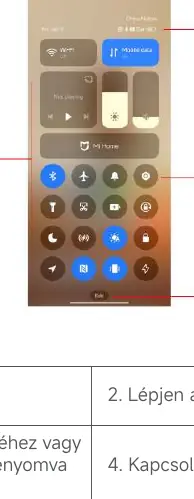
Navigate your device using intuitive gestures or traditional navigation buttons. Customize your experience by changing wallpapers, themes, and font sizes. The Control Center provides quick access to essential toggles like Wi-Fi, Bluetooth, and Flashlight. You can also manage notifications and status icons to stay informed about your device's status.
Camera Features
The camera system offers various modes, including Photo, Portrait, Night, and Pro mode for professional-grade photography. Utilize features like AI Camera, HDR, and Leica photography styles to enhance your images. You can also record videos with advanced settings, including slow motion, timelapse, and director mode.
Maintenance and Troubleshooting
Keep your device running smoothly by using the built-in Security app to clean storage, manage permissions, and block spam. Regularly update your system software via Settings to ensure optimal performance. If you encounter issues, you can perform a factory reset to restore original settings, but ensure you back up your data first as this will erase all personal information.
Battery and Charging
The device supports fast charging. To maintain battery health, avoid charging for more than 12 hours at a time and use only authorized chargers. You can monitor battery usage and enable power-saving modes, such as Ultra Battery Saver, to extend battery life when needed.
Disposal
When disposing of the device, follow local environmental regulations. Do not discard the phone or its battery with household waste. Use designated collection systems to ensure responsible recycling.
Related manuals
Related manuals from the same brand or category.
General / Other Manuals
Xiaomi 15T / 15T Pro VIP Service Terms
XiaomiDocuments / Warranty Safety
Xiaomi 15T & 15T Pro Exclusive Services Terms & Conditions
XiaomiDocuments / Warranty Safety
Xiaomi 15T Safety Information
XiaomiMobile / Smartphones
Xiaomi 15T Safety Information
XiaomiMobile / Smartphones
Xiaomi 15T: Quick Start Guide
XiaomiGeneral / Other Manuals
Xiaomi 15T Pro Quick Start Guide
XiaomiMobile / Smartphones
Xiaomi 15T Smartphone
XiaomiElectronics / Televisions
Xiaomi 15T Quick Start Guide
XiaomiDocuments / Warranty Safety