Power / Power Conditioning
User Manual for Xmart Optima-33-T10 UPS
Comprehensive user manual for the Xmart Optima-33-T10 series UPS. Includes installation, wiring, operation modes, touchscreen interface guide, and troubleshooting.
Table of contents
Manual images
Click an image to enlargeQuick guide from the manual
This manual provides instructions for the Xmart Optima-33-T10 series, an Online Double Conversion UPS. Before installation, ensure the site is dry, well-ventilated, and free from dust. All electrical connections must be performed by qualified technicians. The UPS must be connected to an appropriate grounding system. For parallel systems, ensure all units are of the same model and firmware version.
Product Description
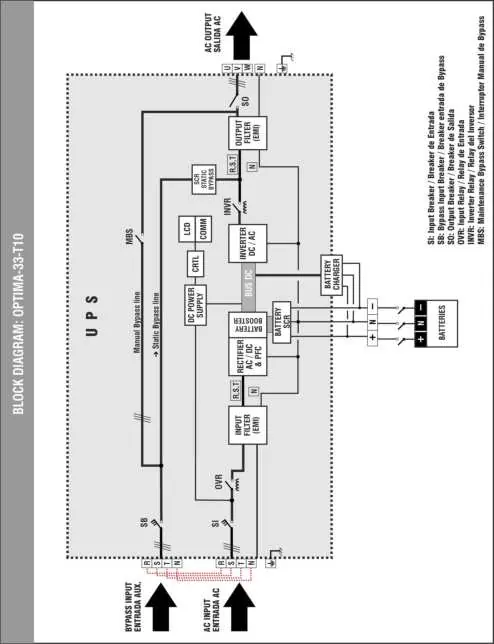
The Optima-33-T10 is an Online UPS with single-phase input and output (or 3-phase depending on configuration). It features IGBT technology, dual input (main and bypass), and a 5-inch color touchscreen for monitoring and configuration. It is compatible with power generators.
Installation
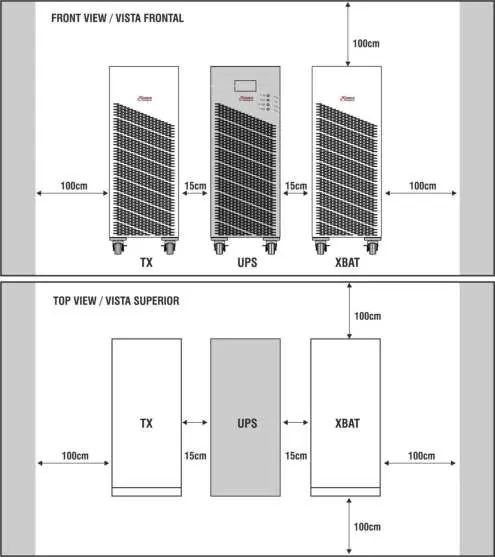
Site Requirements: Install indoors, protected from water, direct sunlight, and extreme temperatures. Maintain at least 100cm of clearance around the unit for ventilation and servicing.
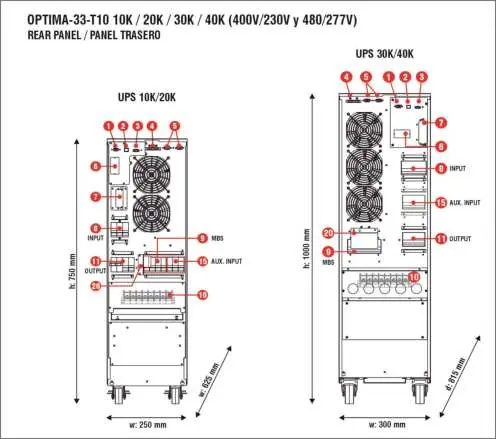
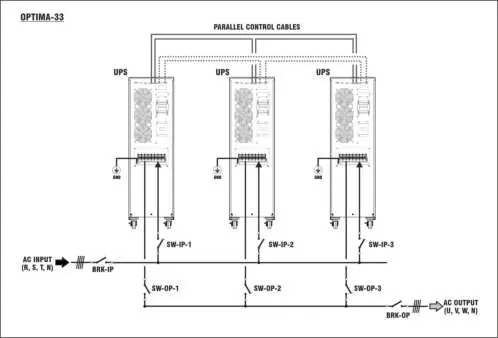
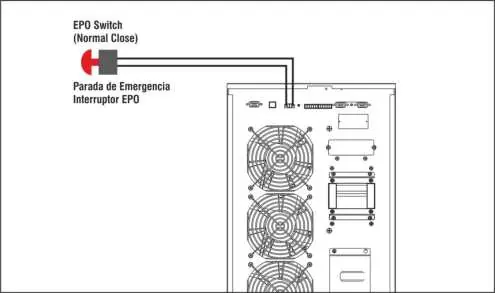
Wiring: Remove the terminal block cover. Connect grounding cables first. Ensure all input and output lines are protected by appropriate circuit breakers. For parallel installations, connect input/output lines in parallel and link the parallel control ports using the provided cables.
Operation Modes
- ONLINE Mode: Powers output from the inverter.
- BATTERY Mode: Powers output from batteries when AC input is out of range.
- ECO Mode: Power-saving mode, bypasses the inverter.
- BYPASS Mode: Powers output directly from the bypass input.
- CVCF Mode: Frequency conversion mode (not available on all models).
Touchscreen Interface
The 5-inch touchscreen provides access to operational zones and menus. Use the CONTROL menu to start/stop the UPS, perform battery tests, or mute alarms. Use the SETTING menu to configure parameters (password required for advanced settings). The MEASUREMENT menu displays real-time voltage, frequency, and load data.
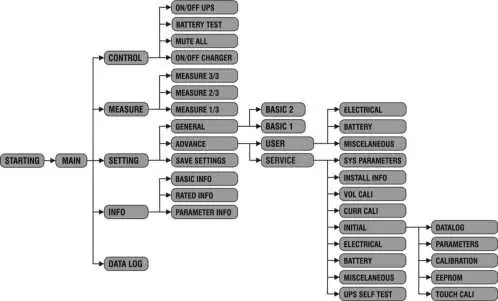
Maintenance and Troubleshooting
Maintenance Bypass Mode (MBS): Used for servicing. Ensure the UPS is in bypass mode before switching the MBS to the maintenance position. Warning: This must be performed only by qualified personnel.
Troubleshooting: If a fault occurs, an error code will appear on the screen. Refer to the error table in the manual to identify the issue. Common issues include input wiring errors, battery connection problems, or output overloads.
Technical Specifications
The UPS supports various capacities from 10KVA to 80KVA. It features a pure sinewave output and is compatible with external battery packs (XBAT) for extended runtime. Detailed electrical requirements, including wire gauges and breaker sizes, are provided in the technical specifications section of the manual.
Practical help
Common problems
UPS trips input circuit breaker
Check if the UPS is configured to a frequency different from the input line. Adjust CVCF mode or output frequency settings.
Alarm displayed
Check battery connections (internal or external) for loose or incorrect wiring.
Alarm displayed
Input neutral is disconnected or an input fuse is blown. Check neutral connection and input fuses.
Alarm displayed
Output overload. Disconnect loads from the UPS output until the situation is resolved and restart the UPS.
Before use
- Ensure the installation site is dry, fresh, and free of dust.
- Verify all wiring connections are tight.
- Ensure the grounding system is connected first.
- Check that the battery bank breaker is set to ON.
- Verify all external input and output circuit breakers are set to OFF before installation.
Images and diagrams
- The rear panel contains ports for RS232, USB, EPO, and terminal blocks for AC input/output.
- Parallel wiring requires connecting input/output lines in parallel and linking the parallel control ports between units.
Model compatibility
- Parallel operation requires identical models and firmware versions.
- External battery packs must match the specific DC voltage requirements of the UPS model.

Manual page author
Michael Turner
Technical manual editor
Reviews PDF manuals for structure, safety notes, and practical product details so readers can find the right information quickly.