Power / Solar Panels
Zendure Home Panel with EV Outlets 10C
A comprehensive user guide for the Zendure Home Panel with EV Outlets (10C), covering installation, safety, operation, troubleshooting, and connecting with SuperBase V units.
Table of contents
Manual images
Click an image to enlargeQuick Guide and Safety Information
The Zendure Home Panel with EV Outlets is a smart load-side transfer switch designed for residential use. Installation must be performed by a licensed electrician. The unit defaults to Grid Mode and does not provide AFCI or GFCI protection; these must be installed downstream. Always ensure the unit is completely de-energized before servicing by opening upstream breakers and unplugging all connected SuperBase V units.
Product Overview
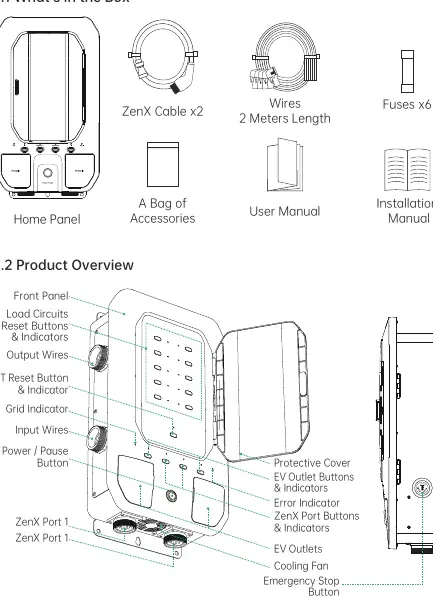
The Home Panel features a front panel with load circuit reset buttons, indicators for grid and IoT status, and a power/pause button. It includes two EV outlets and ports for connecting SuperBase V units. The cooling fan and emergency stop button are located on the side/bottom of the unit.
Operation Guidelines
The device supports various modes and operations, managed via buttons on the panel or the Zendure App:
- Power ON/OFF: Press the Power/Pause button for 1 second to turn on; briefly press to turn off.
- Emergency Mode: Press the Emergency Button to enter; rotate up to exit.
- Grid/Backup Mode: The system defaults to Grid Mode. It switches to Backup Mode automatically during a blackout if configured.
- Charging SuperBase V: Connect via ZenX cable. Press and hold the ZenX Port button for 3 seconds to initiate charging.
- EV Outlets: Press and hold the EV Outlet button for 1 second to turn output power on or off.
- Load Circuits: Use the Load Circuits Reset Buttons to toggle circuits. Press and hold for 3 seconds to reset overcurrent protection.
Connecting SuperBase V
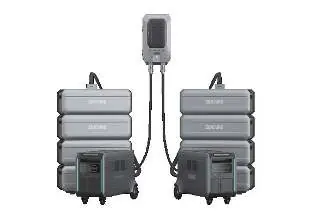
The Home Panel can connect to one or two SuperBase V units. Ensure both the Home Panel and SuperBase V are turned off before connection. Press the AC Power Button for 3 seconds to establish the connection. The Home Panel icon will appear on the SuperBase V display once connected.
Troubleshooting
If the system encounters issues, refer to the indicators and alarms:
- Over voltage: Red fault indicator on & 2 beeps. Resolves once Grid recovers.
- Over current: Red fault indicator flashes & 2 beeps. Cut off power, resolve the issue, and restart.
- Over-temperature: Red fault indicator on & 2 beeps. Reduce load and restart after cooling.
- Fuses broken: Red fault indicator on & 3 beeps. Turn off SBV, restart, and hold Load Circuits Reset Button for 10 seconds.
Practical help
Common problems
Over voltage
Issue will be solved/disappear once Grid recovers to supply power.
Over current
Cut off all power supply, resolve the issue, then power on to start working again.
Over-temperature
Reduce the load or stop working, and restart after the temperature drops to the set recovery working temperature.
Fuses broken of Load Circuits
Turn off the SBV first, then restart the Home Panel & SBV. Press and hold Load Circuits Reset Button for 10 seconds to reset after the fault is solved.
Before use
- Ensure installation is performed by a licensed electrician.
- Verify that all upstream breakers are non-AFCI or non-GFCI.
- Ensure the unit is completely de-energized before servicing.
- Check for the latest firmware using the Zendure app.
- Ensure the unit is not installed in extreme temperatures or unventilated areas.
Specs in practice
- Maximum # of Circuits
- 10 circuits total (4 circuits at 30A, 6 circuits at 20A).
- Rated System Voltage
- 120VAC/240VAC.
- Max Total Input Current
- 50A x 4.
- EV Charging Sockets
- 2 x NEMA 14-50 (40A Max).
Images and diagrams
- The front panel contains the Power/Pause button, Load Circuits Reset Buttons, and various status indicators (Grid, IoT, ZenX Port, EV Outlet).
- The side panel features the Emergency Stop button and cooling fan.
Model compatibility
- Compatible with SuperBase V6400 and SuperBase V4600.
- Supports a maximum of 2 SBV and 8 Satellite Batteries.

Manual page author
Michael Turner
Technical manual editor
Reviews PDF manuals for structure, safety notes, and practical product details so readers can find the right information quickly.