Power / Home Energy Panels
Zendure 200W Solar Panel User Manual
Quick guide for the Zendure 200W Solar Panel (ZD200SP). Includes setup instructions, connection diagrams, technical specifications, and safety precautions.
Quick answers from the manual
Quick answer
- The Zendure 200W Solar Panel (ZD200SP) is a portable solar charger. Setup involves placing the panel in direct sunlight, avoiding shade, and connecting it to a compatible power station using the integrated MC4 connectors. p. 1
Key actions
- Connect the solar panel to your power station using the MC4 connectors. p. 1
- Clean the panel surface with a soft cloth. p. 1
Maintenance and reset
- Store in a cool, dry place and keep the surface clean. p. 1
Technical specifications
| Parameter | Value | Meaning | Pages |
|---|---|---|---|
| Max Power | 200W | Maximum power output | p. 1 |
| Open Circuit Voltage | 23V | Voltage without load | p. 1 |
| Operating Voltage | 18V | Voltage at max power | p. 1 |
Where to find it in the PDF
- Specifications and Setup p. 1
Table of contents
Quick Guide
The Zendure 200W Solar Panel is designed to provide portable power. To achieve maximum energy production, place the solar panel in direct sunlight and avoid any shaded areas. Ensure the surface is clean and free from obstructions.
Solar Panel Connection
The panel utilizes MC4 connectors. You can connect multiple panels in series or parallel depending on your power station's input requirements. Ensure all connections are secure and compatible with your specific power station model.
Specifications
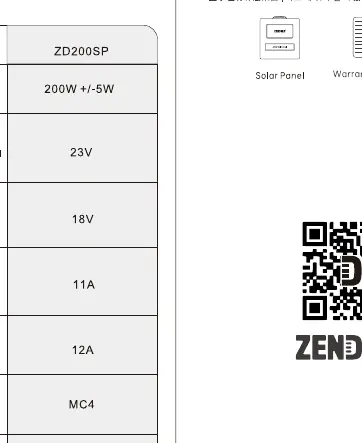
- Model: ZD200SP
- Maximum Power: 200W (+/- 5W)
- Open Circuit Voltage: 23V
- Operating Voltage: 18V
- Operating Current: 11A
- Short Circuit Current: 12A
- Connector Type: MC4
- Dimensions (Unfolded): 21.5 x 94.7 x 2.6 cm
- Dimensions (Folded): 21.5 x 22 x 1.4 cm
- Weight: 18.7 lbs / 8.5 kg
- Operating Temperature: -4°F to 140°F (-20°C to 60°C)
Safety and Maintenance
- Handling: Avoid impact, bumps, and friction during transport. Do not disassemble or modify the product.
- Cleaning: Use a soft cloth to clean the surface. Do not use harsh chemicals or detergents.
- Storage: Store in a cool, dry place. Recommended storage temperature is -4°F to 140°F (-20°C to 60°C).
- Usage: Keep away from children under 3 years old. Do not expose to moisture or submerge in liquid.
Practical help
Common problems
Low power output
Ensure the panel is placed in direct sunlight and not obstructed by shade, dirt, or debris.
Connection issues
Verify that the MC4 connectors are fully engaged and compatible with your power station's input port.
Before use
- Inspect the solar panel for any physical damage or cracks.
- Ensure the panel surface is clean.
- Verify that the MC4 connectors are clean and free of debris.
- Confirm that your power station supports the voltage and current output of the panel.
Specs in practice
- Open Circuit Voltage (Voc)
- 23V - The maximum voltage the panel can output when not connected to a load.
- Operating Voltage (Vmp)
- 18V - The voltage at which the panel provides maximum power output.
- Operating Current (Imp)
- 11A - The current flow when the panel is operating at maximum power.
Images and diagrams
- The manual provides diagrams for connecting panels in series and parallel configurations using MC4 connectors.
- The setup diagram illustrates the importance of placing the panel at an angle towards direct sunlight.
Model compatibility
- Uses standard MC4 connectors.
- Compatible with power stations that accept 18V-23V input ranges.

Manual page author
David Miller
Documentation analyst
Organizes user manual content into clear summaries, with attention to model details, product context, and everyday usability.