Power / Solar Panels
User Manual for Zendure SuperTank 100W Portable Charger
Quick guide for the Zendure SuperTank 100W portable charger. Learn how to charge devices, use X-Charge mode, check power levels, and follow safety guidelines.
Table of contents
Manual images
Click an image to enlargeQuick Guide
The Zendure SuperTank 100W is a high-capacity portable charger. Before first use, ensure the device is fully charged. To check the current power level, press the power button; the LED screen will display the remaining percentage.

Product Overview
The device features the following components:
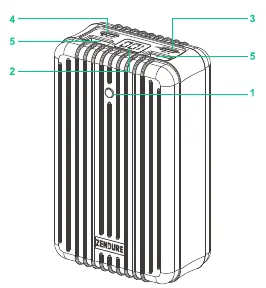
- Power Button: Used to check power levels, toggle X-Charge mode, and switch power output direction.
- Digital LED Screen: Displays current battery percentage and X-Charge status.
- USB-C (1) Port: Supports both Input and Output (up to 100W).
- USB-C (2) Port: Dedicated Output port (up to 60W).
- USB-A Ports: Dedicated Output ports for standard USB devices.
Charging Your Devices
Connect your device to any of the USB output ports on the SuperTank using a compatible charge/sync cable. The LED screen will display the power level while the device is charging.

Note: If your laptop is charging the SuperTank instead of the SuperTank charging your laptop, press and hold the power button for 3 seconds to switch the power output direction.
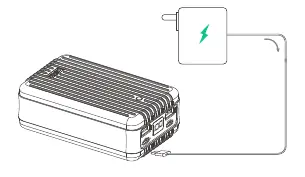
Charging the SuperTank
Connect a power adapter to the USB-C (1) port of the SuperTank using a USB-C charge/sync cable. The LED screen will flash to indicate that the device is charging.
X-Charge Mode
This mode is designed for low-power wearable devices. To activate:
- Double-press the power button.
- The "X" icon will appear on the LED screen.
- Connect your wearable device to the USB output ports.
- To exit, double-press the power button again.
Safety Information
- Fully charge the battery before first use.
- Store in a cool, dry place. Recommended storage temperature: -10°C to 45°C. Operating temperature: 0°C to 35°C.
- Use only original or certified cables.
- Do not expose to moisture or submerge in liquid.
- Do not disassemble, modify, or attempt to repair the device.
- Stop using immediately if the product emits odors, becomes excessively hot, or shows signs of deformation.
- Keep away from children under 3 years old.
- Do not operate in enclosed, unventilated environments (e.g., inside a bag) to prevent overheating.
Specifications
Model: ZDA8PDPCapacity: 26,800mAh / 99.16WhInput/Output: Supports up to 100W via USB-C (1).Dimensions: 119mm x 73mm x 45mmWeight: 528g
Practical help
Common problems
Laptop is charging the SuperTank instead of the SuperTank charging the laptop.
Press and hold the power button for 3 seconds to switch the power output direction.
Device is overheating.
Stop using the device immediately and contact the manufacturer.
Device not charging.
Ensure you are using a certified cable and that the connection is secure.
Before use
- Fully charge the battery before the first use.
- Ensure the storage environment is between -10°C and 45°C.
- Use only original or certified charging cables.
- Ensure the device is not in an enclosed or unventilated space during operation.
Images and diagrams
- 1: Power Button
- 2: Digital LED Screen
- 3: USB-C (1) Port (Input & Output)
- 4: USB-C (2) Port (Output)
- 5: USB-A Ports (Output)
Model compatibility
- X-Charge mode is specifically for low-power wearable devices.

Manual page author
Michael Turner
Technical manual editor
Reviews PDF manuals for structure, safety notes, and practical product details so readers can find the right information quickly.