Power / Portable Power Stations
User Manual for Zendure SuperBase 1000M Power Station
Quick guide for the Zendure SuperBase 1000M power station. Learn how to operate the AC/DC/USB outputs, understand display icons, troubleshoot common issues, and maintain your device for optimal performance.
Table of contents
Manual images
Click an image to enlargeQuick Guide
The Zendure SuperBase 1000M is a portable power station designed for various charging needs. Before first use, ensure the device is charged. Always operate within the specified temperature ranges: 0°C to 40°C for charging and -20°C to 40°C for discharging. If the device is stored for more than 3 months, it is recommended to charge and discharge it 1-2 times to maintain battery health.
Panel Icons
The display screen provides real-time information about the device status:

- Time to Full/Empty: Indicates the estimated time to charge or discharge the battery.
- Battery Icon: Shows the battery level in 6 segments.
- Input/Output Power: Displays current power in Watts or Kilowatts.
- AC/DC/USB/Car/Light Indicators: Icons illuminate when the respective output or input port is active.
- Car-Start: Indicates the device is ready for car battery jump-starting.
- Failed/Completed: Status indicators for charging or jump-start processes.
Daily Use
To operate the power station, follow these steps:
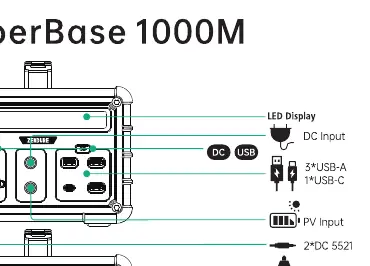
- Powering On/Off: Press and hold the button for 1-2 seconds to turn the device on or off.
- Using Outputs: Press the button corresponding to the desired output (DC, USB, or AC). The icon on the screen will light up when active.
- Car-Start Mode: Double-click the button to activate Car-Start mode.
- LED Light: Press the LED button to toggle between light modes (SOS, flashing, etc.).
Safety and Maintenance
Follow these precautions to ensure safe operation:
- Do not place the product in a hot environment (over 45°C) or near a fire source.
- Do not disassemble the product.
- Keep the product dry and away from water or other liquids to avoid short circuits or electric shock.
- If the device is stored for more than 6 months, charge it every 3 months to preserve battery life.
- Do not use the product if it is damaged or if wires are exposed.
Troubleshooting
If you encounter issues, check the following:
- No response: Charge the device for 5-10 minutes and ensure it is at a normal temperature.
- Device not charging: Verify that the input source is within the required range and that the device is not overheated.
- Unexpected shutdown: The device may have triggered protection due to overload, over-discharge, or extreme temperatures. Allow it to cool down or reset the load.
- Irregular numbers on display: If the display shows error codes, the system may be performing a software update; wait for it to complete.
Practical help
Common problems
No response when switched on
Charge the device for 5-10 minutes and ensure it is at a normal operating temperature.
Device not charging
Check if the input source is within the required voltage range and ensure the device is not overheated.
Unexpected shutdown during use
The protection system may have triggered due to overload, over-discharge, or high/low temperature. Disconnect the load and allow the device to cool down.
Before use
- Check ambient temperature (0-40°C for charging, -20-40°C for discharging).
- Ensure the device is fully charged before first use.
- Verify that connected device power requirements do not exceed 1000W rated output.
- Ensure all cables and ports are free of debris.
Specs in practice
- Rated Output
- 1000W (1500W Peak)
Images and diagrams
- The display panel shows battery percentage, remaining time, input/output power, and active port indicators (DC, USB, AC, Car, Light).
Model compatibility
- Car-Start mode is specifically designed for 12V car batteries.

Manual page author
Emily Carter
User documentation editor
Prepares concise manual descriptions and highlights the most useful setup, operation, and maintenance information for readers.