Lighting / LED Strips
User Manual for Aigostar 100801WNS LED Strip Light
Quick guide for the Aigostar 100801WNS LED Strip Light. Includes installation steps, safety warnings, remote control operation, and technical specifications.
Table of contents
Manual images
Click an image to enlargeQuick Guide
The Aigostar 100801WNS is an LED strip light system designed for decorative lighting. The system includes the LED strip, a remote control, and a power adapter. Installation involves cleaning the surface, cutting the strip to the desired length at marked intervals, and connecting the components. The remote control allows for dimming, color changes, and various lighting modes.
Safety Warnings
- Installation: Must be installed by a qualified person in accordance with local regulations.
- Power: Always turn off the power supply before performing any installation or maintenance.
- Handling: Do not look directly at the light. Keep away from children.
- Environment: Do not use near ovens or heaters. Avoid extreme temperatures, electrostatic interference, and high voltage.
- Damage: If the product is broken or malfunctioning, turn it off immediately and contact a qualified electrician or service provider.
- Battery: The remote control uses a CR2025 battery. If the battery leaks, avoid contact with skin, eyes, and mucous membranes. Rinse thoroughly with water if contact occurs.
Installation
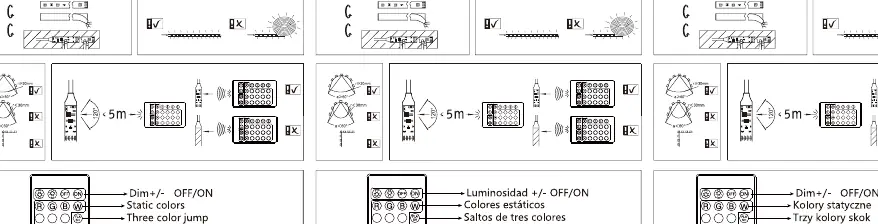
- Clean the surface where the strip will be applied.
- Measure the desired length.
- Cut the strip only at the marked points (every 100mm).
- Peel off the protective film.
- Stick the strip in place.
- Connect the strip to the controller.
- Connect the controller to the adapter.
- Connect the adapter to the power supply.
Operation
The included remote control provides the following functions:
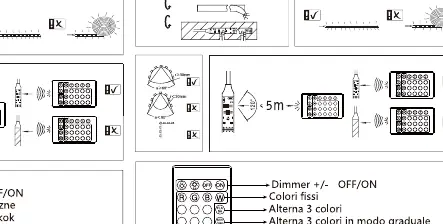
- Dimmer: Increase or decrease brightness.
- Colors: Select static colors.
- Modes: Switch between different color-changing modes (jump, gradient, etc.).
- On/Off: Power the light on or off.
Technical Specifications
- Model: 100801WNS
- Voltage: 12V
- Power: 2.4W
- Battery: CR2025 3V button battery
- Cutting Interval: 100mm
- Protection: IP65 (Strip), IP20 (Adapter)
Manufacturer information
Aigostar
Practical help
Common problems
Light does not turn on
Check if the power adapter is securely plugged into the wall outlet and the controller. Ensure the remote control battery is functional.
Remote control not responding
Check if the CR2025 battery is installed correctly or needs replacement. Ensure there is a clear line of sight to the controller.
Strip not sticking to surface
Ensure the mounting surface is clean, dry, and free of dust or grease before applying the adhesive backing.
Before use
- Ensure the power supply is turned off before starting installation.
- Verify the mounting surface is clean and dry.
- Check that the LED strip is not damaged.
- Confirm the local power supply voltage is compatible with the adapter.
- Ensure the remote control has a working CR2025 battery.
Images and diagrams
- The installation diagram illustrates the sequence: measure, cut at marked points, peel, stick, and connect.
- The remote control diagram shows buttons for dimming, color selection, and mode switching.
Model compatibility
- The LED strip is IP65 rated, but the adapter is IP20 (indoor use only).

Manual page author
David Miller
Documentation analyst
Organizes user manual content into clear summaries, with attention to model details, product context, and everyday usability.