General / Other Manuals
AKO-16526A / AKO-16526AN Advanced Temperature Controller
Advanced temperature and electronic expansion controller for cold room stores, featuring SELFDRIVE mode for autonomous fan and defrost optimization, and NBIoT connectivity for remote data management (AKO-16526AN model).
Table of contents
Product Description
The AKO-16526A / 16526AN is an advanced controller designed for cold room stores. It features a SELFDRIVE operating mode that autonomously manages fans and adaptively minimizes defrost cycles to optimize performance, maximize set point stability, and reduce energy consumption and component wear. The controller includes an output for regulating electronic expansion valves and can be configured to control superheating. The AKO-16526AN model incorporates an NBIoT communication module for autonomous data transmission to akonet.cloud.
Installation and Wiring
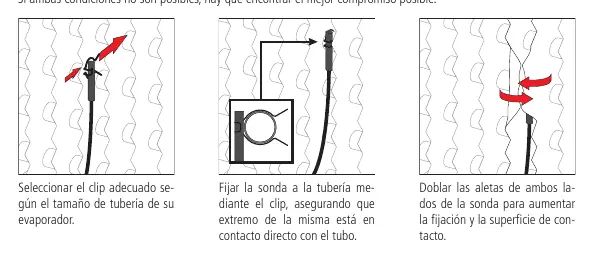
Correct probe installation is critical for performance. The ambient probe should be placed away from direct cold air flow, preferably in the air aspiration area. The evaporator probe must be located as close as possible to the refrigerant inlet in the finned area. Always disconnect the power supply before wiring. Probes and their cables must never be installed in conduits alongside power, control, or supply cables. The power circuit must include a minimum 2 A, 230 V switch located near the device.
Operation and Configuration
Upon initial power-up, the unit enters an ASSISTANT mode to guide the user through essential configuration steps, including installation type, refrigerant gas, and pressure sensor settings. The device features a condensed programming menu for quick adjustments and an extended menu for full parameter customization. The display provides real-time status indicators, including compressor activity, defrost status, and NBIoT connectivity.
Maintenance and Safety
Clean the unit surface with a soft cloth, water, and soap. Do not use abrasive detergents, petrol, alcohol, or solvents. Ensure the device is installed in a location protected from vibrations, water, and corrosive gases. The IP65 protection rating is only valid when the protective cover is closed and cables are properly sealed with appropriate glands.
Troubleshooting
The controller displays various error codes to assist in diagnostics, such as sensor faults (E1-E6), open door alarms (Ad0), and temperature alarms (AH/AL). SELFDRIVE mode alerts (e.g., E10-E18) indicate issues like calibration errors or system instability, which can be viewed by pressing the down key.
Related manuals
Related manuals from the same brand or category.
General / Other Manuals
AKO 1652H4A11 Advanced Temperature Controller for Cold Rooms
AKOGeneral / Other Manuals
AKO 16526A V2 Advanced Temperature Controller
AKOGeneral / Other Manuals
AKO-15724/AKO-15725 Temperature Data Logger
AKO
Manual page author
Emily Carter
User documentation editor
Prepares concise manual descriptions and highlights the most useful setup, operation, and maintenance information for readers.