General / Other Manuals
AKO-16624 Temperature and Moisture Controller for Cold Rooms
User guide for the AKO-16624 controller, designed for precise temperature and moisture management in cold storage environments. Includes installation, configuration, and maintenance instructions.
Table of contents
Product Overview
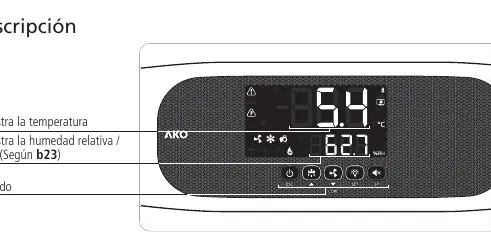
The AKO-16624 is a specialized controller designed for managing temperature and moisture in cold rooms. It features a user-friendly interface with a display for monitoring real-time conditions and a keypad for configuration and control. The device supports various installation types, including solenoid control, compressor management, and defrost cycles.
Installation and Wiring
Safety Warnings: Installation must be performed by qualified personnel. Ensure the device is protected from vibrations, water, and corrosive gases. The IP65 protection rating is only valid when the protective cover is closed and cables are properly sealed with appropriate glands.
- Always disconnect the power supply before wiring.
- Probes and their cables must never be installed in conduits alongside power or control cables.
- The power supply circuit must include a switch (minimum 2 A, 230 V) located near the device.
- Use cables with a minimum cross-section of 2.5 mm² for relay outputs, capable of withstanding temperatures of 70 °C or higher.
Initial Configuration
Upon first power-up, the unit enters the ASSISTANT mode. The display will show In1 flashing with 0. Follow the steps on the screen to select the appropriate cold and moisture regulation types based on your specific installation. Once configured, the unit will operate according to the selected parameters. To re-enter the assistant mode, activate Stand-By mode, wait for the regulation to stop, and press the navigation keys in the specified sequence.
Operation and Maintenance
The keypad allows for quick access to common functions, including manual defrost initiation, light control, and viewing set points. The device includes a comprehensive alarm system for temperature and moisture deviations, as well as HACCP monitoring. Maintenance: Clean the surface of the unit using a soft cloth, water, and soap. Avoid abrasive detergents, gasoline, alcohol, or solvents, as these can damage the equipment.
Troubleshooting
The controller displays specific error codes to assist in diagnostics. Common issues include probe failures (E1, E2, E3, EX), open door alarms (Ad0), and temperature or moisture alarms (AH, AL, AXX, ALX). Refer to the messages table in the manual for a complete list of codes and their corresponding actions.
Technical Specifications
- Power Supply: 100 - 240 V~, 50/60 Hz
- Maximum Nominal Current: 15 A
- Protection Degree: IP65
- Temperature Range: -50.0 °C to 99.9 °C
- Dimensions: 290 mm (W) x 141 mm (H) x 84.4 mm (D)
Related manuals
Related manuals from the same brand or category.
General / Other Manuals
AKO-16526A / AKO-16526AN Advanced Temperature Controller
AKOGeneral / Other Manuals
AKO 16526A V2 Advanced Temperature Controller
AKOGeneral / Other Manuals
AKO-15724/AKO-15725 Temperature Data Logger
AKO
Manual page author
Emily Carter
User documentation editor
Prepares concise manual descriptions and highlights the most useful setup, operation, and maintenance information for readers.