Mobile / Mobile Phones
User Manual for Alcatel 2007X / 2007D Mobile Phone
Comprehensive user manual for the Alcatel 2007X and 2007D mobile phones. This guide covers setup, SIM card installation, basic operations, messaging, camera usage, and troubleshooting steps.
Quick answers from the manual
Quick answer
- To power on the phone, hold down the end key. To insert a SIM card, slide the micro-SIM into the housing with the chip facing upwards. p. 1
Key actions
- Making a call: Dial the number and press the send key. p. 1
- Writing a message: Access 'Messages' > 'Write msg'. p. 1
First start
- Insert SIM card and charge the battery. p. 1
Show 4 more answers Show less
Problems and fixes
Phone frozen
Restart by pressing and holding the end key.
p. 2Maintenance and reset
- Use User Data Format to reset the phone (Warning: All data will be lost). p. 2
Technical specifications
| Parameter | Value | Meaning | Pages |
|---|---|---|---|
| Head SAR | 0.787 W/kg | Maximum SAR for GSM900 + Bluetooth | p. 2 |
| Body-worn SAR | 1.02 W/kg | Maximum SAR for GSM900 + Bluetooth | p. 2 |
Where to find it in the PDF
- Quick Start Guide p. 1
- Safety and Troubleshooting p. 2
Table of contents
Quick guide from the manual
This guide provides essential instructions for setting up and using your Alcatel 2007X or 2007D mobile phone. For detailed information, please refer to the full manual available on the manufacturer's website.
Getting started
Before using your phone, ensure the battery is charged. To insert your SIM card, place it with the chip facing upwards and slide it into the housing. The phone supports micro-SIM cards only.
- Power on: Hold down the end key until the phone powers on.
- Power off: Hold down the end key from the Home screen.
- Charging: Connect the battery charger to your phone and a mains socket.
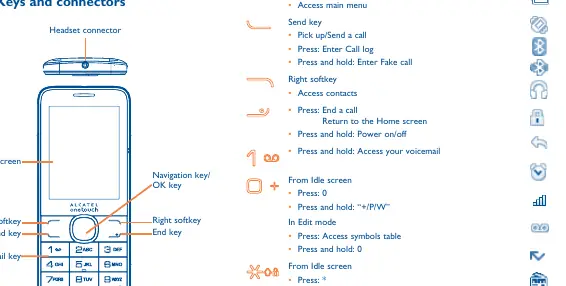
Keys and connectors
The phone features a navigation key, left/right softkeys, send/end keys, and dedicated keys for voicemail and shortcuts. Familiarize yourself with the layout to navigate menus and access functions quickly.
Basic operations
- Making a call: Dial the number and press the send key. To end a call, press the end key.
- Messages: Access the Messages menu to write text or multimedia messages. SMS will convert to MMS automatically if images, videos, or audio are inserted.
- Contacts: Add new contacts to the phone or SIM card via the Contacts menu.
Features and applications
- Camera: Use the built-in camera to take photos and shoot videos. Files can be stored on the phone or an SD card.
- Media: Access music, images, and videos through the Media applications menu.
- Tools: Includes useful utilities such as a Recorder, Alarm, Calculator, Calendar, Notes, and Bluetooth.
- Bluetooth: Use Bluetooth to connect to other devices or use the BT Dialler feature to link with a host phone.
Troubleshooting
If you encounter issues, try the following steps:
- Phone frozen: Restart by pressing and holding the end key.
- Cannot charge: Ensure the battery is not completely discharged and charging conditions are between 0°C and +40°C.
- No network: Verify network coverage and check if the SIM card is valid.
- Reset: You can use the User Data Format to reset the phone (Note: This will erase all user data).
Safety and maintenance
Always handle your phone with care. Avoid exposure to extreme temperatures, moisture, or dust. Do not attempt to disassemble the phone, as the back cover and battery are not removable. Protect your hearing by not listening at high volume levels for long periods.
Manufacturer information
Alcatel
Practical help
Common problems
Phone is frozen or will not switch on
Check battery power level and charge for at least 20 minutes. If it still does not work, use User Data Format to reset the phone.
Cannot connect to network or 'No service' displayed
Try connecting in another location, verify network coverage, or check if the SIM card is valid.
Cannot charge properly
Ensure the battery is not completely discharged and charging is carried out between 0°C and +40°C.
Cannot send/receive MMS
Check phone memory availability, verify server center number, or contact your network operator.
Before use
- Charge the battery for at least 3 hours for the first time.
- Insert a valid micro-SIM card.
- Check network coverage in your area.
- Note your IMEI number (press *#06#) and keep it in a safe place.
Show more Show less
Specs in practice
- SAR (Specific Absorption Rate)
- A measure of the rate at which energy is absorbed by the body when exposed to a radio frequency electromagnetic field.
- GSM 900/1800 MHz
- The network frequency bands supported by the device.
Images and diagrams
- The front view shows the navigation key, softkeys, send/end keys, and headset/micro-USB connectors.
- The SIM card insertion diagram illustrates sliding the micro-SIM into the housing with the chip facing up.
Model compatibility
- Supports micro-SIM cards only.
- PC Suite is compatible with Windows XP, Vista, and Windows 7.

Manual page author
Michael Turner
Technical manual editor