Mobile / Mobile Phones
Alcatel 2020X Mobile Phone
Quick start guide for the Alcatel 2020X mobile phone, covering device layout, SIM and SD card installation, and basic button functions.
Quick answers from the manual
Quick answer
- The Alcatel 2020X is a mobile phone. To set it up, remove the back cover to insert your SIM and SD cards, then charge the device using the bottom port. p. 1, 4
Key actions
- Powering on/off p. 2
- Installing SIM/SD cards p. 4
First start
- Insert SIM and SD cards, then charge the device. p. 4
Show 1 more answers Show less
Where to find it in the PDF
- Front view and controls p. 2
- Back and side features p. 3
- Installation p. 4
Table of contents
Manual images
Click an image to enlargeQuick guide from the manual
This document provides essential information for setting up and using the Alcatel 2020X mobile phone. It covers the physical layout of the device, including button functions, and the procedure for installing SIM and memory cards.
Device overview
The Alcatel 2020X features a standard mobile phone layout with physical keys for navigation and operation.
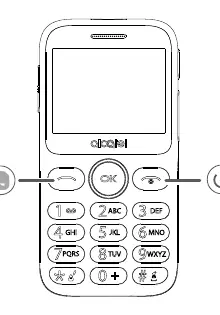
Front view
- Power key: Located on the right side of the keypad, used for turning the device on/off and ending calls.
- Navigation keys: Includes the OK button and directional keys for menu navigation.
- Keypad: Standard alphanumeric keypad for dialing and text input.
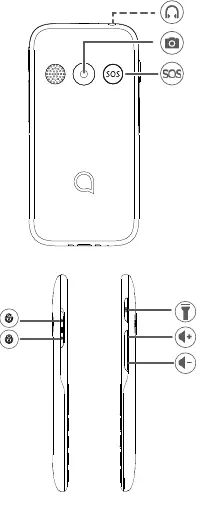
Back and side views
- Headset jack: Located on the top edge of the device.
- Camera: Positioned on the back of the device.
- SOS button: Located on the back, designed for emergency access.
- Lock/Unlock switch: Located on the side of the device.
- Flashlight: Side-mounted for quick access.
- Volume keys: Located on the side for adjusting audio levels.
Getting started
To prepare the device for use, follow these steps:
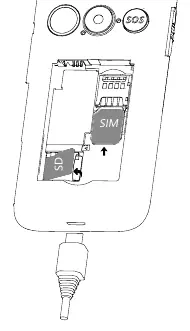
- Access the card slots: Remove the back cover to access the SIM and SD card slots.
- Insert SIM card: Slide the SIM card into the designated slot, ensuring the orientation matches the diagram.
- Insert SD card: If using external storage, insert the microSD card into the provided slot.
- Charging: Connect the charging cable to the port located at the bottom of the device.
Manufacturer information
Alcatel
Practical help
Common problems
Device does not turn on
Ensure the battery is properly installed and charged using the provided cable.
SIM card not detected
Check that the SIM card is inserted correctly in the slot according to the orientation diagram.
Before use
- Remove the back cover to access internal slots.
- Insert the SIM card into the SIM slot.
- Insert a microSD card into the SD slot if additional storage is needed.
- Charge the device fully before first use.
Show more Show less
Images and diagrams
- Front view shows the power key, navigation keys, and keypad layout.
- Back view highlights the camera, SOS button, and headset jack.
- Side view details the lock switch, flashlight, and volume controls.
- Installation diagram illustrates the correct placement of SIM and SD cards.

Manual page author
Emily Carter
User documentation editor