Electronics / Headphones Earbuds
User Manual for Shenzhen 2163MINI Mobile Phone
Comprehensive user guide for the Shenzhen 2163MINI mobile phone. Learn how to install SIM cards, manage settings, use input methods, and troubleshoot common issues.
Quick answers from the manual
Quick answer
- To get started with the Shenzhen 2163MINI, insert your SIM card and battery, charge the device, and hold the End key to power it on. Use the menu to access contacts, messages, and settings. p. 9, 11, 14
Key actions
- Power On/Off: Hold the End key for a few seconds. p. 7, 14
- Lock/Unlock Keypad: In idle screen, press Left soft key then *. p. 8
- Switch Input Method: Press the # key. p. 15, 16
First start
- Install SIM and Battery: Remove back cover, insert SIM into slot, insert battery. p. 9
- Charge Battery: Connect travel charger to the phone's charging slot. p. 12
Show 3 more answers Show less
Problems and fixes
SIM card error
Check if damaged, reposition, or clean contacts.
p. 28
Cannot power on
Charge the battery.
p. 30Maintenance and reset
- Restore factory settings: Use the menu option; default code is 1234. p. 24
Where to find it in the PDF
- Getting Started p. 9, 14
- Troubleshooting p. 28, 31
Table of contents
Manual images
Click an image to enlargeQuick guide from the manual
This guide provides essential instructions for operating the Shenzhen 2163MINI mobile phone. Key actions include installing the SIM card and battery, charging the device, and understanding the keypad functions for navigation and input.
Safety information
- Road Safety: Do not use a hand-held phone while driving.
- Aircraft: Power off the phone before boarding.
- Risky Areas: Switch off in areas susceptible to explosion, such as gas stations.
- Medical Devices: Be cautious near pacemakers and hearing aids.
- Emergency Calls: Ensure the phone is on and in service to make emergency calls.
Installation
Installing the SIM card and battery
- Power off the phone by holding the End key.
- Remove the back cover.
- Remove the battery.
- Insert the SIM card into the slot with the gold contacts facing down and the corner notch aligned.
- Insert the battery, ensuring the metallic contacts align with the phone's contacts, and press down until it locks.
Installing the T-Flash card
The T-Flash card is a storage card. To install, remove the battery and insert the card into the slot. Note that the phone must be powered off and back on to identify a newly inserted T-Flash card.
Basic operation
Powering on/off
Hold the End key for a few seconds to power the phone on or off.
Keypad functions
- Dial key: Make/receive calls, view call records.
- End key: End calls, exit menus, power on/off.
- Direction keys: Navigate menus and lists.
- Left/Right soft keys: Perform functions displayed on the bottom of the screen.
- OK key: Confirm selections.
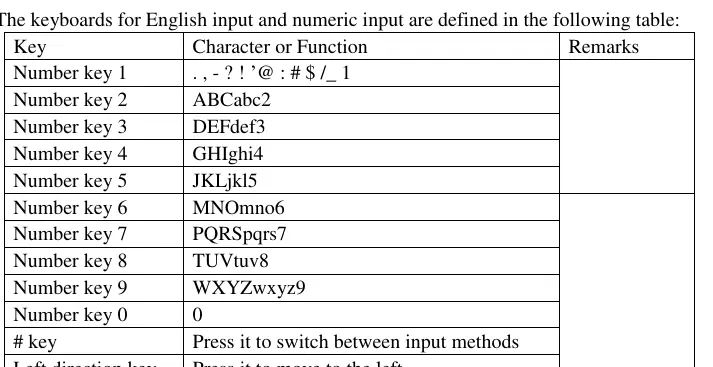
- Number keys: Input numbers and characters.
Input methods
The phone supports English and numeric input. Use the # key to switch between input methods. When in an edit window, an icon indicates the current mode (e.g., "123" for numeric, "ABC" for English).
Settings and menus
- Contacts: Store and search for phone numbers.
- Logs: View missed, dialed, and received calls.
- Messages: Create, send, and manage text messages.
- Settings: Configure call settings (Dual-SIM, call divert, call waiting), phone settings (date/time, language, factory reset), and security (PIN, phone lock).
- Tools: Access alarm, calendar, calculator, and Bluetooth.
Troubleshooting
If you encounter issues, try the following:
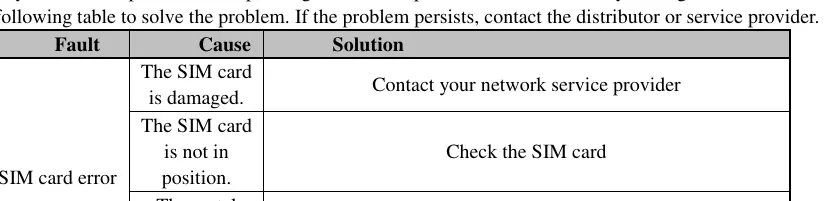
- SIM card error: Check if the card is damaged, correctly positioned, or if the contacts need cleaning.
- Poor signal: Move to an area with better reception.
- Cannot power on: Charge the battery.
- Cannot dial: Check if call barring is activated.
Practical help
Common problems
SIM card error
Check if the SIM card is damaged, properly inserted, or if the metal contacts are dirty and need cleaning.
Poor signal quality
Move to a location with better network coverage, away from obstructions like basements or high buildings.
Phone will not power on
The battery may be exhausted. Connect the charger and charge the battery.
Cannot dial calls
Check if call barring is activated in the settings and cancel it if necessary.
Before use
- Insert the SIM card correctly.
- Insert the battery.
- Charge the battery fully before first use.
- Power on the device using the End key.
- Set the PIN code if required by your network operator.
Show more Show less
Images and diagrams
- The keypad includes a Dial key, End key, Direction keys, Left/Right soft keys, and an OK key.
- The # key is used to switch between input methods.
- The * key is used to lock/unlock the keypad and insert symbols.
Model compatibility
- The phone requires a standard SIM card.
- The phone must be restarted to detect a newly inserted T-Flash card.

Manual page author
David Miller
Documentation analyst