Computers / Tablets
User Guide for Amazon Echo Show (1st Generation)
Quick start guide for the Amazon Echo Show (1st Generation). Learn how to set up your device, connect to Wi-Fi, manage microphone and camera privacy settings, and use the Alexa App.
Quick answers from the manual
Quick answer
- To set up your Echo Show, plug in the power adapter and follow the on-screen instructions using your Wi-Fi password and Amazon login. p. 1
Key actions
- Power on/off p. 1
- Disable Mic/Camera p. 1
First start
- Plug in the device and follow on-screen prompts. p. 1
Where to find it in the PDF
- Quick Start Guide p. 1
Table of contents
Quick guide from the manual
This guide provides the essential steps to set up and operate your Amazon Echo Show (1st Generation). For optimal performance, always use the items included in the original package.
Getting to know your device
The top panel of the device features the following controls:
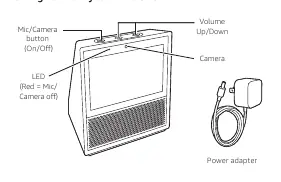
- Mic/Camera button: Press and hold to power the device on or off. A short press disables the microphone and camera (the LED will turn red).
- Volume Up/Down: Adjusts the audio level.
- Camera: Located on the top panel.
Setup and installation
- Connect the included power adapter to your Echo Show and plug it into a power outlet.
- Wait about a minute for the display to turn on and for Alexa to greet you.
- Follow the on-screen instructions to connect to the Internet. Ensure you have your Wi-Fi password and Amazon login credentials ready.
Getting started
Interacting with the device:
- The screen automatically turns on when you walk into the room or say "Alexa".
- To access Settings, swipe down from the top of the screen.
Alexa App: Download the free Amazon Alexa App on your phone or tablet to manage contacts, to-do and shopping lists, remotely control music, link accounts, and access settings. Visit alexa.amazon.com to start the download.
Feedback: You can send feedback via the Alexa App or by emailing [email protected].
Official resources from the manual
Practical help
Common problems
Microphone/Camera is active
Short press the Mic/Camera button; the LED will turn red when the microphone and camera are disabled.
Device not turning on
Ensure the power adapter is securely connected to the device and a working power outlet.
Before use
- Wi-Fi network password
- Amazon account login credentials
- Original power adapter
Images and diagrams
- The top panel contains the Mic/Camera button, Volume Up/Down buttons, and the Camera.
- The LED indicator turns red when the microphone and camera are disabled.
Model compatibility
- Requires Wi-Fi connection
- Requires Amazon account

Manual page author
David Miller
Documentation analyst
Organizes user manual content into clear summaries, with attention to model details, product context, and everyday usability.