Smart Home / Smart Displays
User Guide for Amazon Echo Frames 1st Gen
Comprehensive user guide for the Amazon Echo Frames 1st Gen. Includes setup instructions, control operations, status light indicators, cleaning and care tips, and safety information.
Quick answers from the manual
Quick answer
- The Amazon Echo Frames (1st Gen) are smart glasses featuring Alexa integration. This guide covers setup, control operations, status light meanings, and care instructions. p. 5, 7, 9
Key actions
- Power On/Reconnect p. 7
- Power Off p. 7
First start
- Charge the device using the included cable and adapter. Use the Alexa app to set up and manage your frames. p. 5, 22
Problems and fixes
Frames sliding down
Visit an optician for professional adjustment.
p. 13
Water exposure
Wipe dry with a soft cloth; do not use heat.
p. 19Maintenance and reset
- Clean with a soft dry cloth. Do not use water or chemicals. For lenses, use alcohol-free lens cleaner. p. 11, 20
Technical specifications
| Parameter | Value | Meaning | Pages |
|---|---|---|---|
| Model Number | GR79BR | Product identification | p. 22 |
| Operating Temp | 0°C to 35°C | Safe operating range | p. 22 |
Where to find it in the PDF
- Controls p. 7
- Status Lights p. 9
- Care & Cleaning p. 11, 20
- Specifications p. 22
Table of contents
Manual images
Click an image to enlargeQuick Guide from the Manual
The Amazon Echo Frames (1st Gen) are smart glasses designed for use with Alexa. This guide provides essential information on how to operate, maintain, and fit your device. Always ensure the device is within the recommended operating temperature range (0°C to 35°C) for optimal performance.
What's in the Box
- 1 pair of Echo Frames
- Carrying case
- Cleaning cloth
- Charging cable
- Power adapter
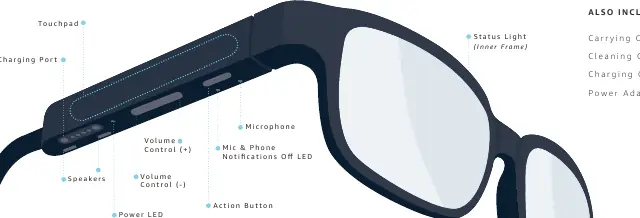
Echo Frames Controls
The device features three primary control areas:
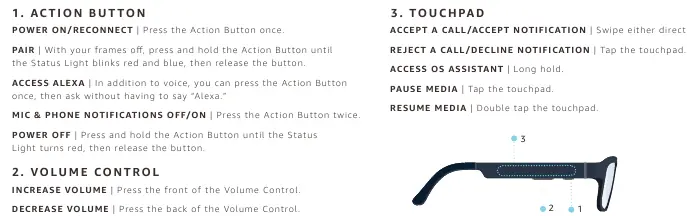
- Action Button: Used for power, pairing, and Alexa access.
- Volume Control: Located on the temple; press the front to increase volume and the back to decrease.
- Touchpad: Used for media playback and call management.
Action Button Functions
- Power On/Reconnect: Press once.
- Pairing: With frames off, press and hold until the status light blinks red and blue.
- Access Alexa: Press once to ask without saying "Alexa".
- Mic & Phone Notifications Off/On: Press twice.
- Power Off: Press and hold until the status light turns red.
Touchpad Functions
- Accept Call/Notification: Swipe in either direction.
- Reject Call/Decline Notification: Tap the touchpad.
- Access OS Assistant: Long hold.
- Pause Media: Tap the touchpad.
- Resume Media: Double tap the touchpad.
Status Light Indicators
The status light is located on the top right side of the inner frame:
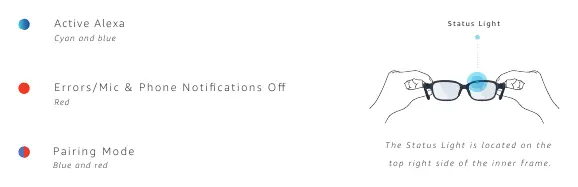
- Cyan and blue: Active Alexa.
- Red: Errors or Mic & Phone Notifications Off.
- Blue and red: Pairing Mode.
Caring for Your Echo Frames
Proper maintenance is essential for the longevity of your device:
- Cleaning: Use a soft, dry cloth. For lenses, use an alcohol-free lens cleaner and a soft cloth.
- Water Protection: The device is not waterproof. Do not rinse under running water or immerse in liquids.
- Heat: Avoid high heat; do not leave in a car on a hot day.
- Exposure to Water/Sweat: If exposed, wipe with a soft, dry cloth and allow to fully dry in a well-ventilated area. Do not use external heat sources like hair dryers or microwaves.
Fitting and Adjustment
Ensure your frames are comfortable before adding prescription lenses:
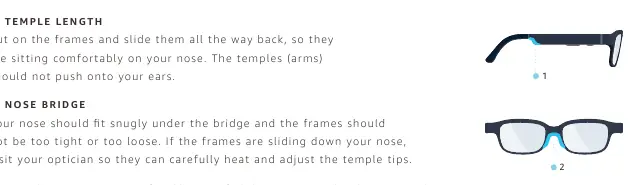
- Temple Length: The frames should sit comfortably on your nose without pushing onto your ears.
- Nose Bridge: The nose should fit snugly under the bridge. If the frames are sliding down, visit an optician to have the temple tips carefully heated and adjusted. Do not attempt to adjust the frames yourself.
Safety Information
- Battery Safety: Contains a rechargeable lithium-ion polymer battery. Do not disassemble, crush, or expose to extreme heat. Use only the included charging accessories.
- Magnets: The device and charging cable contain magnets which may interfere with medical devices like pacemakers. Keep away from such devices.
- Hearing: Avoid prolonged listening at high volumes to prevent hearing damage.
- Eye Protection: Lenses are impact-resistant but not shatterproof or indestructible.
Practical help
Common problems
Frames sliding down the nose
Visit your optician to have the temple tips carefully heated and adjusted. Do not adjust the frames yourself.
Device exposed to water or sweat
Wipe with a soft, dry cloth and allow to fully dry in a well-ventilated area. Do not use external heat sources.
Device not turning on or functioning properly
Ensure the device is within the operating temperature range (0°C to 35°C). If too hot or cold, allow it to reach the correct temperature.
Before use
- Charge the device using the included cable and adapter.
- Ensure the frames fit comfortably on your nose.
- Read the safety information regarding magnets and medical devices.
- Download the Alexa app for setup.
Specs in practice
- Electrical Rating
- 5V, 250mA (Frames); 90-264Vac, 150mA (Adapter)
- Operating Temperature
- 0°C to 35°C (32°F to 95°F)
- Storage Temperature
- -10°C to 45°C (14°F to 113°F)
Images and diagrams
- Page 5: Overview of controls including touchpad, charging port, and buttons.
- Page 7: Detailed control functions for Action Button, Volume, and Touchpad.
- Page 9: Status light color meanings and location.
- Page 13: Fitting guide for temple length and nose bridge.
Model compatibility
- Designed to connect specifically to iPhone (Made for iPhone badge).
- Android is supported (trademark of Google LLC).

Manual page author
Emily Carter
User documentation editor
Prepares concise manual descriptions and highlights the most useful setup, operation, and maintenance information for readers.