Computers / Tablets
Amazon Fire HD 10 Kids (11th Generation) User Guide
Quick start guide for the Amazon Fire HD 10 Kids (11th Generation) tablet. Learn how to set up your device, charge the battery, install a microSD card, and use the integrated stand and handle.
Table of contents
Manual images
Jump to the sectionQuick guide from the manual
This guide provides essential steps for setting up and using your Amazon Fire HD 10 Kids (11th Generation) tablet. It covers initial power-on, charging, and hardware features like the protective case and stand.
What is in the box
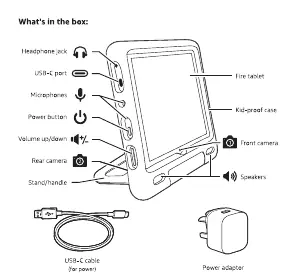
- Fire tablet
- Kid-proof case
- USB-C cable
- Power adaptor
Getting started
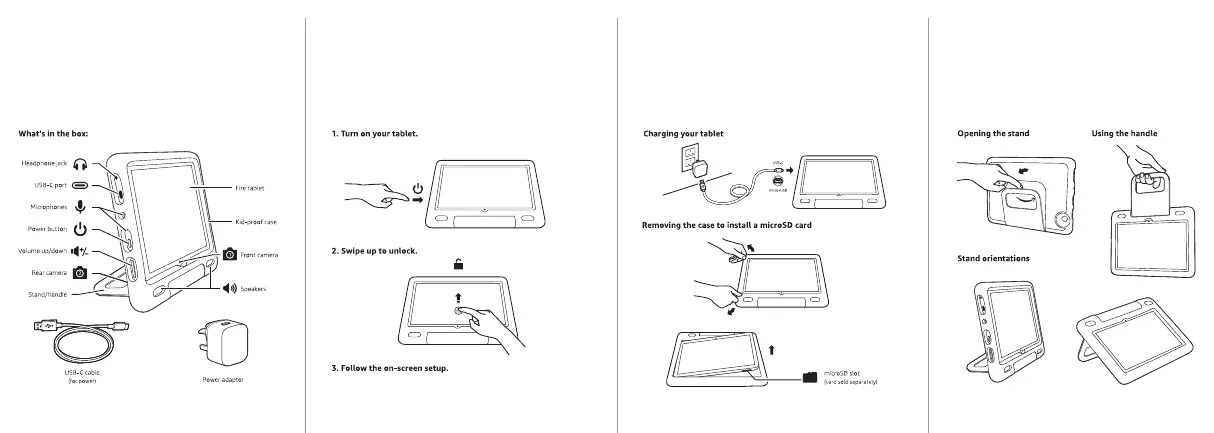
- Turn on your tablet: Locate the power button on the side of the device and press it.
- Unlock: Once the screen lights up, swipe up on the screen to unlock the device.
- Setup: Follow the on-screen instructions to complete the initial configuration of your tablet.
Charging your tablet
Connect the provided USB-C cable to the tablet's USB-C port and plug the other end into the power adaptor. Connect the adaptor to a wall outlet to begin charging.
Using the protective case
The kid-proof case includes an integrated stand and handle. To use the stand, pull it out from the back of the case to prop the tablet up in landscape or portrait orientation. The handle can be used for easy carrying.
Installing a microSD card
To expand your storage, you must remove the kid-proof case to access the microSD slot. Carefully peel back the case from the tablet edges until the device is free, insert the microSD card into the designated slot, and then re-insert the tablet into the case.
Practical help
Common problems
Tablet will not turn on
Ensure the device is charged using the provided power adaptor and USB-C cable.
Cannot access microSD slot
The kid-proof case must be removed from the tablet to access the microSD card slot.
Before use
- Verify all items are present in the box (tablet, case, cable, adaptor).
- Charge the tablet fully before the first use.
- Ensure the protective case is properly fitted.
Images and diagrams
- The power button and volume controls are located on the side of the tablet.
- The microSD slot is located on the side of the tablet, accessible only when the case is removed.
- The stand can be adjusted for different viewing angles.
Model compatibility
- Designed specifically for the 11th Generation Fire HD 10 Kids model.

Manual page author
Emily Carter
User documentation editor
Prepares concise manual descriptions and highlights the most useful setup, operation, and maintenance information for readers.