Electronics / Headphones Earbuds
Operating Instructions for ANKO 18LY56 Bluetooth Sports Earphones
Quick guide for the ANKO 18LY56 Bluetooth Sports Earphones. Learn how to pair with devices, manage phone calls, control music playback, and charge the battery safely.
Table of contents
Quick guide from the manual
This document provides essential operating instructions for the ANKO 18LY56 Bluetooth Sports Earphones. It covers device pairing, playback controls, and battery maintenance. Please note that the device must not be connected to power sources exceeding 5V d.c. 1A.
Function overview
The earphones feature a multi-function control panel:
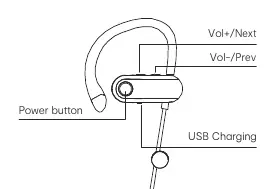
- Power button: Press and hold for 3 seconds to turn the device ON or OFF.
- Play/Pause: Click the power button once.
- Next Song: Press and hold the Vol+/Next button.
- Previous Song: Press and hold the Vol-/Prev button.
- Volume Up: Click the Vol+/Next button. A tone indicates maximum volume.
- Volume Down: Click the Vol-/Prev button.
- Phone calls: Click the power button to pick up or hang up calls.
Pairing with Bluetooth devices
To connect the earphones to your mobile device:
- Power on the earphones; they will automatically enter pairing mode (LED flashes).
- The device will attempt to pair with the last connected device if available.
- Open the Bluetooth menu on your mobile phone and search for anko43646906.
- Once paired, you will hear a confirmation tone and the LED will turn off.
- The pairing window remains open for 10 minutes.
Battery Charging
The earphones use a rechargeable Li-ion battery. To charge:
- Connect the provided USB cable to a suitable USB port and the headset charging port.
- The LED indicator turns RED during charging.
- The LED indicator turns OFF when the battery is fully charged.
- A full charge takes approximately 2 hours.
Safety and Maintenance
Observe the following safety precautions:
- Do not expose the battery to extreme temperatures, low air pressure at high altitudes, or mechanical damage (crushing/cutting), as this may cause an explosion or leakage.
- Do not leave the battery in environments with extremely high temperatures.
- Use only the provided accessory cable for charging.
Technical specifications
- Bluetooth Version: V5.4
- Support profiles: A2DP, AVRCP, HFP
- Working Distance: 10 meters
- Music/Talk Time: >6 Hours
- Standby Time: >100 Hours
- Charging voltage: 5V d.c.
Manufacturer information
Anko
Practical help
Common problems
Earphones not pairing
Ensure the device is in pairing mode (LED flashing) and within the 10-minute pairing window.
Battery not charging
Verify the USB cable is securely connected and the power source does not exceed 5V d.c. 1A.
Before use
- Charge the battery fully for 2 hours before first use.
- Ensure the Bluetooth device is within 10 meters of the earphones.
- Check that the power source for charging is 5V d.c. 1A or less.
Specs in practice
- Bluetooth V5.4
- The wireless communication standard used for connectivity.
- A2DP, AVRCP, HFP
- Supported profiles for high-quality audio streaming and call handling.
Images and diagrams
- The control unit features a Power button, Vol+/Next button, Vol-/Prev button, and a USB charging port.
- The LED indicator provides status: flashing for pairing, solid red for charging, and off when fully charged.
Model compatibility
- Compatible with Bluetooth-enabled mobile phones supporting A2DP, AVRCP, and HFP profiles.

Manual page author
Michael Turner
Technical manual editor
Reviews PDF manuals for structure, safety notes, and practical product details so readers can find the right information quickly.