Power / Uninterruptible Power Supplies
APC 11-Outlet Surge Protector User Manual
Quick guide for the APC 11-Outlet Surge Protector. Learn about installation, safety instructions, indicator lights, and how to connect power, phone, network, and coaxial cables.
Table of contents
Important Information
The APC 11-Outlet Surge Protector is designed for indoor use only. It provides surge protection for connected equipment, including power, telephone, network, and coaxial lines. Ensure the unit is plugged into a 3-wire, 120-volt grounded outlet. Do not use extension cords with this device.
Safety Instructions
- Indoor Use Only: Internal components are not sealed from the environment.
- Grounding: Plug only into a properly wired and grounded 3-wire, 120V outlet.
- Installation: Do not install the unit near heat-emitting appliances (radiators, heat registers) or in areas with excessive moisture.
- Lightning: Never install electrical, telephone, DSS, or CATV wiring during a lightning storm.
- Daisy Chaining: Do not plug extension cords into the unit.
- Distance Requirement: Do not install if there is not at least 10 meters (30 feet) of wire between the electrical outlet and the electrical service panel.
Product Overview
The surge protector features an ON/OFF switch that doubles as a circuit breaker, 11 switched outlets with sliding shutters, and various protection indicators.
Indicator Lights
- Building Wiring Fault (Red): Illuminates if the building wiring is not properly installed. Contact a qualified electrician.
- Protection Working (Green): Illuminates when the unit is actively protecting equipment. If this light is off while the unit is on, the unit is no longer capable of protecting equipment.
- Overload Detection (Yellow): Illuminates when the unit is loaded above 12 amps.
Installation and Operation
Before connecting sensitive equipment, connect the cabling directly to the equipment to verify the system is operating properly.
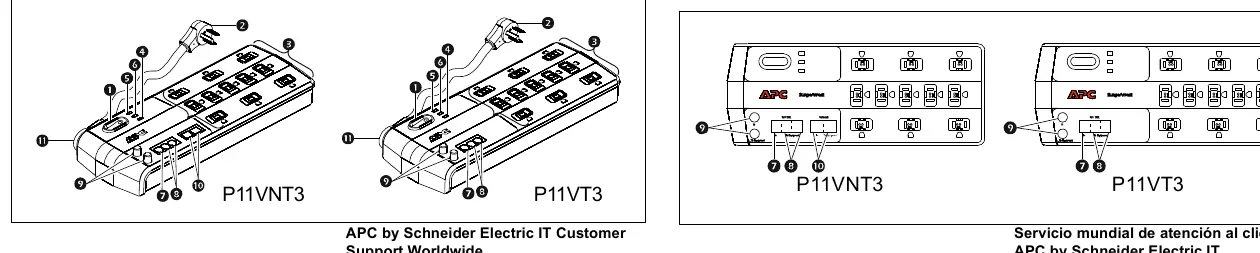
Connections
- Power: Connect the 2.43-meter (8-foot) power cord to a wall outlet. The pivoting strain relief allows for 180-degree rotation.
- Tel/DSL: Connect an RJ-11 telephone line from the wall to the 'Tel/DSL In' port. Connect the device to the 'Tel/DSL To Equipment' port.
- Coaxial: Connect the standard cable TV input to the 'In' coaxial connector. Connect the device (cable modem, cable box, etc.) to the 'To Equipment' connector. Do not connect a DSS dish directly to the Antenna/Cable In connector.
- Network: Connect an RJ-45 network line from the wall to the 'Network In' port. Connect the computer to the 'Network To Equipment' port.
Circuit Breaker Reset
If the circuit breaker trips due to an overload, the ON/OFF switch will move to the OFF position. Disconnect all connected equipment, set the switch to the ON position, and reconnect devices one at a time. Do not reconnect the device that caused the trip.
Practical help
Common problems
Building Wiring Fault indicator is lit (red)
The building wiring is not properly installed and may present a shock hazard. Contact a qualified electrician to correct the wiring.
Protection Working indicator is off (green)
The unit is no longer capable of protecting equipment. The unit should be returned to Schneider Electric IT (SEIT).
Overload Detection indicator is lit (yellow)
The unit is loaded above 12 amps. Disconnect some devices to reduce the load.
Circuit breaker trips
Disconnect all equipment, set the switch to ON, and reconnect devices one at a time. Do not reconnect the device that caused the trip.
Before use
- Verify the outlet is a 3-wire, 120V grounded outlet.
- Ensure there is at least 10 meters (30 feet) of wire between the outlet and the electrical service panel.
- Connect cabling directly to the equipment first to verify the system is operating properly before connecting to the surge protector.
- Ensure the unit is kept away from heat sources and excessive moisture.
Specs in practice
- 2.43 meters (8 feet)
- Length of the power cord.
Images and diagrams
- The diagram illustrates the location of the ON/OFF switch, indicator lights, and various input/output ports for power, phone, network, and coaxial cables.
Model compatibility
- Designed for standard 'dial-up' telephone service.
- CATV coaxial protection requires proper grounding according to National Electric Code Article 820-40.
- Not allowed for DSS operations if connected directly to the Antenna/Cable In connector.

Manual page author
Michael Turner
Technical manual editor
Reviews PDF manuals for structure, safety notes, and practical product details so readers can find the right information quickly.