Power / Uninterruptible Power Supplies
User Manual for APC Easy UPS SMV Series
Comprehensive user guide for the APC Easy UPS SMV Series (750VA to 3000VA). Includes installation steps, battery connection procedures, status indicator meanings, troubleshooting, and technical specifications.
Table of contents
Manual images
Click an image to enlargeQuick Guide from the Manual
The APC Easy UPS SMV Series is designed for indoor use with PCs. Before installation, ensure the input breaker on the UPS upstream is Type C rated at 16A. The unit must be installed in a temperature and humidity-controlled environment, free of conductive contaminants. Always charge the battery for at least 8 hours before first use to ensure sufficient runtime. Do not connect printers, heaters, or copiers to the UPS.
Product Overview
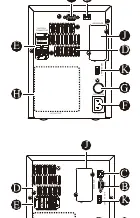
The UPS features a front panel with an LCD display showing On Line mode, Battery mode, Automatic Voltage Regulation (AVR), battery capacity, load capacity, and UPS status. The rear panel includes the AC inlet, battery connector, output outlets, and communication ports such as USB, RS-232, and a dry contact interface.
Installation and Power On
1. Inspection: Ensure the installation site is stable, indoors, and free of excessive dust or corrosive air. Keep away from direct sunlight, water, and heat sources.
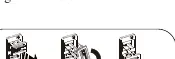
2. Battery Connection: Locate the battery connector on the rear panel. Pull the battery handle up and push it into the unit to connect the battery prior to operation. Disconnect the battery before transportation.
3. Equipment Connection: Plug equipment directly into the UPS outlets. Avoid using extension cords. Plug the UPS power cord directly into a wall outlet, not a surge protector or power strip.
4. Power On: Press the ON/OFF button for 1-3 seconds. A buzzer sound confirms the unit is on and providing power.
5. Cold Start: Use the cold start feature to supply power to connected equipment from the batteries when the UPS is off and there is no utility power.
Dry Contact Interface
The dry contact interface activates based on the UPS operating condition:

- AC mode: PIN3-4 activated.
- Backup mode: PIN2-4 activated.
- AC mode and Battery weak: PIN1-4 & PIN3-4 activated.
- Standby mode and Battery weak: PIN1-4 activated.
Troubleshooting and Status Indicators
The UPS uses audible alarms and error codes to indicate status:
- Beeps every 2 seconds: Running on battery. Save work.
- Continuous Beeping: Low battery. Save work and shut down.
- Continuous tone with icon: Battery Backup outlets overloaded.
- Err 01: Fan fault detected. Turn off, clean dust, and restart.
- Err 02: Inverter short detected. Turn off, disconnect non-essential equipment, and restart.
- Err 03: Inverter over voltage detected. Contact technical support.
Specifications
The SMV series supports 220/230/240VAC input. Output is Pure Sine Wave with a transfer time of 2-6 ms (12ms max). Charging time is 4-6 hours to recover to 90% capacity. The operating environment is 0-95% RH at 0-40°C.
Service and Warranty
If the unit requires service, do not return it to the dealer. Review the troubleshooting section first. If the problem persists, contact Schneider Electric IT (SEIT) Customer Support via www.apc.com. Always disconnect the batteries before shipping the unit. The standard warranty is two years from the date of purchase.
Official resources from the manual
Practical help
Common problems
UPS will not turn on
Press the ON/OFF button. Ensure the power cord is securely connected to the wall outlet and that the wall outlet has power.
Connected equipment loses power
An overload condition may have occurred. Remove non-essential equipment and reconnect one by one.
Err 01 displayed
Fan fault detected. Turn off the UPS, clean dust or foreign materials clogging the fan, and restart.
Err 02 displayed
Inverter short detected. Turn off the UPS, disconnect non-essential equipment, and restart.
Inadequate battery runtime
Battery may not be fully charged. Leave the UPS connected to AC power for 10 hours to charge to full capacity.
Before use
- Ensure the input breaker on the UPS upstream is Type C rated at 16A.
- Install in a temperature and humidity-controlled indoor area.
- Connect the battery by pulling the handle up and pushing it into the unit.
- Charge the battery for at least 8 hours before first use.
- Do not connect printers, heaters, or copiers to the UPS.
Specs in practice
- Transfer time
- Typical 2-6 ms, 12ms max. The time taken to switch to battery power during an outage.
- Charging time
- 4-6 hours to recover to 90% capacity.
Images and diagrams
- The front panel LCD displays status icons for On Line mode, Battery mode, AVR, battery capacity, and load capacity.
- The rear panel contains the AC input, battery connector, output outlets, and communication ports (USB, RS-232, Dry Contact).
Model compatibility
- Designed for PCs only.
- Category C2 UPS product; may cause radio interference in residential environments.

Manual page author
David Miller
Documentation analyst
Organizes user manual content into clear summaries, with attention to model details, product context, and everyday usability.