Electronics / Televisions
Aputure amaran 100x S Product Manual
Comprehensive user guide for the Aputure amaran 100x S bi-color LED light, covering setup, operation, safety, and technical specifications.
Table of contents
Manual images
Jump to the sectionProduct Overview
The amaran 100x S is a high-performance 100W bi-color LED light designed for versatile creative lighting scenarios. It features an adjustable color temperature range from 2700K to 6500K, providing both warm and cool lighting options. The unit is built with an intuitive control interface and supports advanced software features, including compatibility with the Sidus Link app for remote control and firmware updates.
Safety Instructions
To ensure safe operation, always remove the protective cover before turning on the light and before attaching the reflector. Do not block the ventilation or look directly into the LED source. Keep the fixture away from flammable objects and do not operate it in wet conditions. Always use a grounded outlet and ensure the power cable is not damaged. If the unit requires repair, contact authorized service personnel; unauthorized disassembly may void the warranty.
Installation and Setup
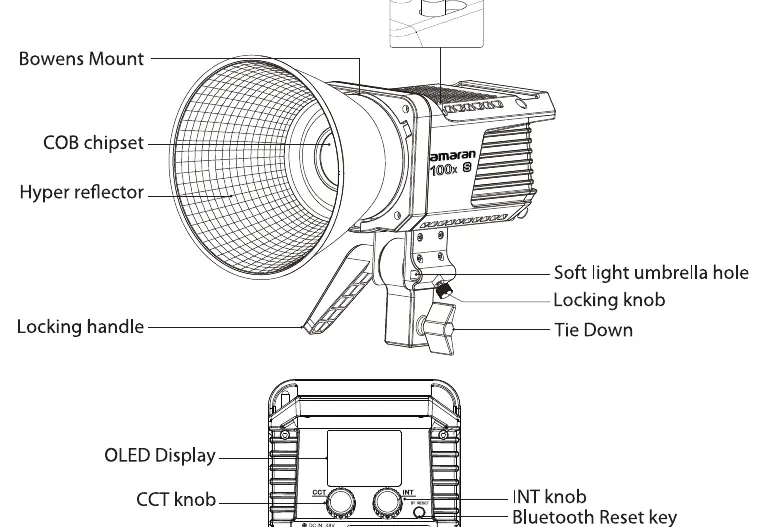
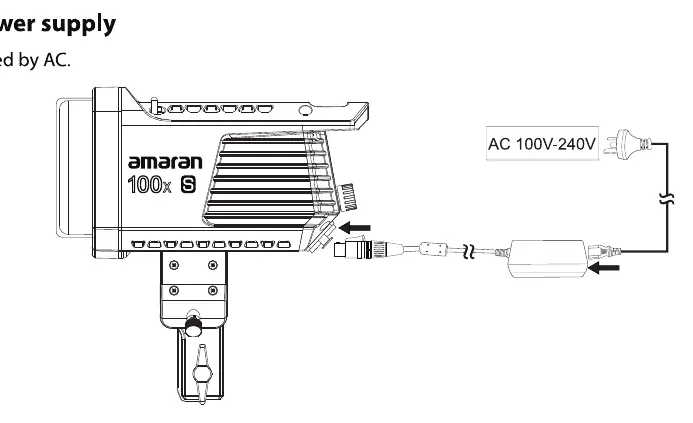
To set up the light, attach it to a tripod and secure it using the locking handle and tie-down. The amaran 100x S features a standard Bowens mount, allowing for the attachment of the included hyper-reflector or other compatible light modifiers. To install the reflector, push the lever handle and rotate the accessory into place. The unit also includes a dedicated hole for soft light umbrellas. Ensure the power adapter is securely connected and the cable is properly managed to prevent tripping.
Operation and Control
The light can be controlled manually via the onboard knobs or remotely using the Sidus Link app. The INT knob adjusts brightness from 0 to 100%, while the CCT knob adjusts color temperature from 2700K to 6500K. Clicking these knobs allows for quick cycling through preset values. The OLED display provides real-time feedback on current settings. For advanced features, connect the light to the Sidus Link app to access nine built-in lighting effects, including Paparazzi, Fireworks, Lightning, and Strobe.
Maintenance and Updates
Keep the fixture clean by using only a dry microfiber cloth. Firmware updates can be performed wirelessly through the Sidus Link app. If you encounter connectivity issues, use the Bluetooth reset button on the back of the unit. Always store the light with the protective cover attached to prevent damage to the COB chipset.
Manufacturer information
Aputure
Practical help
Common problems
Bluetooth connection failure
Long press the Bluetooth reset button until the LCD displays the reset progress and 'Success'.
Light does not turn on
Ensure the power cable is securely connected to both the DC input and a grounded AC outlet.
Before use
- Remove the protective cover from the COB chipset.
- Ensure the light is securely mounted to a stable tripod.
- Check that the power cable is not damaged.
- Verify the power source is grounded.
- Remove the protective cover before attaching the reflector.
Specs in practice
- Output Power
- The power consumption of the lamp, rated at 100W.
Images and diagrams
- The rear panel contains the OLED display, CCT and INT adjustment knobs, DC-in connector, and Bluetooth reset button.
- The Bowens mount release latch is located on top of the fixture for easy accessory changes.
- The power supply setup involves connecting the AC cable to the adapter and the adapter to the lamp's DC-in port.
Model compatibility
- Compatible with the Sidus Link app for remote control and firmware updates.
- Features a standard Bowens mount for various light modifiers.
- Supports soft light umbrellas via the integrated mounting hole.

Manual page author
David Miller
Documentation analyst
Organizes user manual content into clear summaries, with attention to model details, product context, and everyday usability.