Power / Power Banks
User Guide for Baseus Adaman Power Bank
Quick start guide for the Baseus Adaman Power Bank. Learn how to check battery levels, charge your devices, recharge the power bank, and view technical specifications.
Quick answers from the manual
Quick answer
- To use the power bank, press the power button to check the battery level. Connect your device to the USB or Type-C port to charge it. To recharge the power bank, connect it to a USB adapter via the Type-C or Micro USB port. p. 1
Key actions
- Check battery level p. 1
- Recharge the power bank p. 1
Maintenance and reset
- Recharge the power bank at least once every 6 months to preserve battery life. p. 1
Show 2 more answers Show less
Technical specifications
| Parameter | Value | Meaning | Pages |
|---|---|---|---|
| Battery Type | Lithium-ion polymer battery | Standard rechargeable battery chemistry | p. 1 |
| USB Output | 22.5W | Maximum power output for USB port | p. 1 |
Where to find it in the PDF
- Welcome Guide p. 1
Table of contents
Quick guide from the manual
This guide provides essential instructions for operating your Baseus Power Bank. To check the current battery level, simply press the power button once to activate the LCD display. Ensure you use a compatible USB adapter for recharging the unit and appropriate cables for charging your portable devices.
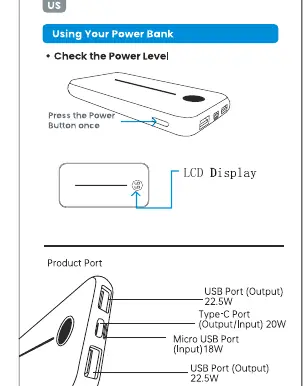
Product overview
The power bank features multiple ports for versatile charging:
- USB Output: 22.5W
- Type-C Port: Input/Output 20W
- Micro USB Port: Input 18W
Charging your devices
To charge your portable device:
- Connect your device to the power bank using a compatible charging cable.
- The power bank will automatically detect the device and begin charging.
Recharging the power bank
To recharge the power bank:
- Connect the power bank to a power source using a USB adapter and the appropriate cable.
- The LCD display will indicate the charging progress.
Safety warnings
To ensure safe operation and longevity of the device, please adhere to the following:
- Do not drop, disassemble, or attempt to repair the unit.
- Keep the device away from water, liquids, and high-temperature environments.
- Do not use chemical detergents to clean the device; use a soft, dry cloth.
- To preserve battery life, recharge the power bank at least once every 6 months.
Manufacturer information
Baseus
Practical help
Common problems
Power bank does not charge
Ensure the USB adapter is functioning and the cable is securely connected to the input port.
Device not charging
Check that the charging cable is compatible and securely connected to both the power bank and your device.
Before use
- Check the battery level by pressing the power button.
- Ensure you have a compatible USB wall adapter for recharging.
- Verify that your charging cable is compatible with your device and the power bank ports.
Show more Show less
Specs in practice
- Micro USB Port
- Dedicated input port for recharging the power bank up to 18W.
Images and diagrams
- The LCD display shows the remaining battery percentage.
- The power button is located on the side to activate the display.
- Ports are clearly labeled for input and output functions.
Model compatibility
- Compatible with most USB-powered devices.
- Charging speed depends on the device's requirements and the cable used.

Manual page author
Michael Turner
Technical manual editor