Power / USB Chargers
User Manual for Baseus Palm 20W USB-C Fast Charger
Quick guide for the Baseus Palm 20W USB-C Fast Charger (CCZC20CE). Includes technical specifications, usage instructions, safety warnings, and warranty information.
Quick answers from the manual
Quick answer
- The Baseus Palm 20W USB-C Fast Charger (CCZC20CE) is a compact power adapter that supports PD 3.0, QC 3.0, and PPS protocols, providing up to 20W of power. p. 2
Key actions
- Plug the charger into a wall outlet and connect your device via a USB-C cable. p. 2
Technical specifications
| Parameter | Value | Meaning | Pages |
|---|---|---|---|
| Input | AC 100-240V~, 50/60Hz, 0.6A max | Power input requirements | p. 2 |
| Output | 5V/3A, 9V/2.22A, 12V/1.67A | Power output capabilities | p. 2 |
Where to find it in the PDF
- Usage and Specs p. 2
- Support and Safety p. 3
Table of contents
Quick guide from the manual
This document provides essential information for the Baseus Palm 20W USB-C Fast Charger (Model CCZC20CE). It covers technical specifications, safety guidelines, and usage instructions to ensure proper operation and longevity of the device.
Product usage
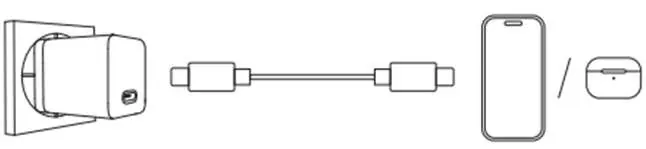
To use the charger, plug it directly into a standard wall outlet. Connect your mobile device or accessory to the charger using a compatible USB-C cable. The charger automatically detects the required power protocol (PD 3.0, QC 3.0, or PPS) to provide optimal charging speed.
Technical specifications
The charger supports multiple voltage and amperage outputs to accommodate various devices:
- Input: AC 100-240V~, 50/60Hz, 0.6A max.
- USB-C Output: 5V/3A (15W); 9V/2.22A (20W); 12V/1.67A (20W) max.
- Supported Protocols: Power Delivery (PD 3.0), Quick Charge (QC 3.0), PPS, and others.
- Operating Temperature: 0°C to 25°C.
- No-load Power Consumption: 0.05W.
Safety instructions
To prevent damage to the product or safety hazards, please adhere to the following guidelines:
- Do not disassemble or modify the product without professional supervision.
- Avoid using the charger in harsh environments, including areas with high temperatures, intense light, strong magnetic fields, or near fire sources.
- Do not use excessive physical force, such as throwing, hitting, or crushing the device.
- Ensure the connected load does not exceed the charger's output current capacity.
- Read all instructions and warnings before use.
Warranty and support
The product comes with a 24-month warranty period and lifetime technical support. For assistance, you can contact Baseus via email at [email protected] or visit their official website at https://www.baseus.com.
Official resources from the manual
Manufacturer information
Baseus
Practical help
Common problems
Device not charging
Ensure the charger is securely plugged into the wall outlet and the USB-C cable is properly connected to both the charger and your device.
Slow charging speed
Verify that your device supports fast charging protocols like PD 3.0 or QC 3.0 and that you are using a high-quality, compatible USB-C cable.
Before use
- Check the wall outlet voltage (100-240V AC).
- Inspect the charger and cable for physical damage.
- Ensure the operating environment is within 0°C-25°C.
- Verify that the device being charged is compatible with USB-C power delivery.
Specs in practice
- PD 3.0 / QC 3.0 / PPS
- Fast charging protocols that allow the charger to negotiate the optimal voltage and current for your specific device.
- 20W Max Output
- The maximum power delivery capacity of the charger, suitable for smartphones and small accessories.
Images and diagrams
- The charger connects to a wall outlet, and a USB-C cable connects the charger to the target device (e.g., smartphone or earbuds case).
Model compatibility
- Compatible with devices supporting USB-C charging.
- Supports Power Delivery (PD 3.0), Quick Charge (QC 3.0), and PPS.

Manual page author
David Miller
Documentation analyst
Organizes user manual content into clear summaries, with attention to model details, product context, and everyday usability.