Power / Power Banks
User Manual for myCharge RazorTurbo 24000mAh Power Bank
Quick guide for the myCharge RazorTurbo 24000mAh power bank. Learn how to recharge the unit, check battery levels, charge your devices, and follow safety guidelines.
Quick answers from the manual
Quick answer
- The RazorTurbo 24000mAh is a portable power bank. Recharge it via a USB power source and connect your devices to the output port to charge them. Press the power button to check battery levels or initiate charging if it does not start automatically. p. 1
Key actions
- Recharging the unit p. 1
- Charging devices p. 1
Problems and fixes
Charging does not begin automatically
Press the power button.
p. 1Show 2 more answers Show less
Technical specifications
| Parameter | Value | Meaning | Pages |
|---|---|---|---|
| Fast charging requirement | 18W adapter | Required for fastest possible recharge. | p. 1 |
Where to find it in the PDF
- User Manual p. 1
Table of contents
Quick guide from the manual
The myCharge RazorTurbo 24000mAh is a portable power bank designed to charge mobile devices. This guide covers the essential operations for recharging the power bank and using it to charge your electronics.
Recharging the RazorTurbo
To recharge the power bank, connect the included recharging cable to any USB power source. You can recharge from a wall outlet, car, or computer. For the fastest possible recharge, it is recommended to use an 18W adapter and a fast charging data cable.
LED Indicators
Press the power button to check the current battery level. When the unit is fully charged, it will display 4 solid, non-blinking LEDs.
Charging Devices
To charge your device, plug one end of your own cable into the RazorTurbo output port and the other end into your device. Charging should begin automatically. If it does not start, press the power button.
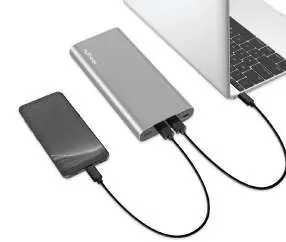
Note for Apple users: An Apple Lightning to Type-C cable is required for fast charging Apple devices (not included).
Safety and Maintenance
- Do not expose the battery to heat sources, extended direct sunlight, or high-temperature environments.
- Avoid dropping or subjecting the battery to excessive impacts.
- Do not attempt to disassemble, repair, or replace any part of the housing or battery.
- Do not attempt to charge the battery using any method or connections other than the device's charging cable.
- Dispose of batteries properly at a local battery-recycling center; do not throw them in the garbage.
Support and Warranty
The product comes with a one-year limited warranty. Keep your receipt as proof of purchase and register your product at mycharge.com. For support, visit support.mycharge.com.
Official resources from the manual
Manufacturer information
myCharge
Practical help
Common problems
Device not charging automatically
Press the power button to initiate charging.
Slow charging speed
Use an 18W adapter and a fast charging data cable for the fastest possible recharge.
Before use
- Ensure you have a compatible charging cable for your device.
- Check the battery level by pressing the power button.
- Use an 18W adapter for the fastest recharging of the power bank.
Show more Show less
Specs in practice
- 4 solid LEDs
- Indicates the unit is fully charged.
Images and diagrams
- The LED indicators show the current battery level when the power button is pressed.
- The output port is used to connect your device for charging.
Model compatibility
- Apple devices require a Lightning to Type-C cable for fast charging (not included).

Manual page author
David Miller
Documentation analyst