Home Appliances / Cleaning Tools
Batavia MAXXPACK 18V Twinbrush User Manual
Quick guide for the Batavia MAXXPACK 18V Twinbrush (BT-CTB001). Learn how to assemble, operate, adjust the brush angle, and maintain your power scrubber for optimal cleaning results.
Table of contents
Manual images
Click an image to enlargeQuick guide from the manual
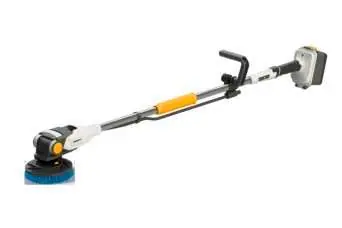
The Batavia MAXXPACK 18V Twinbrush is a versatile cleaning tool designed for indoor and outdoor use. Before operating, ensure you have read the safety instructions, wear eye protection, and verify that the brush accessory is correctly installed. The device can be used dry or with water. If the brush bristles become deformed, they can be restored by immersing them in hot (90°C) water for 30 seconds.
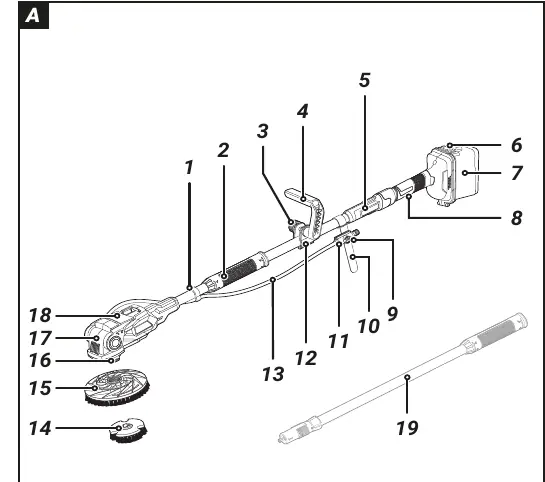
Device overview
The device consists of a motor unit, power supply unit, and various controls including an ON/OFF switch, stopcock for water flow, and a locking lever for tilt adjustment. The battery compartment is protected by a cover that must be kept clean and dry.
Assembly
To assemble the device:
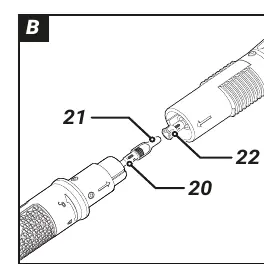
- Place the motor unit and power supply unit with tube ends facing each other.
- Pull the socket and plug out of the tube ends.
- Connect the socket and plug, ensuring arrows point towards each other, and screw together tightly.
- Connect the two tube ends and secure them with the grip sleeve.
- Plug the hose into the motor unit connection.
- Guide the hose through the retaining clip and mount on the motor unit.
- Connect the hose adapter to the hose and slide it onto the guide track of the attachment clip.
Operation
Battery: Open the battery cover, insert the battery, and ensure the seal is clean and undamaged before closing. Always lock the battery cover with the locking clip.
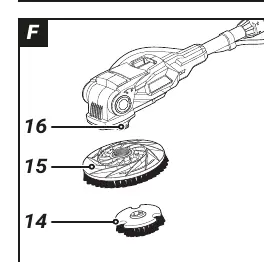
Brush: To attach or change the brush, use the shaft lock button to block the shaft. Screw the outer part of the brush clockwise to attach, or counter-clockwise to remove. The inner part locks in the counter-clockwise direction.
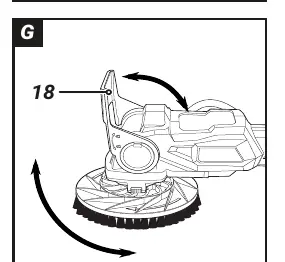
Tilt Adjustment: Lift the locking lever to adjust the tilt angle of the brush head. Lock the head when using the device above shoulder height; leave it unlocked for floor cleaning to allow the head to follow the surface.
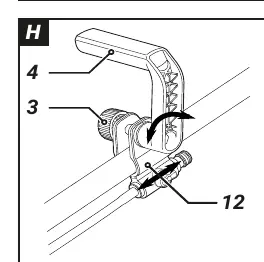
Handle Adjustment: Undo the locking screw to adjust the position of the attachment clip and the tilt of the extra handle, then retighten.
Working with the device
For wet use, connect the hose adapter to your water supply and adjust the water quantity using the stopcock. Press the ON/OFF switch to start. Use minimal pressure and push the device gently and evenly forward.
Maintenance
Remove the battery pack before performing any maintenance. Keep the device clean. If bristles are deformed, immerse the brush in 90°C water for 30 seconds to restore their shape.
Technical data
- Battery type: 18 V, 4000 mAh, Li-Ion
- No load speed: 200/400 min-1
- Sound pressure level: 66 dB(A)
- Sound power level: 77 dB(A)
- Hand/arm vibration: 3.91 m/s2
Manufacturer information
Batavia
Practical help
Common problems
Bristles are deformed
Immerse the brush in hot (90°C) water for 30 seconds to restore the correct shape.
Locking lever does not close properly
Adjust the inclination of the brush slightly.
Device not starting
Check if the battery is inserted correctly and charged.
Before use
- Check for transit damage.
- Ensure battery cover seal is clean and dry.
- Verify brush accessory is installed correctly.
- Wear eye protection.
- Ensure the battery cover is properly closed before wet use.
Specs in practice
- Battery type
- 18V, 4000 mAh, Li-Ion
- No load speed
- 200/400 min-1
- Sound pressure level
- 66 dB(A)
Images and diagrams
- Fig A: Overview of all components.
- Fig B: Connecting the motor unit and power supply.
- Fig F: Attaching/changing the brush.
- Fig G: Adjusting the tilt angle of the brush head.
- Fig H: Adjusting the extra handle.
Model compatibility
- Use only with Maxxpack batteries and chargers.
- Do not use more than one extension pole with the device.
- Only use accessories recommended by the supplier.

Manual page author
David Miller
Documentation analyst
Organizes user manual content into clear summaries, with attention to model details, product context, and everyday usability.