General / Accessories
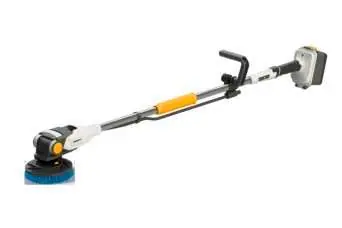
Batavia MAXXPACK 18V Twinbrush Operating Instructions
Quick guide for the Batavia MAXXPACK 18V Twinbrush. Includes assembly, battery insertion, brush attachment, tilt adjustment, and maintenance instructions.
Table of contents
Quick guide from the manual
This document provides essential instructions for the safe operation and maintenance of the Batavia MAXXPACK 18V Twinbrush. Always read the enclosed general safety instructions for power tools before use. The device is intended for domestic cleaning of surfaces indoors and outdoors and can be used dry or with water.
Assembly
- Place the motor unit and power supply unit with tube ends facing each other.
- Pull the socket and plug out of the tube ends using the tug strap.
- Connect the socket and plug, ensuring arrows point towards each other, and screw together tightly.
- Connect the two tube ends and secure them with the grip sleeve.
- Plug the hose into the motor unit connection and guide it through the retaining clip and mount.
- Connect the hose adapter to the hose and slide it onto the guide track of the attachment clip.
Inserting/changing the battery
The battery cover protects the battery from moisture and debris. Ensure the seal and rubber edge are clean and dry before closing.
- Undo the locking clip and open the battery cover.
- Insert or remove the battery.
- Always check the seal for damage before closing the cover and locking it.
Attaching/changing the brush
- Block the shaft using the shaft lock button.
- Screw on the outer part of the brush in a clockwise direction.
- Insert the inner part of the brush and lock it by turning counter-clockwise.
- To remove, unlock the inner part clockwise, then unscrew the outer part counter-clockwise while holding the shaft lock button.
Adjusting the tilt angle
The brush head should remain unlocked when cleaning floors to allow it to follow the surface. Lock the head only when working above shoulder height.
- Lift the locking lever fully.
- Adjust the angle to your needs.
- Push the locking lever down to fix the position. Do not use excessive force; adjust the inclination slightly if it does not close properly.
Working with the device
For wet cleaning, close the stopcock and connect the hose adapter to your water supply. Use the stopcock to regulate water flow. Press the ON/OFF switch to start. Use minimal pressure and guide the device gently forward.
Maintenance and cleaning
Remove the battery before any maintenance. If brush bristles become deformed, immerse the brush in 90 degrees Celsius water for 30 seconds to restore their shape.
Manufacturer information
Batavia
Practical help
Common problems
Brush bristles are deformed
Immerse the brush in 90 degrees Celsius water for 30 seconds to restore the correct shape.
Locking lever does not close properly
Do not force it; adjust the inclination of the brush head slightly and try again.
Device damaged
Do not use the device. Have it repaired by a professional or contact customer support. Do not disassemble.
Before use
- Check all parts for damage in transit.
- Ensure the battery cover seal and rubber edge are clean and dry.
- Verify the brush accessory is installed correctly.
- Ensure the battery is fully inserted and the cover is locked.
- Check that the hose is properly connected and not restricted.
Specs in practice
- Battery type
- 18V, 4000 mAh, Li-Ion.
- No load speed
- 200/400 min-1 (depending on brush size).
- Sound pressure level
- 66 dB(A) with 3 dB(A) uncertainty.
Images and diagrams
- A: Overview of components including motor unit, handle, battery, and brush parts.
- B: Detail of socket and plug connection using the tug strap.
- C: Correct vs incorrect brush head alignment.
- D: Hose adapter and attachment clip assembly.
- E: Battery insertion process.
Model compatibility
- Only use accessories recommended by the supplier.
- Do not use more than one extension pole with the device.
- Not intended for permanent commercial use.
- Do not use in the rain.

Manual page author
David Miller
Documentation analyst
Organizes user manual content into clear summaries, with attention to model details, product context, and everyday usability.