Lighting / Stage Lighting
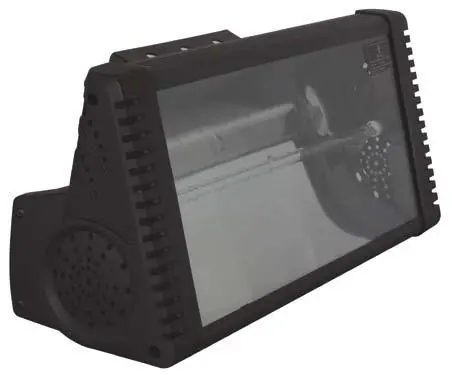
User Manual for Beamz 1500W DMX Strobe
Quick guide for the Beamz 1500W DMX Strobe. Learn how to set up DMX addressing, configure manual/DMX modes, and safely mount your lighting fixture.
Table of contents
Manual images
Click an image to enlargeQuick Guide
This manual provides essential instructions for the Beamz 1500W DMX Strobe. Before using the unit, ensure the mains voltage matches the required 220-240Vac/50Hz. The unit is designed for indoor use within a temperature range of 5°C to 35°C. Always ensure the unit is properly mounted with a safety chain if suspended.
Safety Instructions
- High Voltage: The unit contains voltage-carrying parts. Never open the housing.
- Heat: The housing becomes very hot during operation. Do not touch it during or immediately after use.
- Mounting: If ceiling-mounted, use a truss system with clamps and an extra safety chain. Keep at least 50cm away from flammable materials and ensure 1 meter of clearance on all sides for ventilation.
- Epilepsy Warning: Persons subject to epileptic attacks should be aware of the effects this light effect may have.
- Eye Safety: Do not look directly into the lens.
Operating Modes
The unit supports two primary operation modes, selectable via dipswitches on the back:
- Manual Mode: Set dipswitch 9 to ON. Speed and brightness can be adjusted using the controls on the back of the unit.
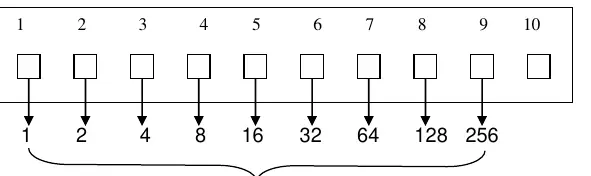
- DMX Mode: Set dipswitch 10 to ON. Use switches 1-9 to set the DMX address.
DMX Configuration
To set the DMX address, use the binary dipswitch system (switches 1-9). For example, to set address 49, turn switches 1, 5, and 6 to ON (1+16+32=49). The unit uses 2 DMX channels:
- CH1 (Speed): 0-255 (Slow to fast).
- CH2 (Brightness): 0-255 (Minimum to maximum).
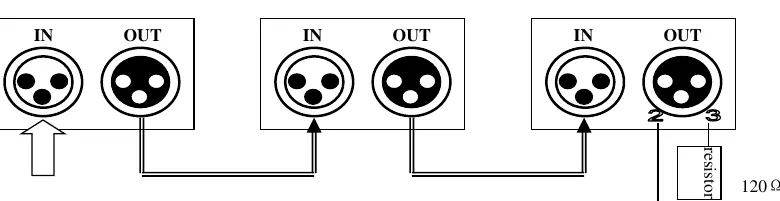
It is recommended to use a DMX terminator (a 120-ohm resistor between pin 2 and pin 3 of an XLR connector) at the last unit in the DMX chain to prevent signal issues.
Specifications
- Modes: Automatic programs, DMX.
- DMX Channels: 2.
- Lamp: 1500W Flash Tube.
- Power Supply: 220-240VAC 50Hz.
- Dimensions: 465 x 178 x 225mm.
- Weight: 4.65kg.
Manufacturer information
beamZ
Practical help
Common problems
Unit smells when switched on for the first time
This is normal and will disappear after a short period of operation.
DMX signal issues or flickering
Ensure a DMX terminator (120 ohm resistor) is connected to the output of the last light in the chain.
Unit does not turn on
Check the mains connection, ensure the power outlet is active, and verify the fuse.
Before use
- Verify the mains voltage is 220-240Vac/50Hz.
- Ensure the unit is placed on a stable, non-vibrating surface.
- Check that ventilation holes are not covered.
- Confirm the ambient temperature is between 5°C and 35°C.
- If ceiling mounting, attach a safety chain.
Specs in practice
- DMX Channels
- The unit uses 2 channels: CH1 for flash speed and CH2 for brightness.
Images and diagrams
- Dipswitch settings: Switches 1-9 are used to set the DMX address using binary values (1, 2, 4, 8, 16, 32, 64, 128, 256).
- DMX Termination: Connect a 120 ohm resistor between pin 2 and pin 3 on the XLR output of the last unit.
Model compatibility
- Not suitable for continuous use.
- Do not connect to a rheostat or dimmer.

Manual page author
Emily Carter
User documentation editor
Prepares concise manual descriptions and highlights the most useful setup, operation, and maintenance information for readers.